Playback starts YouTube’s embedded player (privacy-enhanced mode).
How to Fill Out a Deposit Slip - Carousel Checks
ChannelCarouselChecksMediaDescription from the creator
How to fill out a deposit slip .
Step one- Go to were your account is housed
Step two- Your will be able to find your deposit slips in the back of your checkbook. ( behind all your checks)
Your name should be already preprinted on your personal deposit slips. If you don't have any deposit slips, then request one from a teller, or you may find one in/on the writing stand located in the lobby of your bank.
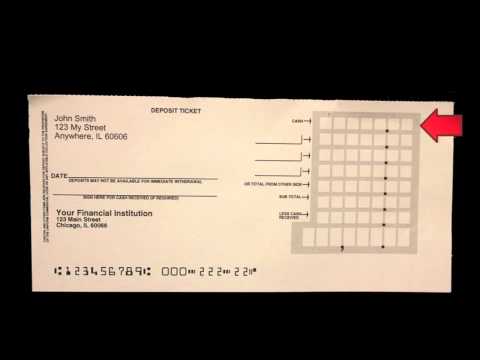
Step three- Notice that on the the deposit slip, there are lines or a column designated to list your deposit. The first line says "Cash" this spot is for ANY CASH you're depositing. Count the cash you're depositing and write the amount where it is listed "Cash".
Step 4- Look to see that next line is reserved for a check you want to deposit. If your deposit contains checks, then go ahead and list the one check in that spot. To enter a check enter the check number in the blank and the amount in the boxes.
Step 5- Realize the next line may be reserved for "Checks" or "Total from the other side". Don't let this scare you, if you turn your deposit slip over you'll see that there are more lines to add more checks.
If you have more than 2 checks, you can list them on the back and total them on the back as well.
Once you have totaled the checks on the back, you can list them where it says "Total from the other side".
Step 6- The next line says Sub Total. This is where you add up all the cash and checks you have listed.
Step 7-Check out the next line and notice it says "Less Cash Received". This spot is reserved for the amount of money you would like to get back from the deposit.
Step 8- Now you just subtract the "Less Cash Received" line from the "Sub Total" line to get the total for your Net Deposit.
Step one- Go to were your account is housed
Step two- Your will be able to find your deposit slips in the back of your checkbook. ( behind all your checks)
Your name should be already preprinted on your personal deposit slips. If you don't have any deposit slips, then request one from a teller, or you may find one in/on the writing stand located in the lobby of your bank.
Step three- Notice that on the the deposit slip, there are lines or a column designated to list your deposit. The first line says "Cash" this spot is for ANY CASH you're depositing. Count the cash you're depositing and write the amount where it is listed "Cash".
Step 4- Look to see that next line is reserved for a check you want to deposit. If your deposit contains checks, then go ahead and list the one check in that spot. To enter a check enter the check number in the blank and the amount in the boxes.
Step 5- Realize the next line may be reserved for "Checks" or "Total from the other side". Don't let this scare you, if you turn your deposit slip over you'll see that there are more lines to add more checks.
If you have more than 2 checks, you can list them on the back and total them on the back as well.
Once you have totaled the checks on the back, you can list them where it says "Total from the other side".
Step 6- The next line says Sub Total. This is where you add up all the cash and checks you have listed.
Step 7-Check out the next line and notice it says "Less Cash Received". This spot is reserved for the amount of money you would like to get back from the deposit.
Step 8- Now you just subtract the "Less Cash Received" line from the "Sub Total" line to get the total for your Net Deposit.
About this tutorial
CarouselChecksMedia published this 1:55 video tutorial on October 31, 2011. It has been watched 453,779 times on YouTube.
- Channel
- CarouselChecksMedia
- Category
- Howto & Style
- Duration
- 1:55
- Published
- October 31, 2011
- Views
- 453,779
- Likes
- 1,182
Tags
Share
This tutorial in other languages
- FRComment remplir un bordereau de dépôt - chèques Carousel
- ESCómo llenar una hoja de depósito - Los cheques carrusel
- PTComo preencher um comprovante de depósito - Carrossel Cheques
- ITCome compilare un bollettino di versamento - Controlli Carousel
- DEWie zu füllen Einzahlungsbeleg Out - Karussell-Checks
- NLHoe maak je het invullen van een afgiftebewijs - Carousel Controles
- RUКак заполнить платежное поручение - Carousel Проверку
- PLJak wypełnić pokwitowania - Sprawdza Carousel
- JA預金スリップを記入する方法 - カルーセルチェックを
- ARكيفية تعبئة قسيمة الإيداع - الشيكات كاروسيل
- HIकैसे एक जमा पर्ची भरने के लिए - कैरोसेल चेकों
- IDCara Isi Out Slip Setoran - Carousel Cek