Playback starts YouTube’s embedded player (privacy-enhanced mode).
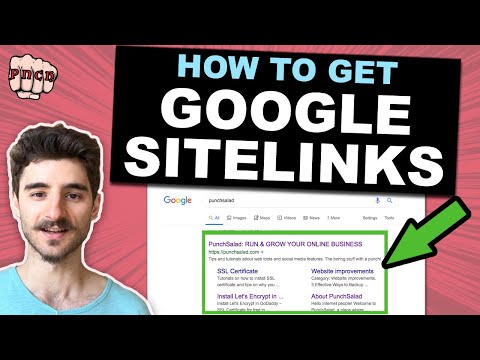
How to Get Google Sitelinks
ChanneltipswithpunchDescription from the creator
In this video, I’ll show you how to get sitelinks to appear in Google Search Results.
Unfortunately, there is no guaranteed way to do this, as Google chooses when it’s relevant to show those, but there are few things you can do to increase the likelihood that Google will show them.
I’ll reveal 6 tips to increase your chances to get sitelinks for your website.
My website recommendations: punchsalad.com/recommendations?utm_campaign=Rem…
PayPal tip jar: paypal.me/punchsalad
The sitelinks in Google search results are these additional links that show up for specific searches. These are links that Google thinks are most relevant to this site, and it shows some relevant links on your website.
And here is an example of one for one of my posts, you see they take you to a specific part of the post. I actually didn’t know I had these before I started making this video.
The benefit of having this is obviously the click-through rate, you cover more space than other results, but also that Google thinks your website is trustful enough to promote in this way. And users can click directly into more relevant pages.
1. Make sure your website is the first in search results because Google shows sitelinks mostly for the first result.
It helps if your brand name is unique. If your website’s name is not unique, as for example, Amsterdam tulip company, the chance is that this site will never have sitelinks, just because the name is too generic.
2. People should be searching for your website name.
If you're starting out, it will be hard to get sitelinks, you need to have some traffic that actually searches for your website
3. Install structured data (schema.org) to your Website.
SEO plugin that I use (Yoast): wordpress.org/plugins/wordpress-seo/
4. Create a simple and easy to understand site and menu structure.
In WordPress: studio.youtube.com/video/ExKynNMzxJY/edit
In HTML website: youtube.com/watch?v=56yqniz-dK4
5. Add an XML sitemap to your website using Google Search Console.
6. Add a table of contents for long-form posts with in-page links.
youtube.com/watch?v=jnY-f6aonMc
Please note that you can’t demote a link in sitelinks in Google Search Console anymore.
Unfortunately, there is no guaranteed way to do this, as Google chooses when it’s relevant to show those, but there are few things you can do to increase the likelihood that Google will show them.
I’ll reveal 6 tips to increase your chances to get sitelinks for your website.
My website recommendations: punchsalad.com/recommendations?utm_campaign=Rem…
PayPal tip jar: paypal.me/punchsalad
The sitelinks in Google search results are these additional links that show up for specific searches. These are links that Google thinks are most relevant to this site, and it shows some relevant links on your website.
And here is an example of one for one of my posts, you see they take you to a specific part of the post. I actually didn’t know I had these before I started making this video.
The benefit of having this is obviously the click-through rate, you cover more space than other results, but also that Google thinks your website is trustful enough to promote in this way. And users can click directly into more relevant pages.
1. Make sure your website is the first in search results because Google shows sitelinks mostly for the first result.
It helps if your brand name is unique. If your website’s name is not unique, as for example, Amsterdam tulip company, the chance is that this site will never have sitelinks, just because the name is too generic.
2. People should be searching for your website name.
If you're starting out, it will be hard to get sitelinks, you need to have some traffic that actually searches for your website
3. Install structured data (schema.org) to your Website.
SEO plugin that I use (Yoast): wordpress.org/plugins/wordpress-seo/
4. Create a simple and easy to understand site and menu structure.
In WordPress: studio.youtube.com/video/ExKynNMzxJY/edit
In HTML website: youtube.com/watch?v=56yqniz-dK4
5. Add an XML sitemap to your website using Google Search Console.
6. Add a table of contents for long-form posts with in-page links.
youtube.com/watch?v=jnY-f6aonMc
Please note that you can’t demote a link in sitelinks in Google Search Console anymore.
About this tutorial
tipswithpunch published this 8:00 video tutorial on November 13, 2019. It has been watched 80,228 times on YouTube.
- Channel
- tipswithpunch
- Category
- Howto & Style
- Duration
- 8:00
- Published
- November 13, 2019
- Views
- 80,228
- Likes
- 893
Tags
Share
This tutorial in other languages
- FRComment obtenir Google Sitelinks
- ESCómo conseguir enlaces de sitio de Google
- PTComo obter o Google Sitelinks
- ITCome ottenere Google sitelink
- DEWie man Google Sitelinks
- NLHoe je Google Sitelinks
- RUКак получить Google Sitelinks
- PLJak uzyskać Google linki do podstron
- JAGoogleのサイトリンクを取得する方法
- ARكيفية الحصول على روابط أقسام الموقع جوجل
- HIगूगल साइटलिंक प्राप्त करने के लिए कैसे
- IDBagaimana Mendapatkan Google Sitelinks