Playback starts YouTube’s embedded player (privacy-enhanced mode).
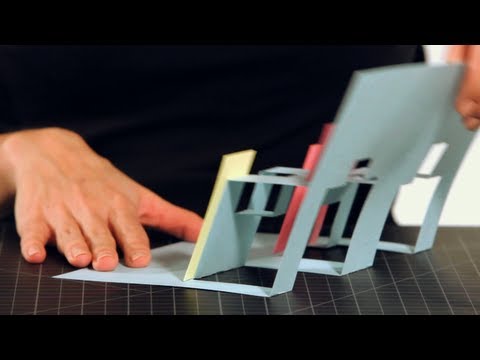
How to Make a City Pop-Up Card | Pop-Up Cards
ChannelHowcastDescription from the creator
Full Playlist: youtube.com/playlist?list=PL70E27F3163493CCA
-
-
Watch more How to Make Pop-Up Cards & Crafts videos: howcast.com/videos/499169-How-to-Make-a-City-Po…
Now I am going to show you how to make a pop-up city out of layers. Take
a piece of cardstock and fold it in half. What we are going to end up
doing is cut the layers of the city out of the base page. Keep it
folded, and we are going to cut a wide layer. Make sure that they are
equal. While it is closed, fold it, fold it back, unfold the base page,
and push the building forward for the layer. Now from here, we are going
to cut another layer right there, and we will cut another one out of
there.
When you close it, make sure that you can cut on either side of that
layer. You're not cutting it together. Make sure that they are even. Be
careful not to cut all the way through to the edge of this first layer.
Now we are going to make another one down here in the front, and I made
a very little incision because I would like this one to be an unequal
layer. I'm going to pop that layer forward, and before I fold it, I'm
going to cut a little higher on this top part.
When we close it, it's going to find where it wants to fold
automatically. Just help it along by pushing it forward and crease it.
Even though it's folding in the middle, that's OK, because we are going
to put a building right on top. I'm going to cut out another building.
I'm going to make this one a little taller. Fold it forward, unfold, and
pop that out. Actually, I'm going to put another layer in here, but it's
going to come in. This one comes out like the other ones, but this layer
will pop in, like that, so that we have some more buildings.
Now that we have some layers, I'm going to double stick some buildings.
I've already pre-cut some rectangles out. You can use whatever shapes
you would like. My guy sticks out, so we are going to trim him down.
There's one building. I'm going to double stick another one on here. He
sticks out too. What I'm going to do is just trim it down. Our city is
beginning to form. That is how you make a pop-up city out of layers.
-
-
Watch more How to Make Pop-Up Cards & Crafts videos: howcast.com/videos/499169-How-to-Make-a-City-Po…
Now I am going to show you how to make a pop-up city out of layers. Take
a piece of cardstock and fold it in half. What we are going to end up
doing is cut the layers of the city out of the base page. Keep it
folded, and we are going to cut a wide layer. Make sure that they are
equal. While it is closed, fold it, fold it back, unfold the base page,
and push the building forward for the layer. Now from here, we are going
to cut another layer right there, and we will cut another one out of
there.
When you close it, make sure that you can cut on either side of that
layer. You're not cutting it together. Make sure that they are even. Be
careful not to cut all the way through to the edge of this first layer.
Now we are going to make another one down here in the front, and I made
a very little incision because I would like this one to be an unequal
layer. I'm going to pop that layer forward, and before I fold it, I'm
going to cut a little higher on this top part.
When we close it, it's going to find where it wants to fold
automatically. Just help it along by pushing it forward and crease it.
Even though it's folding in the middle, that's OK, because we are going
to put a building right on top. I'm going to cut out another building.
I'm going to make this one a little taller. Fold it forward, unfold, and
pop that out. Actually, I'm going to put another layer in here, but it's
going to come in. This one comes out like the other ones, but this layer
will pop in, like that, so that we have some more buildings.
Now that we have some layers, I'm going to double stick some buildings.
I've already pre-cut some rectangles out. You can use whatever shapes
you would like. My guy sticks out, so we are going to trim him down.
There's one building. I'm going to double stick another one on here. He
sticks out too. What I'm going to do is just trim it down. Our city is
beginning to form. That is how you make a pop-up city out of layers.
About this tutorial
Howcast published this 5:09 video tutorial on November 5, 2012. It has been watched 1,303,226 times on YouTube.
- Channel
- Howcast
- Category
- Howto & Style
- Duration
- 5:09
- Published
- November 5, 2012
- Views
- 1,303,226
- Likes
- 5,362
Tags
Share
This tutorial in other languages
- FRComment faire une carte Ville Pop-Up | Pop-Up Cartes
- ESCómo hacer una tarjeta de City Pop-Up | Pop-up Tarjetas
- PTComo fazer um cartão Cidade Pop-Up | Pop-Up Cartões
- ITCome fare una City Card Pop-Up | Pop-up Card
- DEWie eine Stadt Pop-Up Karte machen | Pop-Up-Karten
- NLHoe maak je een stad Pop-Up Card Make | Pop-Up Cards
- RUКак сделать город Pop-Up Card | Pop-Up карты
- PLJak zrobić Miasto Pop-up karty | Pop-Up Karty
- JA市ポップアップカードを作る方法|ポップアップカード
- ARكيفية جعل بطاقة مدينة المنبثقة | المنبثقة بطاقات
- HIकैसे एक शहर के पॉप-अप कार्ड बनाने के लिए | पॉप-अप कार्ड
- IDCara Membuat Kartu Kota Pop-Up | Pop-Up Kartu