Playback starts YouTube’s embedded player (privacy-enhanced mode).
How To Make Gmail Default Mail App on iPhone & iPad in iOS 14
ChanneliPhone TricksChapters
Description from the creator
iOS 14 allows users to change the default mail and web browser apps on iPhone and iPad. For this new feature to work third-party mail clients have to update with support for this functionality.
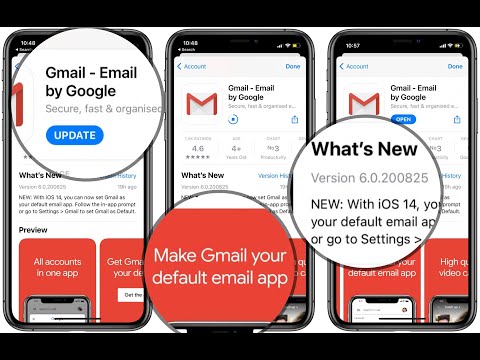
Google has updated Gmail for iOS and iPadOS today. Update to the latest version on your iPhone and iPad. Next, open the Settings app and scroll for Gmail. Select 'Default Mail App' and pick Gmail from the list. That's you've now set Google's mail app as default mail client on your Apple device.
This video also shows a real-world example when changing the stock Mail app with Gmail and vice-versa.
The same trick can be applied to the default iPhone web browser setting. You can make Chrome, Firefox. Microsoft Edge or DuckDuckGo as main browser instead of the stock Safari app.
Chapters:
0:00 | Start
0:14 | Update Gmail to latest version
0:35 | Set Gmail as Default Mail
0:54 | Gmail Default App Demo
1:44 | How To Change Default Browser
2:14 | Conclusion
Resources:
Gmail App Store download link: apps.apple.com/us/app/gmail-email-by-google/id4…
Source Article: iphonetricks.org/how-to-set-gmail-as-default-ma…
Subscribe to our YouTube Channel: youtube.com/channel/UCjoks8g6Mb5cR15K10vcaGA?su…
Google has updated Gmail for iOS and iPadOS today. Update to the latest version on your iPhone and iPad. Next, open the Settings app and scroll for Gmail. Select 'Default Mail App' and pick Gmail from the list. That's you've now set Google's mail app as default mail client on your Apple device.
This video also shows a real-world example when changing the stock Mail app with Gmail and vice-versa.
The same trick can be applied to the default iPhone web browser setting. You can make Chrome, Firefox. Microsoft Edge or DuckDuckGo as main browser instead of the stock Safari app.
Chapters:
0:00 | Start
0:14 | Update Gmail to latest version
0:35 | Set Gmail as Default Mail
0:54 | Gmail Default App Demo
1:44 | How To Change Default Browser
2:14 | Conclusion
Resources:
Gmail App Store download link: apps.apple.com/us/app/gmail-email-by-google/id4…
Source Article: iphonetricks.org/how-to-set-gmail-as-default-ma…
Subscribe to our YouTube Channel: youtube.com/channel/UCjoks8g6Mb5cR15K10vcaGA?su…
About this tutorial
iPhone Tricks published this 2:30 video tutorial on September 27, 2020. It has been watched 5,530 times on YouTube.
- Channel
- iPhone Tricks
- Category
- Howto & Style
- Duration
- 2:30
- Published
- September 27, 2020
- Views
- 5,530
- Likes
- 37
Tags
Share
This tutorial in other languages
- FRComment faire Gmail messagerie par défaut App sur iPhone et iPad dans iOS 14
- ESCómo hacer que Gmail defecto aplicación de correo en el iPhone y iPad en iOS 14
- PTComo fazer Gmail Padrão Mail App no iPhone e iPad em iOS 14
- ITCome fare Gmail predefinito posta App su iPhone e iPad in iOS 14
- DEWie man Gmail Mail App Standard auf iPhone & iPad in iOS 14
- NLHow To Make Gmail standaard e-App op iPhone & iPad in iOS 14
- RUКак сделать Gmail почты по умолчанию приложения на iPhone и IPad в ИО 14
- PLJak zrobić Gmail Domyślnie mail aplikację na iPhone'a i iPada w iOS 14
- JAiOSの14でiPhone&iPadでGmailをデフォルトのメールアプリケーションを作成する方法
- ARكيفية جعل جوجل افتراضي البريد التطبيقات على اي فون و آي باد في دائرة الرقابة الداخلية 14
- HIकैसे जीमेल iPhone और iPad पर मेल एप्लिकेशन को डिफ़ॉल्ट आईओएस 14 मेक इन करने के लिए
- IDCara Membuat Gmail Standar Mail App pada iPhone & iPad di iOS 14