Playback starts YouTube’s embedded player (privacy-enhanced mode).
How to remotely control your PC from your Mobile Anytime From Anywhere
ChanneliTechDescription from the creator
Earn $5 Every day 😍 - bit.ly/5EveryDay
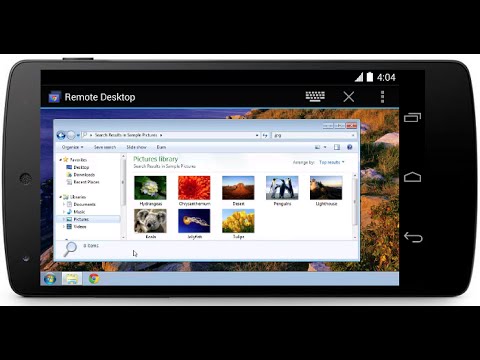
With Google's Remote Desktop app for Chrome, accessing a PC or Mac from any Android device is easy, and doesn't require installing any clunky desktop software.
The setup process is simple, taking roughly five minutes and little technical knowledge. With the goal of remotely controlling a computer, let's start by installing the Chrome Web app. Using Chrome, visit and install the Remote Chrome Desktop app on your computer. You can find it on the Chrome Web Store site.
Link : goo.gl/9t1e8N
★★★ How to Install Remix OS on VIrtualBox ★★★
youtube.com/watch?v=ndGIODb4s3E
★★★How to install Android 6.0 Marshmallow on PC★★★
youtube.com/watch?v=8D7O35hhOg8
After installing the Chrome app you'll be guided through a series of dialogs and prompts. Follow the instructions, granting permission where required. Be sure to install the additional piece of software that makes the magic happen.
Last, you'll be asked if you want to grant remote assistance or access your own computers. The former option is useful when trying to troubleshoot a relative's computer; the latter is for your personal use. Selecting your computers (instead of remote assistance) will ask you to enter a PIN. The PIN is required each time you attempt to connect to the computer from your Android device.
Now that you've granted permissions, installed software, and set up a PIN, the hard part is over. The final piece of the puzzle involves downloading the Android app (from the Google Play store).
Link: goo.gl/gBmMSH
Assuming you're signed into the same account in both Chrome and on your Android device, the app will automatically display your controllable computers. Select the computer you want to control and enter your PIN to connect. Pretty simple.
Like & Subscribe.
Install Android L on PC goo.gl/PqqsVm
How to make Google Chrome Faster goo.gl/31CZpj
★★★ How to Install Windows 10 Tech Preview ★★★
Check it out ➩➩goo.gl/duSGFC
★★★ Top 10 Must have Google Chrome Extensions★★★
Check it out ➩➩ goo.gl/58j6nx
How to turn Your Windows Laptop into a FREE WiFi Hotspot goo.gl/9djFGp
With Google's Remote Desktop app for Chrome, accessing a PC or Mac from any Android device is easy, and doesn't require installing any clunky desktop software.
The setup process is simple, taking roughly five minutes and little technical knowledge. With the goal of remotely controlling a computer, let's start by installing the Chrome Web app. Using Chrome, visit and install the Remote Chrome Desktop app on your computer. You can find it on the Chrome Web Store site.
Link : goo.gl/9t1e8N
★★★ How to Install Remix OS on VIrtualBox ★★★
youtube.com/watch?v=ndGIODb4s3E
★★★How to install Android 6.0 Marshmallow on PC★★★
youtube.com/watch?v=8D7O35hhOg8
After installing the Chrome app you'll be guided through a series of dialogs and prompts. Follow the instructions, granting permission where required. Be sure to install the additional piece of software that makes the magic happen.
Last, you'll be asked if you want to grant remote assistance or access your own computers. The former option is useful when trying to troubleshoot a relative's computer; the latter is for your personal use. Selecting your computers (instead of remote assistance) will ask you to enter a PIN. The PIN is required each time you attempt to connect to the computer from your Android device.
Now that you've granted permissions, installed software, and set up a PIN, the hard part is over. The final piece of the puzzle involves downloading the Android app (from the Google Play store).
Link: goo.gl/gBmMSH
Assuming you're signed into the same account in both Chrome and on your Android device, the app will automatically display your controllable computers. Select the computer you want to control and enter your PIN to connect. Pretty simple.
Like & Subscribe.
Install Android L on PC goo.gl/PqqsVm
How to make Google Chrome Faster goo.gl/31CZpj
★★★ How to Install Windows 10 Tech Preview ★★★
Check it out ➩➩goo.gl/duSGFC
★★★ Top 10 Must have Google Chrome Extensions★★★
Check it out ➩➩ goo.gl/58j6nx
How to turn Your Windows Laptop into a FREE WiFi Hotspot goo.gl/9djFGp
About this tutorial
iTech published this 4:32 video tutorial on November 9, 2014. It has been watched 378,217 times on YouTube.
- Channel
- iTech
- Category
- Howto & Style
- Duration
- 4:32
- Published
- November 9, 2014
- Views
- 378,217
- Likes
- 2,043
Tags
Share
This tutorial in other languages
- FRComment contrôler à distance votre PC à partir de votre mobile Anytime De Partout
- ES¿Cómo controlar remotamente su PC de tu móvil en cualquier momento desde cualquier lugar
- PTComo controlar remotamente seu PC a partir de sua Sempre móvel de qualquer lugar
- ITCome controllare in remoto il PC dal cellulare qualsiasi momento da qualsiasi
- DEWie aus der Ferne Ihren PC von Ihrem Handy überall und jederzeit kontrollieren
- NLHoe om op afstand de controle van uw pc vanaf uw mobiele overal en altijd
- RUКак удаленно управлять компьютером с помощью мобильного в любое время из любой точки мира
- PLJak zdalnie sterować komputerem za pomocą telefonu dowolnym czasie z dowolnego
- JAリモートでどこからでもモバイルいつから、あなたのPCを制御する方法
- ARكيفية السيطرة على جهاز الكمبيوتر الخاص بك عن بعد من أي وقت النقال من أي مكان
- HIकैसे दूर से कहीं से भी अपने मोबाइल कभी भी से अपने पीसी को नियंत्रित करने के
- IDBagaimana untuk kontrol jarak jauh PC Anda dari Ponsel Anytime Anda Dari Anywhere