Playback starts YouTube’s embedded player (privacy-enhanced mode).
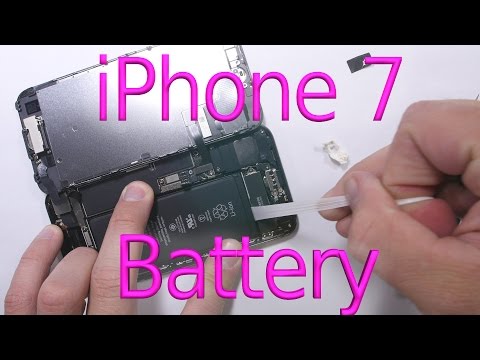
How to replace iPhone 7 Battery in 3 minutes
ChannelJerryRigEverythingIn brief
Replace the battery in an iPhone 7 in under three minutes using basic tools. This quick repair is ideal for those whose battery drains rapidly or shuts off unexpectedly, and who have prior experience with tool use.
Questions & answers
What tools are needed for this repair?
Pentalobe screwdrivers, a green pry tool, and a phone opening metal tool.
How do I know if my iPhone 7 battery needs replacing?
If it lasts less than 2–3 hours or shuts off randomly at 30% charge.
Description from the creator
Here is the Y000 zero bit: amzn.to/2efbH2U
Pentalobe screw drivers: amzn.to/2e3p9uP
Green Pry tool: amzn.to/1Tu57pI
Phone opening metal tool: amzn.to/1WdOFv0
The Battery is not yet available yet. Keep checking back, or if you find one let me know in the comments!!
Use these adhesive strips to hold your new battery in place: goo.gl/VCxtUK
Let me know if any of those links stop working.
This video will show how I replace the battery in my Apple iPhone 7. If your battery is lasting less than 2 or 3 hours, or maybe it gets to 30 percent and just shuts off randomly, it might be time for a new battery. Sometimes disconnecting the battery will get rid of any software errors like it did with the 1-1-1990 glitch: youtu.be/ofnq37dqGyY
Remember all repairs are done at your own risk. The repair itself is not that difficult if you have worked with tools before. And you are careful removing that screen.
Awesome Smart Phone Tool Kit: amzn.to/1XdJPuA
Green Pry tool: amzn.to/1Tu57pI
Phone opening metal tool: amzn.to/1WdOFv0
The camera I used to film this video: amzn.to/1IjlaCD
The Lens I used for this video: amzn.to/1QOXDw2
And this Metabones adapter: amzn.to/1R7Ltic
*Follow me for updates!*
Instagram: instagram.com/zacksjerryrig
Facebook: on.fb.me/1U4bQqv
Twitter: twitter.com/ZacksJerryRig
Snapchat: bit.ly/1UAb2Fq
GooglePlus: bit.ly/1YyKice
JerryRigEverything assumes no liability for property damage or injury incurred as a result of any of the information contained in this video. JerryRigEverything recommends safe practices when working with power tools, automotive lifts, lifting tools, jack stands, electrical equipment, blunt instruments, chemicals, lubricants, expensive electronics, or any other tools or equipment seen or implied in this video. Due to factors beyond the control of JerryRigEverything, no information contained in this video shall create any express or implied warranty or guarantee of any particular result. Any injury, damage or loss that may result from improper use of these tools, equipment, or the information contained in this video is the sole responsibility of the user and not JerryRigEverything. Only attempt your own repairs if you can accept personal responsibility for the results, whether they are good or bad.
Pentalobe screw drivers: amzn.to/2e3p9uP
Green Pry tool: amzn.to/1Tu57pI
Phone opening metal tool: amzn.to/1WdOFv0
The Battery is not yet available yet. Keep checking back, or if you find one let me know in the comments!!
Use these adhesive strips to hold your new battery in place: goo.gl/VCxtUK
Let me know if any of those links stop working.
This video will show how I replace the battery in my Apple iPhone 7. If your battery is lasting less than 2 or 3 hours, or maybe it gets to 30 percent and just shuts off randomly, it might be time for a new battery. Sometimes disconnecting the battery will get rid of any software errors like it did with the 1-1-1990 glitch: youtu.be/ofnq37dqGyY
Remember all repairs are done at your own risk. The repair itself is not that difficult if you have worked with tools before. And you are careful removing that screen.
Awesome Smart Phone Tool Kit: amzn.to/1XdJPuA
Green Pry tool: amzn.to/1Tu57pI
Phone opening metal tool: amzn.to/1WdOFv0
The camera I used to film this video: amzn.to/1IjlaCD
The Lens I used for this video: amzn.to/1QOXDw2
And this Metabones adapter: amzn.to/1R7Ltic
*Follow me for updates!*
Instagram: instagram.com/zacksjerryrig
Facebook: on.fb.me/1U4bQqv
Twitter: twitter.com/ZacksJerryRig
Snapchat: bit.ly/1UAb2Fq
GooglePlus: bit.ly/1YyKice
JerryRigEverything assumes no liability for property damage or injury incurred as a result of any of the information contained in this video. JerryRigEverything recommends safe practices when working with power tools, automotive lifts, lifting tools, jack stands, electrical equipment, blunt instruments, chemicals, lubricants, expensive electronics, or any other tools or equipment seen or implied in this video. Due to factors beyond the control of JerryRigEverything, no information contained in this video shall create any express or implied warranty or guarantee of any particular result. Any injury, damage or loss that may result from improper use of these tools, equipment, or the information contained in this video is the sole responsibility of the user and not JerryRigEverything. Only attempt your own repairs if you can accept personal responsibility for the results, whether they are good or bad.
About this tutorial
JerryRigEverything published this 3:23 video tutorial on November 3, 2016. It has been watched 2,627,153 times on YouTube.
- Channel
- JerryRigEverything
- Category
- Howto & Style
- Duration
- 3:23
- Published
- November 3, 2016
- Views
- 2,627,153
- Likes
- 31,336
Tags
Share
This tutorial in other languages
- FRComment remplacer iPhone 7 batterie en 3 minutes
- ESCómo reemplazar la batería iPhone 7 en 3 minutos
- PTComo substituir iPhone 7 Battery em 3 minutos
- ITCome sostituire iPhone 7 della batteria in 3 minuti
- DEWie man iPhone 7 Batterie 3 Minuten ersetzen
- NLVervangen iPhone 7 Battery in 3 minuten
- RUКак заменить iPhone 7 батареи в течение 3 минут
- PLJak wymienić baterię iPhone 7 w 3 minuty
- JA3分でiPhone 7バッテリーを交換する方法
- ARكيف ليحل محل فون 7 البطارية في 3 دقائق
- HI3 मिनट में iPhone 7 बैटरी को बदलने के लिए कैसे
- IDBagaimana cara mengganti iPhone 7 Baterai dalam 3 menit