Playback starts YouTube’s embedded player (privacy-enhanced mode).
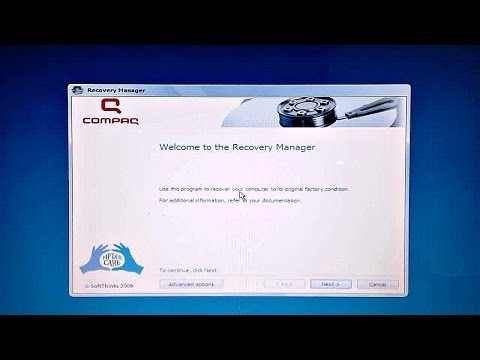
How To Restore Windows from A Recovery Partition
ChannelJamie WagnerDescription from the creator
Tutorial- restore windows operating system from the recovery partition boot into/use an hp recovery partition to factory reset/restore your windows pc to it's original factory condition/settings by pressing f11 to boot the factory recovery partition image to re-install your computers original factory software and operating system. YOU SHOULD BACK UP ALL YOUR DATA FIRST and make sure your notebook is plugged in before booting from this partition volume. It might take longer than an hour to complete! All of your user files will be lost if you don't back them up first. All files created after you purchased your notebook/computer, and all programs you installed after your purchase will be lost without backing up FIRST. This partition is a very easy way to recover your system to it's original factory state. It is an original factory image used for system recovery. Works great if your system has a virus or has spyware. After re-installing windows it should be automatically activated for you. You will just need to go into the control panel and uninstall all of the old programs and trial edition software that originally came with your PC that the recovery partition restored. Then download all of Microsoft Windows latest updates.
DISCLAIMER: As an Amazon Associate I earn from qualifying purchases, I am a participant in the Amazon Services LLC Associates Program, an affiliate advertising program designed to provide a means for me to earn fees/commission by linking to Amazon.com and affiliated sites. If you click on any of the product links provided in this description I could earn a fee/commission. Thank you all for your support!
**MY TECH GEAR 2026**
APPLE AirPods Pro 3
Amazon ➜ amzn.to/4sokc06
APPLE iPad Magic Keyboard
Amazon ➜ amzn.to/4bcpsNZ
APPLE iPad Pro 13-inch M5 1TB Wi-Fi/Cellular
Amazon ➜ amzn.to/4q1Y4XI
SPIGEN for iPhone 17 Pro Max Case
Amazon ➜ amzn.to/4pk0bF0
CRUCIAL X10 8TB Portable SSD
Amazon ➜ amzn.to/4joIhQk
SANDISK 1TB Extreme PRO Dual Drive
Amazon ➜ amzn.to/49x60Kz
APPLE 2024 Mac mini
Amazon ➜ amzn.to/3MZYcs0
LOGITECH Pebble 2 Combo for Mac
Amazon ➜ amzn.to/4qtgPmq
LOGITECH Signature M650
Amazon ➜ amzn.to/494RuIs
LOGITECH MX Keys Mini
Amazon ➜ amzn.to/48YtXdD
NVIDIA GEFORCE RTX 2080 Ti FE
Amazon ➜ amzn.to/2K5SbbK
LOGITECH BRIO 4K Webcam
Amazon ➜ amzn.to/2P09BFS
DISCLAIMER: As an Amazon Associate I earn from qualifying purchases, I am a participant in the Amazon Services LLC Associates Program, an affiliate advertising program designed to provide a means for me to earn fees/commission by linking to Amazon.com and affiliated sites. If you click on any of the product links provided in this description I could earn a fee/commission. Thank you all for your support!
COPYRIGHT: Unless otherwise permitted by Jamie Wagner or under the United States Copyright Act, no part of the content of this video or any video published under Jamie Wagner, shall be copied, recreated, stored, republished, or transported. Permission by Jamie Wagner is required before any use of this video not permitted under the United States Copyright Act. Please contact me first at [email protected].
DISCLAIMER: As an Amazon Associate I earn from qualifying purchases, I am a participant in the Amazon Services LLC Associates Program, an affiliate advertising program designed to provide a means for me to earn fees/commission by linking to Amazon.com and affiliated sites. If you click on any of the product links provided in this description I could earn a fee/commission. Thank you all for your support!
**MY TECH GEAR 2026**
APPLE AirPods Pro 3
Amazon ➜ amzn.to/4sokc06
APPLE iPad Magic Keyboard
Amazon ➜ amzn.to/4bcpsNZ
APPLE iPad Pro 13-inch M5 1TB Wi-Fi/Cellular
Amazon ➜ amzn.to/4q1Y4XI
SPIGEN for iPhone 17 Pro Max Case
Amazon ➜ amzn.to/4pk0bF0
CRUCIAL X10 8TB Portable SSD
Amazon ➜ amzn.to/4joIhQk
SANDISK 1TB Extreme PRO Dual Drive
Amazon ➜ amzn.to/49x60Kz
APPLE 2024 Mac mini
Amazon ➜ amzn.to/3MZYcs0
LOGITECH Pebble 2 Combo for Mac
Amazon ➜ amzn.to/4qtgPmq
LOGITECH Signature M650
Amazon ➜ amzn.to/494RuIs
LOGITECH MX Keys Mini
Amazon ➜ amzn.to/48YtXdD
NVIDIA GEFORCE RTX 2080 Ti FE
Amazon ➜ amzn.to/2K5SbbK
LOGITECH BRIO 4K Webcam
Amazon ➜ amzn.to/2P09BFS
DISCLAIMER: As an Amazon Associate I earn from qualifying purchases, I am a participant in the Amazon Services LLC Associates Program, an affiliate advertising program designed to provide a means for me to earn fees/commission by linking to Amazon.com and affiliated sites. If you click on any of the product links provided in this description I could earn a fee/commission. Thank you all for your support!
COPYRIGHT: Unless otherwise permitted by Jamie Wagner or under the United States Copyright Act, no part of the content of this video or any video published under Jamie Wagner, shall be copied, recreated, stored, republished, or transported. Permission by Jamie Wagner is required before any use of this video not permitted under the United States Copyright Act. Please contact me first at [email protected].
About this tutorial
Jamie Wagner published this 16:39 video tutorial on November 2, 2015. It has been watched 180,649 times on YouTube.
- Channel
- Jamie Wagner
- Category
- Howto & Style
- Duration
- 16:39
- Published
- November 2, 2015
- Views
- 180,649
- Likes
- 362
Tags
Share
This tutorial in other languages
- FRComment faire pour restaurer Windows à partir de la partition de récupération A
- ESCómo restaurar Windows desde la partición de recuperación Una
- PTComo restaurar o Windows a partir de uma partição de recuperação
- ITCome ripristinare Windows da una partizione di ripristino
- DEWie man Windows von A Recovery-Partition wiederherstellen
- NLHoe Windows herstellen van A Herstelpartitie
- RUКак восстановить Windows, от восстановления раздела
- PLJak przywrócić system Windows od A do odzyskiwania partycji
- JAAリカバリパーティションからWindowsを復元する方法
- ARكيفية استعادة ويندوز من التقسيم عملية استعادة
- HIएक वसूली विभाजन से विंडो पुनर्स्थापित करना कैसे
- IDCara Kembalikan Windows dari A Pemulihan Partisi