Playback starts YouTube’s embedded player (privacy-enhanced mode).
How to set a custom lock screen message in Windows 10
ChannelmydoodadsDescription from the creator
If you found this video useful please like and subscribe to our channel. In order to skip the introduction and description to this video, please select 0:31
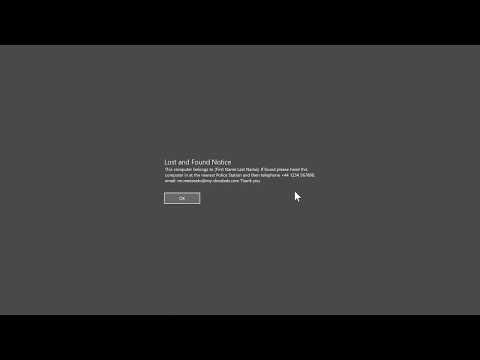
If we ever were to lose our Windows 10 computer, because we have set a lock message, a member of the public will be more easily able to return our computer to us. So in this video, we take a look at how you set a lock message in the login screen for a computer running Microsoft Windows.
Please note that the lock screen message will only appear when you boot Windows 10. It will also be the first thing you see, as it will appear before the login screen or desktop.
The example text we used for our lock message is as follows:
"This computer belongs to [First Name Last Name]. If found please hand this computer in at the nearest Police Station and then telephone +44 1234 567890, email: [email protected] Thank you."
---------------------------------
◽Blog Site: mydoodads.com
◽Youtube channel: mydoodads
◽Recently purchased from Amazon: amazon.co.uk/shop/mydoodads
If we ever were to lose our Windows 10 computer, because we have set a lock message, a member of the public will be more easily able to return our computer to us. So in this video, we take a look at how you set a lock message in the login screen for a computer running Microsoft Windows.
Please note that the lock screen message will only appear when you boot Windows 10. It will also be the first thing you see, as it will appear before the login screen or desktop.
The example text we used for our lock message is as follows:
"This computer belongs to [First Name Last Name]. If found please hand this computer in at the nearest Police Station and then telephone +44 1234 567890, email: [email protected] Thank you."
---------------------------------
◽Blog Site: mydoodads.com
◽Youtube channel: mydoodads
◽Recently purchased from Amazon: amazon.co.uk/shop/mydoodads
About this tutorial
mydoodads published this 5:41 video tutorial on May 10, 2020. It has been watched 12,153 times on YouTube.
- Channel
- mydoodads
- Category
- Howto & Style
- Duration
- 5:41
- Published
- May 10, 2020
- Views
- 12,153
- Likes
- 117
Share
This tutorial in other languages
- FRComment définir un message d'écran de verrouillage personnalisé dans Windows 10
- ESCómo configurar un mensaje de la pantalla de bloqueo personalizada en Windows 10
- PTComo definir um bloqueio de tela mensagem personalizada no Windows 10
- ITCome impostare un messaggio personalizzato schermata di blocco in Windows 10
- DEWie eine benutzerdefinierte Bildschirmsperre Meldung in Windows 10 einzustellen
- NLHoe maak je een aangepast bericht op het scherm hebt ingesteld in Windows 10
- RUКак установить пользовательские сообщения блокировки экрана в Windows 10
- PLJak ustawić niestandardowy komunikat na ekranie blokady w systemie Windows 10
- JAWindowsの10でカスタムロック画面のメッセージを設定する方法
- ARكيفية تعيين مخصصة قفل الرسالة الشاشة في ويندوز 10
- HIकैसे Windows 10 में एक कस्टम लॉक स्क्रीन संदेश सेट करने के लिए
- IDBagaimana mengatur kunci pesan layar kustom pada Windows 10