Playback starts YouTube’s embedded player (privacy-enhanced mode).
How to Set Up a Modem | Internet Setup
ChannelHowcastDescription from the creator
Full Playlist: youtube.com/playlist?list=PL2C8C676F80FEB2E8
-
-
Watch more How to Set Up Internet videos: howcast.com/videos/499718-How-to-Set-Up-a-Modem…
So I'm going to take you a little bit through how to setup and install your modem.
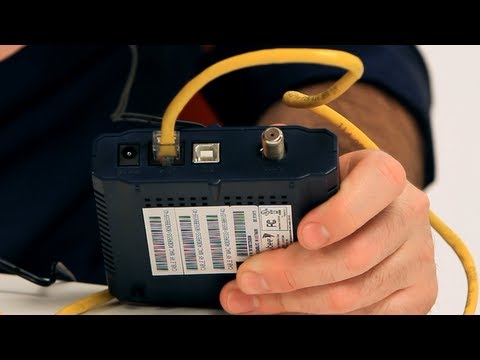
The truth is, most of the time you're not really going to have to do this. Because when you call your Internet service provider and set up an account, they will in most cases send a technician over to your place to set everything up for you. But, it's a pretty simple process if you do decide to do it yourself. And when you get the modem from the either, cable or DSL company, it will look like this little guy right here.
And basically you just have to connect it to three things. One, is power. So you just connect it to the wall. The other is your computer. On this particular modem we can connect it either through ethernet or through USB. And the third is to connect it to the outside world. In this case, this is a cable modem so I'm going to connect it to a coaxial cable that comes out from the street to my apartment. And it's also used by my TV and stuff like that.
The other kind of modem is a DSL modem which will look pretty much identical but instead of a coaxial cable, it will have a little phone connection.
One final thing to mention is a little bit about troubleshooting. So like I said, modems are a pretty simple device but sometimes they do break or they do stop working. Nine times out of ten, the best way to fix this is to simply unplug from the power adapter right here, wait two minutes, and plug it back in. After a few seconds all the lights should come back up on the front and it should be working again. That's it about setting up your modem.
-
-
Watch more How to Set Up Internet videos: howcast.com/videos/499718-How-to-Set-Up-a-Modem…
So I'm going to take you a little bit through how to setup and install your modem.
The truth is, most of the time you're not really going to have to do this. Because when you call your Internet service provider and set up an account, they will in most cases send a technician over to your place to set everything up for you. But, it's a pretty simple process if you do decide to do it yourself. And when you get the modem from the either, cable or DSL company, it will look like this little guy right here.
And basically you just have to connect it to three things. One, is power. So you just connect it to the wall. The other is your computer. On this particular modem we can connect it either through ethernet or through USB. And the third is to connect it to the outside world. In this case, this is a cable modem so I'm going to connect it to a coaxial cable that comes out from the street to my apartment. And it's also used by my TV and stuff like that.
The other kind of modem is a DSL modem which will look pretty much identical but instead of a coaxial cable, it will have a little phone connection.
One final thing to mention is a little bit about troubleshooting. So like I said, modems are a pretty simple device but sometimes they do break or they do stop working. Nine times out of ten, the best way to fix this is to simply unplug from the power adapter right here, wait two minutes, and plug it back in. After a few seconds all the lights should come back up on the front and it should be working again. That's it about setting up your modem.
About this tutorial
Howcast published this 1:31 video tutorial on November 7, 2012. It has been watched 486,261 times on YouTube.
- Channel
- Howcast
- Category
- Howto & Style
- Duration
- 1:31
- Published
- November 7, 2012
- Views
- 486,261
- Likes
- 1,241
Tags
Share
This tutorial in other languages
- FRComment configurer un modem | Configuration Internet
- ESCómo configurar un módem | Configuración de Internet
- PTComo configurar um modem | Configuração Internet
- ITCome impostare un modem | Configurazione Internet
- DEWie Einrichten eines Modem Up | Internet-Setup
- NLHoe het opzetten van een Modem | internet instellingen
- RUКак настроить модем | Настройка Интернета
- PLJak skonfigurować modem | Ustawienia internetowe
- JAモデムを設定する方法|インターネット設定
- ARكيفية إعداد مودم | إعداد Internet
- HIएक मोडेम सेट अप कैसे | इंटरनेट सेटअप
- IDCara Set Up Modem | Pengaturan Internet