Playback starts YouTube’s embedded player (privacy-enhanced mode).
How To Transfer Song From iPod to iTunes Easy!!!
ChannelTheHowtoTechDescription from the creator
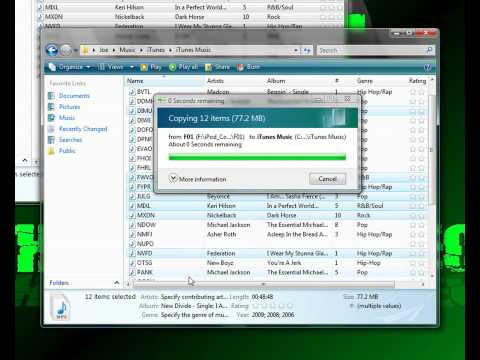
A tutorial showing how to get your songs from your ipod to itunes.
Instructions:
1. Open up iTunes.
2. Plug in your iPod and be sure it doesn't start to syncronize.
3. Make sure your iPod has a check mark next to "Manually Manage Music" and "Enable Disk Use".
4. Be sure to go to Start--Computer--Organize Tab--Folder and Search Options--View Tab--Bubble in bubble next to "Show Hidden Files And Folders" and hit OK.
5. Go to Start--Computer--Your iPod(F:)--iPod Control--Music
6. Go into your Music Folder--iTunes--iTunes Music
7.Now Copy and Paste all music inside Music folder from iPod to iTunes Music folder.
8.Go into iTunes and go on top where it says File
9.Then click "Add Folder To Library"
10.Navigate to the iTunes Music Folder and click "Add Folder"
11.Now your iPod Music is in your iTunes!!!
12.Enjoy!!!!
Thanks for Watching,
RATE, COMMENT, and SUBSCRIBE!!!
Instructions:
1. Open up iTunes.
2. Plug in your iPod and be sure it doesn't start to syncronize.
3. Make sure your iPod has a check mark next to "Manually Manage Music" and "Enable Disk Use".
4. Be sure to go to Start--Computer--Organize Tab--Folder and Search Options--View Tab--Bubble in bubble next to "Show Hidden Files And Folders" and hit OK.
5. Go to Start--Computer--Your iPod(F:)--iPod Control--Music
6. Go into your Music Folder--iTunes--iTunes Music
7.Now Copy and Paste all music inside Music folder from iPod to iTunes Music folder.
8.Go into iTunes and go on top where it says File
9.Then click "Add Folder To Library"
10.Navigate to the iTunes Music Folder and click "Add Folder"
11.Now your iPod Music is in your iTunes!!!
12.Enjoy!!!!
Thanks for Watching,
RATE, COMMENT, and SUBSCRIBE!!!
About this tutorial
TheHowtoTech published this 5:52 video tutorial on November 2, 2009. It has been watched 731,849 times on YouTube.
- Channel
- TheHowtoTech
- Category
- Howto & Style
- Duration
- 5:52
- Published
- November 2, 2009
- Views
- 731,849
- Likes
- 1,643
Tags
Share
This tutorial in other languages
- FRComment faire pour transférer la chanson de l'iPod à iTunes facile !!!
- ESCómo transferir canciones desde el iPod a iTunes Fácil !!!
- PTComo transferir música do iPod ao iTunes Fácil !!!
- ITCome trasferire canzoni da iPod a iTunes facile !!!
- DEWie man Songs vom iPod auf iTunes Easy Transfer !!!
- NLHow To Song transfer van de iPod naar iTunes Gemakkelijk !!!
- RUКак перенести песни из IPod к ITunes Легко !!!
- PLJak przesłać utwór z iPoda do iTunes Łatwe !!!
- JAiTunesの簡単にiPodのから曲を転送する方法!
- ARكيفية نقل أغنية من اي بود الى اي تيونز سهلة !!!
- HIआईट्यून आसान करने के लिए आइपॉड से गाने के स्थानांतरित करने का तरीका !!!
- IDCara Transfer Lagu Dari iPod ke iTunes Mudah !!!