Playback starts YouTube’s embedded player (privacy-enhanced mode).
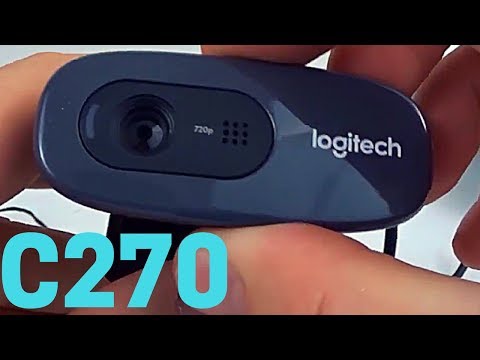
Logitech C270 Webcam Review and Install Tutorial - C270 Video Test
ChannelGauging GadgetsDescription from the creator
Logitech C270 Desktop or Laptop Webcam, HD 720p Widescreen for Video Calling and Recording
Get it on Amazon 👍(paid link): geni.us/Logitech-C270
Looking for a new HD webcam? In this unboxing, review, and tutorial we look at the Logitech C270 HD webcam. Additionally, I show you how to setup the Logitech C270 and we do a video comparison test. The C270 webcam features 720 HD video, a built in microphone with noise canceling, and is easy to install.
How to Install the Logitech C270:
1. Go to the C270 support page support.logi.com/hc/en-us/articles/360024692954…
2. Select Downloads
3. Download the correct Logitech C270 software for your operating system
4. Once the download completes, open the file and begin the installation process.
5. In the installation options, select the software that you would like to install.
6. Your Logitech C270 HD webcam is now installed and ready to be used.
Pros of the Logitech C270 HD Webcam:
- Less than $20
- Extremely easy to install
- Very easy to mount to monitor or laptop
- The video quality and picture are good. Not great but good for $20. I think the C270 would be great for speaking with friends or family but may not be high enough for business or professional usage
- Video indicator light
- Face detection
- Always in focus lens
- Similar to other HD webcams from brands like Genius, Microsoft, Ausdom, Besteker, Creative, HP, TECKNET, iRush, Docooler, eStorees, M.Way, and Belkin
Cons of the Logitiech C270 HD Webcam:
- Video picture is square not wide screen
- Audio volume is low
Disclaimer: Some of the links in this description are Amazon affiliate links. As an Amazon Associate, Gauging Gadgets earns from qualifying purchases through affiliate links.
😀 HAPPY WITH THE VIDEO? 😀
SUBSCRIBE NOW! CLICK HERE - youtube.com/c/gauginggadgets?sub_confirmation=1
SEND ME A TIP! - paypal.me/GaugingGadgets
FOLLOW ME!
BLOG: GaugingGadgets.com
FACEBOOK - fb.me/GaugingGadgets
TWITTER - twitter.com/GaugingGadgets
TWITCH - twitch.tv/GaugingGadgets
Learn How to Crochet: youtube.com/c/CrochetWithJulie
REDDIT - reddit.com/r/GaugingGadgets/
INSTAGRAM - instagram.com/GaugingGadgets/
💰 💰
HOW DO I DO IT? (Paid Links)
TubeBuddy YouTube Toolkit: tubebuddy.com/gauginggadgets/yt
My YouTube Setup:
Sony DSC-HX80 Camera - geni.us/SonyHX80
Neewer Mini Table Tripod - geni.us/MiniTableTripod
Lighting Kit - geni.us/LightingKit
Mpow PC Headset - geni.us/Mpow071Headset
Cell Phone - Google Nexus 6 - amzn.to/2oWpfF9
Get it on Amazon 👍(paid link): geni.us/Logitech-C270
Looking for a new HD webcam? In this unboxing, review, and tutorial we look at the Logitech C270 HD webcam. Additionally, I show you how to setup the Logitech C270 and we do a video comparison test. The C270 webcam features 720 HD video, a built in microphone with noise canceling, and is easy to install.
How to Install the Logitech C270:
1. Go to the C270 support page support.logi.com/hc/en-us/articles/360024692954…
2. Select Downloads
3. Download the correct Logitech C270 software for your operating system
4. Once the download completes, open the file and begin the installation process.
5. In the installation options, select the software that you would like to install.
6. Your Logitech C270 HD webcam is now installed and ready to be used.
Pros of the Logitech C270 HD Webcam:
- Less than $20
- Extremely easy to install
- Very easy to mount to monitor or laptop
- The video quality and picture are good. Not great but good for $20. I think the C270 would be great for speaking with friends or family but may not be high enough for business or professional usage
- Video indicator light
- Face detection
- Always in focus lens
- Similar to other HD webcams from brands like Genius, Microsoft, Ausdom, Besteker, Creative, HP, TECKNET, iRush, Docooler, eStorees, M.Way, and Belkin
Cons of the Logitiech C270 HD Webcam:
- Video picture is square not wide screen
- Audio volume is low
Disclaimer: Some of the links in this description are Amazon affiliate links. As an Amazon Associate, Gauging Gadgets earns from qualifying purchases through affiliate links.
😀 HAPPY WITH THE VIDEO? 😀
SUBSCRIBE NOW! CLICK HERE - youtube.com/c/gauginggadgets?sub_confirmation=1
SEND ME A TIP! - paypal.me/GaugingGadgets
FOLLOW ME!
BLOG: GaugingGadgets.com
FACEBOOK - fb.me/GaugingGadgets
TWITTER - twitter.com/GaugingGadgets
TWITCH - twitch.tv/GaugingGadgets
Learn How to Crochet: youtube.com/c/CrochetWithJulie
REDDIT - reddit.com/r/GaugingGadgets/
INSTAGRAM - instagram.com/GaugingGadgets/
💰 💰
HOW DO I DO IT? (Paid Links)
TubeBuddy YouTube Toolkit: tubebuddy.com/gauginggadgets/yt
My YouTube Setup:
Sony DSC-HX80 Camera - geni.us/SonyHX80
Neewer Mini Table Tripod - geni.us/MiniTableTripod
Lighting Kit - geni.us/LightingKit
Mpow PC Headset - geni.us/Mpow071Headset
Cell Phone - Google Nexus 6 - amzn.to/2oWpfF9
About this tutorial
Gauging Gadgets published this 5:04 video tutorial on October 25, 2017. It has been watched 1,646,068 times on YouTube.
- Channel
- Gauging Gadgets
- Category
- Howto & Style
- Duration
- 5:04
- Published
- October 25, 2017
- Views
- 1,646,068
- Likes
- 11,297
Share
Further reading
-
Review of logitech c270 webcam - test-cam
test-cam.com
Review of logitech c 270 webcam. In this post we will talk about reviewing the logitech c 270 webcam. if you are interested in this camera, as far as what you get in the box you just get the webcam as well as a couple p…
-
Reviewing The Logitech HD Webcam C270 - A Good Budget ...
digitalcitizen.life
If you’re using Windows 7, the operating system identifies the Logitech HD Webcam C270 as a USB Composite Device.While the camera will work well in any video app, in this case we strongly recommend that you download and…
This tutorial in other languages
- FRLogitech Webcam C270 Review et installer Tutoriel - C270 Test vidéo
- ESLogitech C270 Webcam Revisar e instalar Tutorial - prueba de vídeo C270
- PTLogitech C270 Webcam Revisar e instalar Tutorial - C270 teste de vídeo
- ITLogitech C270 Webcam Verifica e installa Tutorial - C270 Video di prova
- DELogitech C270 Webcam überprüfen und installieren Tutorial - C270 Video-Test
- NLLogitech C270 Webcam weergeven en installeren Tutorial - C270 Video Test
- RULogitech C270 Webcam Обзор и установка Учебник - C270 Video Test
- PLLogitech Webcam C270 Przegląd i instalacja Tutorial - C270 test wideo
- JAロジクールC270ウェブカメラレビューとインストールのチュートリアル - C270ビデオテスト
- ARلوجيتك كاميرا C270 استعراض وتركيب دروس - C270 فيديو اختبار
- HILogitech C270 Webcam समीक्षा करें और स्थापित करें ट्यूटोरियल - C270 वीडियो टेस्ट
- IDLogitech C270 Webcam Ulasan dan Install Tutorial - C270 Video Uji