Playback starts YouTube’s embedded player (privacy-enhanced mode).
Windows 7 64 Bit - EzCap DC60+ - Audio Driver - Tutorial
ChannelMrVitoADPDescription from the creator
=======READ MORE & WATCH IN HD=======
.
.
.
.
.
It is vital that you watch this video in HD to read the on-screen text and follow the instructions.
This is a tutorial on how to install the correct Audio Driver for EzCap DC60+ on Windows 7, 64 Bit Operating System.
I would recommend that you uninstall your EzCap Drivers you already have installed and install the drivers from this link. EzCap Drivers - megaupload.com/?d=0Q1K065L
INSTRUCTIONS:
1. Install the drivers for the EzCap DC60+ from the link above.
2. After Installing the drivers, plug in your EzCap DC60+.
3. Once the EzCap is plugged in, it will automatically start updating the drivers, it will properly install the Composite Driver and The Video Driver.#
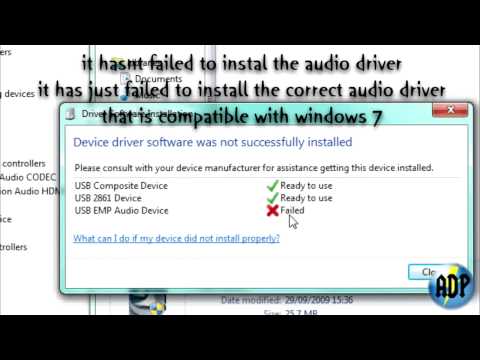
4. It will fail to install the Audio Driver, so what you will need to do is open the Device Manager from Control Panel.
5. Once in the Device Manager, go down to the Sounds, Video and Games Controllers Section.
6. Right click on the USB EMP Audio Device and click on Update Driver Software...
7. Click on Browse My Computer for Driver Software.
8. Choose the option to pick from a list of Drivers.
9. Click on the Model called USB Audio Device.
10. That will update the old driver with the proper driver and fix the audio problem.
Note: This only works for EzCap DC60+ NOT EasyCap DC60, this may or may not work for the EasyCap DC60.
If this tutorial helped you and fixed any audio problems you had please take the time to rate, comment and subscribe.
If you have any further problems just comment below or send me a message and I'll try my hardest to help you with your EzCap problems.
*DISCLAIMER*
Copyright Disclaimer Under Section 107 of the Copyright Act 1976, allowance is made for "fair use" for purposes such as criticism, comment, news reporting, teaching, scholarship, and research. Fair use is a use permitted by copyright statute that might otherwise be infringing. Non-profit, educational or personal use tips the balance in favor of fair use.
Song - Journey - Seperate Ways (Worlds Apart)
.
.
.
.
.
It is vital that you watch this video in HD to read the on-screen text and follow the instructions.
This is a tutorial on how to install the correct Audio Driver for EzCap DC60+ on Windows 7, 64 Bit Operating System.
I would recommend that you uninstall your EzCap Drivers you already have installed and install the drivers from this link. EzCap Drivers - megaupload.com/?d=0Q1K065L
INSTRUCTIONS:
1. Install the drivers for the EzCap DC60+ from the link above.
2. After Installing the drivers, plug in your EzCap DC60+.
3. Once the EzCap is plugged in, it will automatically start updating the drivers, it will properly install the Composite Driver and The Video Driver.#
4. It will fail to install the Audio Driver, so what you will need to do is open the Device Manager from Control Panel.
5. Once in the Device Manager, go down to the Sounds, Video and Games Controllers Section.
6. Right click on the USB EMP Audio Device and click on Update Driver Software...
7. Click on Browse My Computer for Driver Software.
8. Choose the option to pick from a list of Drivers.
9. Click on the Model called USB Audio Device.
10. That will update the old driver with the proper driver and fix the audio problem.
Note: This only works for EzCap DC60+ NOT EasyCap DC60, this may or may not work for the EasyCap DC60.
If this tutorial helped you and fixed any audio problems you had please take the time to rate, comment and subscribe.
If you have any further problems just comment below or send me a message and I'll try my hardest to help you with your EzCap problems.
*DISCLAIMER*
Copyright Disclaimer Under Section 107 of the Copyright Act 1976, allowance is made for "fair use" for purposes such as criticism, comment, news reporting, teaching, scholarship, and research. Fair use is a use permitted by copyright statute that might otherwise be infringing. Non-profit, educational or personal use tips the balance in favor of fair use.
Song - Journey - Seperate Ways (Worlds Apart)
About this tutorial
MrVitoADP published this 1:40 video tutorial on November 13, 2010. It has been watched 18,069 times on YouTube.
- Channel
- MrVitoADP
- Category
- Howto & Style
- Duration
- 1:40
- Published
- November 13, 2010
- Views
- 18,069
- Likes
- 106
Tags
Share
This tutorial in other languages
- FRWindows 7 64 bits - EzCap DC60 + - Audio Driver - Tutoriel
- ESWindows 7 64 bits - EZCAP DC60 + - controlador de audio - Tutorial
- PTWindows 7 64 bits - EzCAP DC60 + - Driver Audio - Tutorial
- ITWindows 7 64 Bit - EzCAP DC60 + - Audio Driver - Tutorial
- DEWindows 7 64 Bit - EZCAP DC60 + - Audio-Treiber - Tutorial
- NLWindows 7 64 bit - ezcap DC60 + - Audio Driver - Tutorial
- RUWindows 7 64 Bit - EzCap DC60 + - Audio Driver - Учебник
- PLWindows 7 64 bit - EzCap DC60 + - Audio Driver - Tutorial
- JAWindows 7の64ビット - EzCap DC60 + - オーディオドライバ - チュートリアル
- ARويندوز 7 64 بت - قطة EzCAP DC60 + - برنامج تشغيل الصوت - دروس
- HIविंडोज 7 64 बिट - EzCap DC60 + - ऑडियो चालक - ट्यूटोरियल
- IDWindows 7 64 Bit - EzCap DC60 + - Audio Driver - Tutorial