Playback starts YouTube’s embedded player (privacy-enhanced mode).
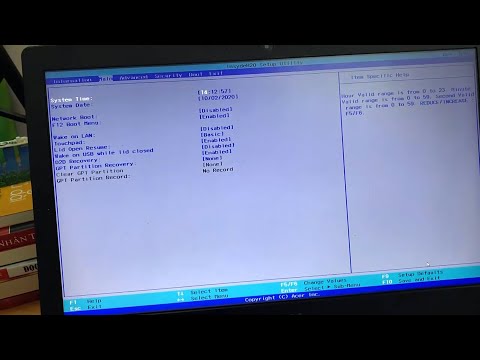
How to access bios on Acer laptop
ChannelWindows 10 FixDescription from the creator
Hi friends, this video will show you how to get into BIOS on an Acer Laptop.
For most Acer laptops, the key you use to enter BIOS is F2, and as with all computers, you enter BIOS as the computer is booting up. However, unlike on many laptops, ACER recommends that you press and hold the F2 key before you switch on the power. Hold down the key until the BIOS screen is displayed; otherwise, your laptop might not recognize that you want to enter BIOS and may start up in the usual way.
F2 is the traditional ACER access-BIOS key, but there are other options you can try if it doesn't work for your laptop.
On some ACER laptop models, you may need to use another key to enter BIOS. The most common alternative key is the "Delete" key, but if it doesn't work, try the "Insert" key. In rare cases, the correct key is F10.
From Windows 8 onward, Microsoft added options to make it easier to get into your BIOS settings. If you're looking for an ACER BIOS key for Windows 10, you can use a different approach. Click the "Start" menu and then choose the gear icon to go to "Settings." Select "Update & Security" from the options that appear, and choose the "Recovery" tab on the left of the next window.
Scroll down to "Advanced startup" and click "Restart now." This action restarts your computer and takes you to a boot options screen instead of starting Windows normally. Choose "Troubleshoot," then "Advanced options" and go to "UEFI Firmware Settings." Click "Restart," and your computer restarts again and takes you to BIOS.
- See more:
How To Clean Your Acer Laptop Screen: youtu.be/ZbKqNWimvN4
How to screen record on Acer laptop Windows 10: youtu.be/G_mjqFocjjw
For most Acer laptops, the key you use to enter BIOS is F2, and as with all computers, you enter BIOS as the computer is booting up. However, unlike on many laptops, ACER recommends that you press and hold the F2 key before you switch on the power. Hold down the key until the BIOS screen is displayed; otherwise, your laptop might not recognize that you want to enter BIOS and may start up in the usual way.
F2 is the traditional ACER access-BIOS key, but there are other options you can try if it doesn't work for your laptop.
On some ACER laptop models, you may need to use another key to enter BIOS. The most common alternative key is the "Delete" key, but if it doesn't work, try the "Insert" key. In rare cases, the correct key is F10.
From Windows 8 onward, Microsoft added options to make it easier to get into your BIOS settings. If you're looking for an ACER BIOS key for Windows 10, you can use a different approach. Click the "Start" menu and then choose the gear icon to go to "Settings." Select "Update & Security" from the options that appear, and choose the "Recovery" tab on the left of the next window.
Scroll down to "Advanced startup" and click "Restart now." This action restarts your computer and takes you to a boot options screen instead of starting Windows normally. Choose "Troubleshoot," then "Advanced options" and go to "UEFI Firmware Settings." Click "Restart," and your computer restarts again and takes you to BIOS.
- See more:
How To Clean Your Acer Laptop Screen: youtu.be/ZbKqNWimvN4
How to screen record on Acer laptop Windows 10: youtu.be/G_mjqFocjjw
About this tutorial
Windows 10 Fix published this 2:26 video tutorial on October 2, 2020. It has been watched 475,390 times on YouTube.
- Channel
- Windows 10 Fix
- Category
- People & Blogs
- Duration
- 2:26
- Published
- October 2, 2020
- Views
- 475,390
- Likes
- 1,720
Share
This tutorial in other languages
- FRComment bios d'accès sur ordinateur portable Acer
- ESCómo bios de acceso en ordenador portátil Acer
- PTComo bios de acesso no portátil Acer
- ITCome bios di accesso su computer portatile Acer
- DEWie man Zugang BIOS auf Acer Laptop
- NLHoe krijg ik toegang bios op Acer laptop
- RUКак биос доступа на Acer ноутбук
- PLJak bios dostępowych na laptopie Acer
- JAどのようにAcerのノートパソコンのBIOSへのアクセスへ
- ARكيفية السير الوصول على جهاز الكمبيوتر المحمول أيسر
- HIकैसे एसर लैपटॉप पर पहुँच bios को
- IDCara bios akses pada laptop Acer