Playback starts YouTube’s embedded player (privacy-enhanced mode).
How to Create and Use Geofences for your Vehicles Using Linxup GPS Tracking Software
ChannelLinxup GPS TrackingDescription from the creator
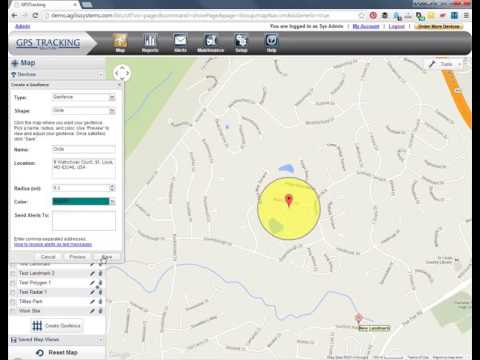
Learn how create landmarks (0:40), circular geofences (1:37), and polygon geofences (2:32) using your GPS tracking devices. With the Linxup GPS vehicle tracking system, you can create virtual fences of any size and shape to highlight important areas on a map, such as your home office or frequently visited customer locations. You can also set up real-time alerts for when cars equipped with Linxup GPS trackers enter or exit these areas. Watch this video to learn how.
With the Linxup system, you can clearly indicate important customer locations or geofences (imaginary boundaries around important or frequently visited locations) on a map. With these features, you can:
-Get alerts when drivers enter or exit areas you designate, such as your head office, customer locations, and more.
-Create custom shaped geofences to outline any area you need.
-Mark key locations such as customer addresses or other areas of importance
Read more about GPS geofences and landmarks here: linxup.com/how/real-time-gps-tracking.html
Learn more about how to get the most out of your Linxup GPS tracking devices on our blog: linxup.com/blog/
How much can GPS tracking save your company? Try this return on investment (ROI) calculator: linxup.com/resources/calculator.html
Follow us on Facebook: facebook.com/Linxup/
Follow us on LinkedIn: linkedin.com/company/linxup
Follow us on Google+: plus.google.com/+Linxup/about
With the Linxup system, you can clearly indicate important customer locations or geofences (imaginary boundaries around important or frequently visited locations) on a map. With these features, you can:
-Get alerts when drivers enter or exit areas you designate, such as your head office, customer locations, and more.
-Create custom shaped geofences to outline any area you need.
-Mark key locations such as customer addresses or other areas of importance
Read more about GPS geofences and landmarks here: linxup.com/how/real-time-gps-tracking.html
Learn more about how to get the most out of your Linxup GPS tracking devices on our blog: linxup.com/blog/
How much can GPS tracking save your company? Try this return on investment (ROI) calculator: linxup.com/resources/calculator.html
Follow us on Facebook: facebook.com/Linxup/
Follow us on LinkedIn: linkedin.com/company/linxup
Follow us on Google+: plus.google.com/+Linxup/about
About this tutorial
Linxup GPS Tracking published this 4:09 video tutorial on November 2, 2017. It has been watched 2,506 times on YouTube.
- Channel
- Linxup GPS Tracking
- Category
- People & Blogs
- Duration
- 4:09
- Published
- November 2, 2017
- Views
- 2,506
- Likes
- 9
Tags
Share
This tutorial in other languages
- FRComment créer et utiliser geofences pour vos véhicules utilisant Linxup GPS Tracking Software
- ESCómo crear y utilizar Geocercas para sus vehículos que utilizan Linxup software de seguimiento GPS
- PTComo criar e usar Geofences para seus veículos que utilizam Linxup GPS Tracking Software
- ITCome creare e utilizzare geofences per i vostri veicoli che utilizzano Linxup Software di localizzazione GPS
- DEWie Erstellen und Verwenden geofences für Fahrzeuge, die mit Linxup GPS-Tracking-Software
- NLHoe te gebruiken geofences maken en voor uw voertuigen met Linxup GPS Tracking Software
- RUКак создать и использовать Геозоны для транспортных средств с использованием Linxup GPS слежения программного обеспечения
- PLJak tworzyć i wykorzystywać granic geograficznych dla pojazdów wykorzystujących Linxup GPS Tracking Software
- JALinxup GPSトラッキングソフトウェアを使用して、あなたの車のために作成して使用ジオフェンスにする方法
- ARكيفية إنشاء واستخدام السياج الجغرافي للمركبات الخاصة بك عن طريق Linxup GPS تتبع البرمجيات
- HIकैसे अपने वाहन Linxup जीपीएस ट्रैकिंग सॉफ्टवेयर का उपयोग करने के लिए उपयोग भू-बाड़े बना सकते हैं और करने के लिए
- IDCara Membuat dan Penggunaan Geofences untuk Kendaraan Anda Menggunakan Linxup GPS Tracking Software