Playback starts YouTube’s embedded player (privacy-enhanced mode).
How to disable Windows key or WinKey in Windows 10/8/7
ChannelWindows 10 FixDescription from the creator
In this video, learn how to disable windows key in Windows 10/8/7.
To disable the Windows key, follow these steps
1. Open regedit.
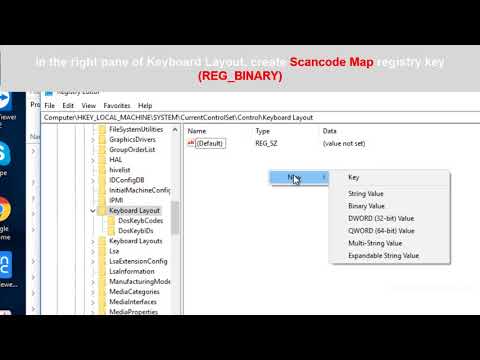
2. Go to HKEY_LOCAL_MACHINE\SYSTEM\CurrentControlSet\Control\Keyboard Layout
3. Click Edit menu, click Add Value, type in Scancode Map, click REG_BINARY as the Data Type. Click OK.
4. Enter 00000000000000000300000000005BE000005CE000000000 in the Data field. Click OK.
5. Close Registry Editor and reboot the machine.
To enable the Windows key, follow these steps
1. Open regedit.
2.Go to HKEY_LOCAL_MACHINE\SYSTEM\CurrentControlSet\Control\Keyboard Layout
3. Delete the Scancode Map registry entry.
4. Close Registry Editor and reboot the machine
---------------------------------------------------------------------
Thanks watch my video.
My channel: youtube.com/channel/UCZ0epl7dQmJm4iy5vp9R4FA
My blog: windows10freeapps.com
To disable the Windows key, follow these steps
1. Open regedit.
2. Go to HKEY_LOCAL_MACHINE\SYSTEM\CurrentControlSet\Control\Keyboard Layout
3. Click Edit menu, click Add Value, type in Scancode Map, click REG_BINARY as the Data Type. Click OK.
4. Enter 00000000000000000300000000005BE000005CE000000000 in the Data field. Click OK.
5. Close Registry Editor and reboot the machine.
To enable the Windows key, follow these steps
1. Open regedit.
2.Go to HKEY_LOCAL_MACHINE\SYSTEM\CurrentControlSet\Control\Keyboard Layout
3. Delete the Scancode Map registry entry.
4. Close Registry Editor and reboot the machine
---------------------------------------------------------------------
Thanks watch my video.
My channel: youtube.com/channel/UCZ0epl7dQmJm4iy5vp9R4FA
My blog: windows10freeapps.com
About this tutorial
Windows 10 Fix published this 2:15 video tutorial on November 2, 2018. It has been watched 106,785 times on YouTube.
- Channel
- Windows 10 Fix
- Category
- People & Blogs
- Duration
- 2:15
- Published
- November 2, 2018
- Views
- 106,785
- Likes
- 946
Tags
Share
This tutorial in other languages
- FRComment désactiver la touche Windows ou WinKey dans Windows 10/8/7
- ESCómo desactivar la tecla Windows o WinKey en Windows 10/8/7
- PTComo desativar tecla Windows ou WinKey no Windows 10/8/7
- ITCome disattivare il tasto Windows o il tasto Windows in Windows 10/8/7
- DEWie Windows-Taste oder WinKey in Windows 10/8/7 deaktivieren
- NLHoe maak je Windows-toets of WinKey in Windows 10/8/7 uitschakelen
- RUКак отключить клавишу Windows, или WinKey в Windows, 10/8/7
- PLJak wyłączyć klawisz Windows lub WinKey w Windows 10/8/7
- JAWindowsの10/8/7でWindowsキーまたはWINKEYを無効にする方法
- ARكيفية تعطيل ويندوز مفتاح أو ينكي في نظام التشغيل Windows 10/8/7
- HIWindows कुंजी या Winkey विंडोज 10/8/7 में अक्षम कैसे करें
- IDCara menonaktifkan tombol Windows atau WinKey pada Windows 10/8/7