Playback starts YouTube’s embedded player (privacy-enhanced mode).
How to Change Individual App Volume in Windows 10 - EarTrumpet App Review
ChannelNazmusLabsDescription from the creator
Let’s take a look at a simple app that lets you change the individual volumes of all running Windows 10 apps! In Windows 7, we were introduced a new volume mixer that let us change volumes of individual running apps. That mixer hasn’t been updated since, and while it still works for desktop apps in Windows 10, it doesn’t work with modern UWP apps (including those that come from the Windows Store).
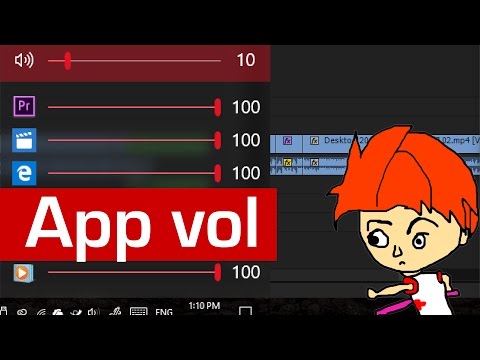
But now, we have a new app, called EarTrumpet, to the rescue, available to download, right from the Windows Store! With this app, you now have an icon on the system tray that, when clicked, shows you a list of all apps running currently that is playing audio. The list includes both desktop and modern UWP apps. You can change the master volume as well as individual app volumes.
So if you are interested, get EarTrumpet from the Windows Store!
microsoft.com/store/apps/9nblggh516xp
(Note that you need to be running the Windows 10 Anniversary Update to be able to install this app)
The neat thing about this app is that it fits right in with the Windows 10 user interface. It follows your accent color and transparency of Windows 10’s Start Menu. The slider of the volume controls also matches that of the official volume control.
Want to download this video?
Visit: nazmuslabs.com/videos/downloads/
This video is provided by the official NazmusLabs YouTube Channel. Thank you for watching.
Visit the websites:
Main Site: nazmuslabs.com
Technology Site: mcakins.com
Connect on social media!
Facebook: facebook.com/nazmuslabs
Twitter: twitter.com/nazmuslabs
Google+: google.com/+NazmusShakibKhandaker
Online Forum: mcakins.com/forum
Flickr: flickr.com/people/nazmus/
LinkedIn: linkedin.com/pub/nazmus-shakib-khandaker/48/121…
For gaming only playlists, visit:
youtube.com/exosphir
For educational only playlists, visit:
youtube.com/nazmuslabs
But now, we have a new app, called EarTrumpet, to the rescue, available to download, right from the Windows Store! With this app, you now have an icon on the system tray that, when clicked, shows you a list of all apps running currently that is playing audio. The list includes both desktop and modern UWP apps. You can change the master volume as well as individual app volumes.
So if you are interested, get EarTrumpet from the Windows Store!
microsoft.com/store/apps/9nblggh516xp
(Note that you need to be running the Windows 10 Anniversary Update to be able to install this app)
The neat thing about this app is that it fits right in with the Windows 10 user interface. It follows your accent color and transparency of Windows 10’s Start Menu. The slider of the volume controls also matches that of the official volume control.
Want to download this video?
Visit: nazmuslabs.com/videos/downloads/
This video is provided by the official NazmusLabs YouTube Channel. Thank you for watching.
Visit the websites:
Main Site: nazmuslabs.com
Technology Site: mcakins.com
Connect on social media!
Facebook: facebook.com/nazmuslabs
Twitter: twitter.com/nazmuslabs
Google+: google.com/+NazmusShakibKhandaker
Online Forum: mcakins.com/forum
Flickr: flickr.com/people/nazmus/
LinkedIn: linkedin.com/pub/nazmus-shakib-khandaker/48/121…
For gaming only playlists, visit:
youtube.com/exosphir
For educational only playlists, visit:
youtube.com/nazmuslabs
About this tutorial
NazmusLabs published this 6:46 video tutorial on November 9, 2016. It has been watched 42,551 times on YouTube.
- Channel
- NazmusLabs
- Category
- Science & Technology
- Duration
- 6:46
- Published
- November 9, 2016
- Views
- 42,551
- Likes
- 420
Tags
Share
This tutorial in other languages
- FRComment faire pour modifier le volume App individuel dans Windows 10 - EarTrumpet App Review
- ESCómo cambiar la aplicación individual de volumen en Windows 10 - EarTrumpet la aplicación de Examen
- PTComo Mudança individual App Volume no Windows 10 - EarTrumpet App Review
- ITCome modificare le singole App Volume in Windows 10 - EarTrumpet App Review
- DESo ändern Einzelne App Volume in Windows 10 - EarTrumpet App Review
- NLHoe te veranderen van de afzonderlijke App volume in Windows 10 - EarTrumpet App review
- RUКак изменить отдельные приложения тома в Windows 10 - EarTrumpet App Обзор
- PLJak zmienić indywidualna App tom w systemie Windows 10 - EarTrumpet App recenzję
- JAどのようにWindowsの10の変更個々のアプリの音量に - EarTrumpetアプリレビュー
- ARكيفية تغيير الفردية التطبيقات وحدة التخزين في ويندوز 10 - EarTrumpet التطبيق مراجعة
- HIEarTrumpet अनुप्रयोग की समीक्षा करें - Windows 10 में कैसे बदलें अलग-अलग एप्लिकेशन वॉल्यूम के लिए
- IDCara Ganti App Individu Volume pada Windows 10 - EarTrumpet App Ulasan