Playback starts YouTube’s embedded player (privacy-enhanced mode).
How to Create a pfSense lab environment with proper routing using Virtual Network Editor -- Part 1
ChannelVMware AdvisorDescription from the creator
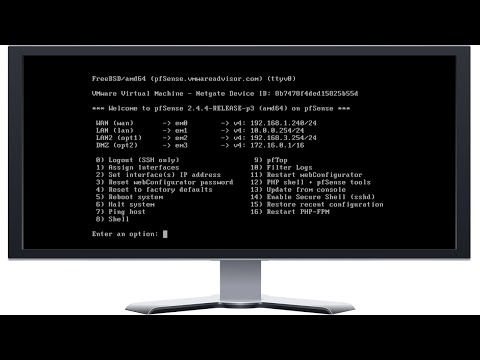
Today we will be adventuring into the world of pfSense Firewall with pfSense 2.4.4. I created this video to mirror a pfSense routing appliance (SG-3100) and for anyone who wants to see how to properly setup a pfSense router with more than just a WAN and LAN.
I explain how to setup for multiple VM networks to mirror what you would see on a pfSense appliance. I will also show you how to setup a multiple network firewall setup and show how you can test it in a virtual environment that is all connecting to the pfSense router.
We will setup a Virtual NiCs from the Virtual Network Editor and connect them directly to your pfSense VM and that will provide you internet and connections. So, this is a completely closed VM network with your pfSense router at the helm.
This is Part 1 of a multiple part setup. We will Install the pfSense software, setup 3 networks (LAN, LAN2, and DMZ) with 3 different types of private IP address (192.x.x.x / 10.x.x.x / 172.x.x.x) with all different subnets as well so you can get an huge crash course in setups.
I also will provide all the ISOs and VM that is created in a link below for anyone to either follow along or download the final VM I created.
So, if the video is helpful then Like and subscribe to my channel for a lot more videos on VMWare OS installs as well as ESXI installation and best practices on how to maintain and secure your Virtual Environment.
## Links to Items used in the video above ##
pfSense official website - pfsense.org/
pfSense Download - pfsense.org/download/
Netgate SG-3100 pfSense Firewall - store.netgate.com/SG-3100.aspx
### Links to VMware and How to begin you journey into Virtualization ###
VMware Advisor Cloud Drive - Tinyurl.com/vmwareadvisor
Create a Free account at VMWare - my.vmware.com/web/vmware/registration
Download VMWare Player 15.5 - vmware.com/products/workstation-player/workstat…
WinWorldPC - winworldpc.com/home
My YouTube Channel - youtube.com/channel/UCe3i0Jntidh60-nos_8SMHQ/
Download Windows Media Tool – go.microsoft.com/fwlink/?LinkId=691209
DistroWatch for Linux Operating Systems - distrowatch.com/
Download Raspbian for VMware - raspberrypi.org/downloads/raspberry-pi-desktop/
Download Official VMs from Distros - osboxes.org/vmware-images/
Download Linux Mint 19 – linuxmint.com/download.php
Download Ubuntu 18.04 LTS – ubuntu.com/download/desktop
Download Rufus (created bootable USB) - github.com/pbatard/rufus/releases/download/v3.8…
I explain how to setup for multiple VM networks to mirror what you would see on a pfSense appliance. I will also show you how to setup a multiple network firewall setup and show how you can test it in a virtual environment that is all connecting to the pfSense router.
We will setup a Virtual NiCs from the Virtual Network Editor and connect them directly to your pfSense VM and that will provide you internet and connections. So, this is a completely closed VM network with your pfSense router at the helm.
This is Part 1 of a multiple part setup. We will Install the pfSense software, setup 3 networks (LAN, LAN2, and DMZ) with 3 different types of private IP address (192.x.x.x / 10.x.x.x / 172.x.x.x) with all different subnets as well so you can get an huge crash course in setups.
I also will provide all the ISOs and VM that is created in a link below for anyone to either follow along or download the final VM I created.
So, if the video is helpful then Like and subscribe to my channel for a lot more videos on VMWare OS installs as well as ESXI installation and best practices on how to maintain and secure your Virtual Environment.
## Links to Items used in the video above ##
pfSense official website - pfsense.org/
pfSense Download - pfsense.org/download/
Netgate SG-3100 pfSense Firewall - store.netgate.com/SG-3100.aspx
### Links to VMware and How to begin you journey into Virtualization ###
VMware Advisor Cloud Drive - Tinyurl.com/vmwareadvisor
Create a Free account at VMWare - my.vmware.com/web/vmware/registration
Download VMWare Player 15.5 - vmware.com/products/workstation-player/workstat…
WinWorldPC - winworldpc.com/home
My YouTube Channel - youtube.com/channel/UCe3i0Jntidh60-nos_8SMHQ/
Download Windows Media Tool – go.microsoft.com/fwlink/?LinkId=691209
DistroWatch for Linux Operating Systems - distrowatch.com/
Download Raspbian for VMware - raspberrypi.org/downloads/raspberry-pi-desktop/
Download Official VMs from Distros - osboxes.org/vmware-images/
Download Linux Mint 19 – linuxmint.com/download.php
Download Ubuntu 18.04 LTS – ubuntu.com/download/desktop
Download Rufus (created bootable USB) - github.com/pbatard/rufus/releases/download/v3.8…
About this tutorial
VMware Advisor published this 45:26 video tutorial on April 2, 2020. It has been watched 48,164 times on YouTube.
- Channel
- VMware Advisor
- Category
- Science & Technology
- Duration
- 45:26
- Published
- April 2, 2020
- Views
- 48,164
- Likes
- 661
Share
This tutorial in other languages
- FRComment faire pour créer un environnement de laboratoire pfSense avec un routage correct en utilisant Virtual Network Editor - Partie 1
- ESCómo crear un entorno de laboratorio pfSense con el enrutamiento adecuado mediante el Editor Red Virtual - Parte 1
- PTComo criar um ambiente de laboratório pfSense com o encaminhamento adequado utilizando o Editor de Rede Virtual - Parte 1
- ITCome creare un ambiente di laboratorio pfSense con la giusta rotta utilizzando Virtual Network Editor - Parte 1
- DEWie man eine pfSense Laborumgebung erstellen mit dem richtigen Routing Virtual Network Editor - Teil 1
- NLHoe maak je een pfSense lab-omgeving met de juiste routing met behulp van Virtual Network Editor Maak - Deel 1
- RUКак создать лабораторную среду pfSense с правильной маршрутизации с использованием Virtual Network Editor - Часть 1
- PLJak utworzyć środowiska laboratoryjnego pfSense z właściwego routingu z wykorzystaniem wirtualnych Edytor Network - część 1
- JA仮想ネットワークエディタを使用して、適切なルーティングとpfSenseのラボ環境を作成する方法 - パート1
- ARكيفية إنشاء بيئة معملية pfSense مع التوجيه السليم باستخدام محرر الشبكة الافتراضية - الجزء 1
- HIउचित मार्ग वर्चुअल नेटवर्क संपादक का उपयोग के साथ एक pfSense प्रयोगशाला के वातावरण बनाने के लिए कैसे - भाग 1
- IDCara membuat lingkungan laboratorium pfSense dengan routing yang tepat menggunakan Virtual Network Editor - Part 1