Playback starts YouTube’s embedded player (privacy-enhanced mode).
How To Enable Emoji Keyboard On The iPhone or iPad
ChannelPhoneBuffDescription from the creator
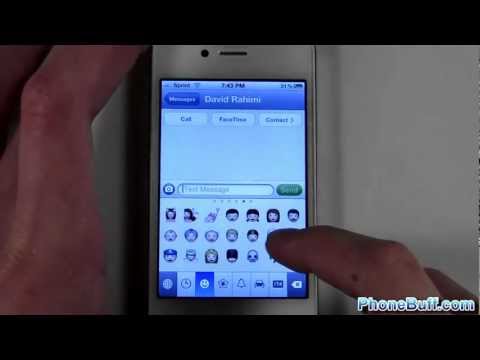
In this video, I show you how to enable (or disable) the Emoji keyboard on the iPhone, iPad or iPod. Emoji is a set of a wide range of emoticons that you can send from one iPhone to another (or other compatible devices).
To add the Emoji keyboard to your iPhone, go to your iPhone's main settings. From here, go to General. And then go to International (NOT keyboard). Hit keyboards and then add. Emoji will be in the list of international keyboards. Tap on it and it will be enabled on your phone. Now you can send as many little emoticons as you want.
If you wish to disable the emoji emoticon keyboard, simply press edit (at the international keyboard screen) and then press the red minus icon.
SUBSCRIBE HERE: bit.ly/phonebuffsub
FOLLOW ME HERE:
twitter.com/phonebuff
facebook.com/phonebuff
instagram.com/phonebuff
google.com/+phonebuff
About PhoneBuff:
It's not official until it's done phonebuffstyle! Home of the best smartphone speed tests, drop tests, and battery tests.
Send Products To:
PhoneBuff
23811 Washington Ave 110-394
Murrieta, CA 92562
How To Enable Emoji Keyboard On The iPhone or iPad
youtube.com/watch?v=DYA6JiFa0z4
PhoneBuff
youtube.com/phonebuff
To add the Emoji keyboard to your iPhone, go to your iPhone's main settings. From here, go to General. And then go to International (NOT keyboard). Hit keyboards and then add. Emoji will be in the list of international keyboards. Tap on it and it will be enabled on your phone. Now you can send as many little emoticons as you want.
If you wish to disable the emoji emoticon keyboard, simply press edit (at the international keyboard screen) and then press the red minus icon.
SUBSCRIBE HERE: bit.ly/phonebuffsub
FOLLOW ME HERE:
twitter.com/phonebuff
facebook.com/phonebuff
instagram.com/phonebuff
google.com/+phonebuff
About PhoneBuff:
It's not official until it's done phonebuffstyle! Home of the best smartphone speed tests, drop tests, and battery tests.
Send Products To:
PhoneBuff
23811 Washington Ave 110-394
Murrieta, CA 92562
How To Enable Emoji Keyboard On The iPhone or iPad
youtube.com/watch?v=DYA6JiFa0z4
PhoneBuff
youtube.com/phonebuff
About this tutorial
PhoneBuff published this 1:37 video tutorial on October 29, 2012. It has been watched 643,656 times on YouTube.
- Channel
- PhoneBuff
- Category
- Science & Technology
- Duration
- 1:37
- Published
- October 29, 2012
- Views
- 643,656
- Likes
- 4,692
Tags
Share
This tutorial in other languages
- FRComment faire pour activer Emoji clavier sur l'iPhone ou l'iPad
- ESCómo habilitar Emoji teclado en el iPhone o iPad
- PTComo ativar Emoji teclado no iPhone ou iPad
- ITCome attivare Emoji tastiera su iPhone o iPad
- DESo aktivieren Tastatur Emoji auf dem iPhone oder iPad
- NLHow To Emoji-toetsenbord op de iPhone of iPad inschakelen
- RUКак включить Emoji клавиатуры на iPhone или IPad
- PLJak włączyć Emoji klawiatury na iPhone lub iPad
- JAザ・iPhoneやiPad上で絵文字キーボードを有効にする方法
- ARكيفية تمكين لوحة المفاتيح رموز تعبيرية على اي فون أو آي باد
- HIकैसे है iPhone या iPad पर इमोजी कीबोर्ड सक्षम करने के लिए
- IDCara Aktifkan Emoji Keyboard On The iPhone atau iPad