Playback starts YouTube’s embedded player (privacy-enhanced mode).
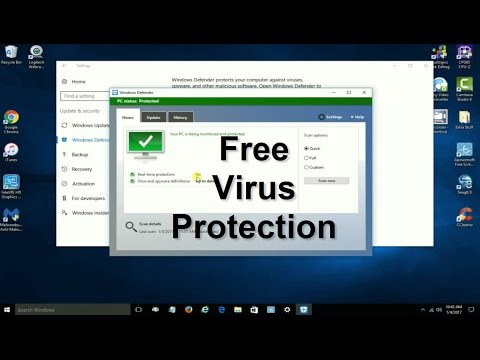
How to enable Windows deFender - How to turn on Windows deFender in Windows 10 - Free & Easy
ChannelnickscomputerfixDescription from the creator
Windows Defender is a free App that comes with Windows 10, that gives you free virus protection. Learn how to enable Windows Defender in Windows 10 in just a few moments. It's easy to figure out how to turn on Windows Defender real time protection permanently for free. This is a easy to follow Windows tutorial that shows you how to use the free Windows Virus Protection software app that comes with Windows 10.
Take Note: Windows Defender is free from Micrsoft Corporation. It's a free virus and spyware protection app included in Windows 10, Windows 8.1 and Windows 7. Also Windows 10 has a built in Internet Firewall too for total computer security protection
Normally there is free anti virus protection apps that get included with new laptop computers from third party security software manufactures. However, most of the time it's only a limited trial version (good for 30 days or less) that expires in a short period of time. Then you have to buy or purchase it in order to keep being protected. A lot of people can't or don't want to keep spending money on virus protection software renewals. These people and maybe you, might like to be protected with Microsoft free anti virus and spyware protection software at no additional cost forever. My video tutorial shows you how to enable Windows defender and turn on real time virus protection.
I don't know about you, but I bet you are just like me when it comes to free Windows 10 Apps...I like them. I've been using Windows defender on all 5 of my computers and laptops for years now. And I feel confident that they are being protected against the latest viruses, spyware and malware threats in real time protection. However, keep in mind there is no perfect solution or perfect laptop computer security solution. But one thing is for sure you can learn how to remove virus from Windows 10 free the easy way by scanning with the free virus protection software, once you enable Windows Defender from Microsoft.
Virus removal in Windows 10 is easy to do with Windows Defender. Or if you just want a good virus protection app to use in Windows 10 and want to learn how to remove spyware or how to remove malware it's easy with this free virus protection software built right into Windows 10 operation system.
About this tutorial
nickscomputerfix published this 3:46 video tutorial on October 26, 2017. It has been watched 119,048 times on YouTube.
- Channel
- nickscomputerfix
- Category
- Science & Technology
- Duration
- 3:46
- Published
- October 26, 2017
- Views
- 119,048
- Likes
- 576
Tags
Share
Further reading
-
Turn on Windows Defender | Microsoft Docs
docs.microsoft.com
Turn on Windows Defender. Complete the following steps to turn on Windows Defender on your device. Select the Start menu. In the search bar, type group policy. Then select Edit group policy from the listed results. The…
-
How to turn on Windows Defender on Windows 10
addictivetips.com
Windows Defender isn’t easy to disable; users need admin rights to turn it off and it will normally nag a user to enable it again. It isn’t the easiest feature to turn off but it can still be turned off. If you’ve insta…
-
How to Turn On or Off Microsoft Defender Antivirus in Windows 10 ...
tenforums.com
4 In the right pane of Windows Defender Antivirus or Microsoft Defender Antivirus in Local Group Policy Editor, double click/tap on the Turn off Windows Defender Antivirus or Turn off Microsoft Defender Antivirus policy…
This tutorial in other languages
- FRComment activer Windows Defender - Comment activer Windows Defender dans Windows 10 - Free & Easy
- ESCómo habilitar Windows Defender - Cómo activar Windows Defender en Windows 10 - Free & Easy
- PTComo ativar o Windows Defender - Como ativar o Windows Defender no Windows 10 - Free & Easy
- ITCome abilitare Windows Defender - Come attivare Windows Defender in Windows 10 - Free & Easy
- DEWie Windows Defender ermöglichen - wie 10 auf Windows Defender in Windows drehen - Free & Easy
- NLHoe Windows Defender in staat - Het inschakelen van Windows Defender in Windows 10 - Free & Easy
- RUКак включить Защитник Windows - Как включить Защитник Windows в Windows 10 - Free & Easy
- PLJak włączyć Windows Defender - Jak włączyć Windows Defender w systemie Windows 10 - Free & Easy
- JAWindowsの10でWindows Defenderをオンにする方法 - - Windows Defenderのを有効にする方法フリー&イージー
- ARكيفية تمكين برنامج Windows Defender - كيفية تشغيل برنامج Windows Defender في نظام التشغيل Windows 10 - مجانية وسهلة
- HIविंडोज डिफेंडर को सक्षम कैसे - कैसे Windows 10 में विंडोज डिफेंडर को चालू करने की - नि: शुल्क और आसान
- IDCara mengaktifkan Windows Defender - Cara mengaktifkan Windows Defender di Windows 10 - Free & Easy