Playback starts YouTube’s embedded player (privacy-enhanced mode).
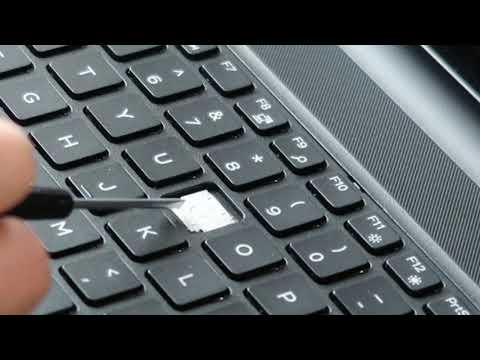
How To Fix Replace Key for Dell Vostro Laptop - Normal / Small Sized Keyboard Key
ChannelPC MonkeyDescription from the creator
Use this video to help you safely remove and then install a letter sized key for a Dell Vostro laptop computer. If you need help with a larger sized key, refer to this video; youtu.be/HsU3HOZUwy4.
Check out the FAQ's and the Related Links below for more helpful info !!
Please remember to Like, Share and Subscribe if this was helpful !!
To support the channel more, leave a Super Thanks or donate to $PCHelper on your CashApp.
Related Video Links:
Laptop Repair Tools & Supplies: amzn.to/3XpHdlw
HDD & SSD Replacement / Upgrades: amzn.to/430vkEz
Hard Drives vs Different Kinds of Solid State Drives Explained: youtu.be/KgDucEw7drA
FAQ's:
Q: The Hinge Clip came apart in two :(
A: You can see how to reassemble it in this video at 5:49
Q: Where can I purchase replacement keys?
A: If the key assembly is not installing correctly, its either due to a component being damaged and needing to be replaced or a component not being orientated correctly. I would remove the key assembly and check for damage. If damage is found, replace the assembly. If no damage is found or you are unsure, try to install again. For help with the orientation, I sometimes remove another key cap, and compare the hinge clip to the one I'm trying to install. If you cant install after several tries, the key assembly is most likely damaged and needs to be replaced.
Q: My Key Cap will not click down in place correctly. What's wrong?
A: If your Key Cap is not clicking down in place correctly, it is most likely due to the Retainer Clip not being properly installed or damaged. Remove the Cap and inspect for damage or that its not laying down flush and properly snapped in itself. Compare to another Clip if needed by removing another Cap.
Q: The rubber spring came off. How do I reattach it?
A: There isn't really a good way to reattach those. They are not meant to be replaced. Best advice is try to use a small amount of glue. If that does not work, you may have to replace the keyboard.
Q: The Hinge Clip is still attached to the Key Cap. What do I do?
A: Because the Key Cap and the Hinge Clip can usually not be installed while attached to each other, you will have to separate them before installing. You can do so as seen here in this video, by using a small flat pry tool.
Check out the FAQ's and the Related Links below for more helpful info !!
Please remember to Like, Share and Subscribe if this was helpful !!
To support the channel more, leave a Super Thanks or donate to $PCHelper on your CashApp.
Related Video Links:
Laptop Repair Tools & Supplies: amzn.to/3XpHdlw
HDD & SSD Replacement / Upgrades: amzn.to/430vkEz
Hard Drives vs Different Kinds of Solid State Drives Explained: youtu.be/KgDucEw7drA
FAQ's:
Q: The Hinge Clip came apart in two :(
A: You can see how to reassemble it in this video at 5:49
Q: Where can I purchase replacement keys?
A: If the key assembly is not installing correctly, its either due to a component being damaged and needing to be replaced or a component not being orientated correctly. I would remove the key assembly and check for damage. If damage is found, replace the assembly. If no damage is found or you are unsure, try to install again. For help with the orientation, I sometimes remove another key cap, and compare the hinge clip to the one I'm trying to install. If you cant install after several tries, the key assembly is most likely damaged and needs to be replaced.
Q: My Key Cap will not click down in place correctly. What's wrong?
A: If your Key Cap is not clicking down in place correctly, it is most likely due to the Retainer Clip not being properly installed or damaged. Remove the Cap and inspect for damage or that its not laying down flush and properly snapped in itself. Compare to another Clip if needed by removing another Cap.
Q: The rubber spring came off. How do I reattach it?
A: There isn't really a good way to reattach those. They are not meant to be replaced. Best advice is try to use a small amount of glue. If that does not work, you may have to replace the keyboard.
Q: The Hinge Clip is still attached to the Key Cap. What do I do?
A: Because the Key Cap and the Hinge Clip can usually not be installed while attached to each other, you will have to separate them before installing. You can do so as seen here in this video, by using a small flat pry tool.
About this tutorial
PC Monkey published this 5:23 video tutorial on April 3, 2020. It has been watched 38,818 times on YouTube.
- Channel
- PC Monkey
- Category
- Science & Technology
- Duration
- 5:23
- Published
- April 3, 2020
- Views
- 38,818
- Likes
- 188
Share
This tutorial in other languages
- FRComment réparer Remplacer la clé pour ordinateur portable Dell Vostro - Normal / petite taille Clavier clé
- ESCómo corregir Reemplazar clave para Dell Vostro Laptop - Normal / llave pequeña teclado de tamaño
- PTComo corrigir Substituir chave para Dell Vostro Laptop - Normal / Pequeno Key Keyboard Sized
- ITCome risolvere la sostituzione della chiave per Dell Vostro computer portatile - Normale / Piccolo tasto della tastiera Sized
- DEWie Fix Um Key für Dell Vostro Laptop ersetzen - Normalen / Kleiner Größe Keyboard Key
- NLHow To Fix Vervangen Key voor Dell Vostro Laptop - Normaal / Kleine Sized Keyboard Key
- RUКак исправить ошибки Заменить ключ для Dell Vostro Ноутбук - Normal / малого размера клавишная клавиатура
- PLJak ustalić Wymień Klucz do Dell Vostro Laptop - Normal / niewielkich rozmiarów klawiatura klucz
- JAデルのVostroノートパソコンのキーを交換してくださいどのように修正 - ノーマル/小サイズのキーボードのキーを
- ARكيفية إصلاح استبدال مفتاح لأجهزة الكمبيوتر المحمول Vostro من Dell - عادي / صغير الحجم مفتاح لوحة المفاتيح
- HIकैसे ठीक करने के लिए Dell Vostro लैपटॉप के लिए कुंजी बदलें - सामान्य / छोटे आकार कीबोर्ड कुंजी
- IDBagaimana Untuk Perbaiki Ganti kunci untuk Dell Vostro Laptop - Normal / Kecil Berukuran Keyboard Key