Playback starts YouTube’s embedded player (privacy-enhanced mode).
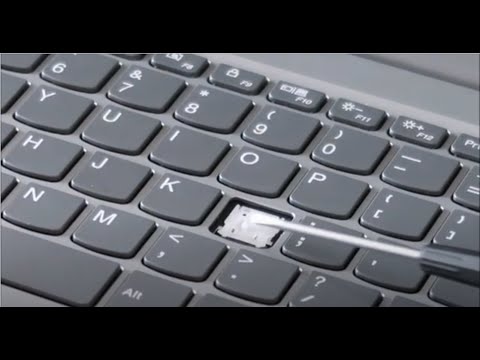
How To Fix Replace Keyboard Key for Lenovo Ideapad - Individual Key Repair - Letter Arrow Etc
ChannelPC MonkeyDescription from the creator
This video shows you how to perform a physical repair of a keyboard key. How to fix it if its mechanically not working properly or to replace it. If you need to see how to replace a larger key, refer to this video; youtu.be/3AEuZyVfuuA. If there is nothing physically wrong with your key, but it still does not work properly, troubleshoot as seen here: youtu.be/wqrchfpdJ_w
Check out the FAQ's and the Related Links below for more helpful info !!
Please remember to Like, Share and Subscribe if this was helpful !!
Please subscribe to youtube.com/@JamTechs where I give you 5 minute or less videos about cool tech!
Related Links:
Laptop Tools, Components & Accessories: amzn.to/3XpHdlw
HDD & SSD Replacement / Upgrades: amzn.to/430vkEz
Check out the FAQ's in the description or leave me a comment and Ill get back to you asap!!
FAQ's:
Q: My Key Cap will not click down in place correctly. Whats wrong?
A: If the key assembly is not installing correctly, its either due to a component being damaged and needing to be replaced or a component not being orientated correctly. I would disassemble the key as seen here in this video and inspect for damage. If there is no damage, install the key. If there is damage, replace the key. Would you like help locating a key? If so, what is the brand and model for your computer?
Q: Where can I purchase replacement keys?
A: If any components are broken, you may have to replace them. I usually get my keys on Ebay or www.replacementlaptopkeys.com. If you cannot find a loose key for sale, you may have to purchase a keyboard and take a key from there.
Q: I have a Key or Keys that are not working. Will this fix them?
A: This video is a tutorial on how to replace a key. If your keys are not working but are not mechanically broken, troubleshoot them as seen here; youtu.be/wqrchfpdJ_w.
Q: The hinge clip came apart into two pieces. How can I reassemble?
A: Unfortunately they do come apart sometimes :( You can see how to put them back together in the last half of this video: youtube.com/watch?v=vVA-nSROSKk
Q: The rubber spring came off. How do I reattach it?
A: There isnt really a good way to reattach the Rubber Springs. They are not meant to be replaced. Best advice is try to use a small amount of glue. If that does not work, you may have to replace the keyboard.
Q: The Hinge Clip came off with the Key Cap. What do I do?
A: Because they key can usually not be reinstalled with the Retainer Clip and the Key Cap still attached to each other, you would have to separate them as seen here, using a small flat pry tool.
(edited 7/25)
Check out the FAQ's and the Related Links below for more helpful info !!
Please remember to Like, Share and Subscribe if this was helpful !!
Please subscribe to youtube.com/@JamTechs where I give you 5 minute or less videos about cool tech!
Related Links:
Laptop Tools, Components & Accessories: amzn.to/3XpHdlw
HDD & SSD Replacement / Upgrades: amzn.to/430vkEz
Check out the FAQ's in the description or leave me a comment and Ill get back to you asap!!
FAQ's:
Q: My Key Cap will not click down in place correctly. Whats wrong?
A: If the key assembly is not installing correctly, its either due to a component being damaged and needing to be replaced or a component not being orientated correctly. I would disassemble the key as seen here in this video and inspect for damage. If there is no damage, install the key. If there is damage, replace the key. Would you like help locating a key? If so, what is the brand and model for your computer?
Q: Where can I purchase replacement keys?
A: If any components are broken, you may have to replace them. I usually get my keys on Ebay or www.replacementlaptopkeys.com. If you cannot find a loose key for sale, you may have to purchase a keyboard and take a key from there.
Q: I have a Key or Keys that are not working. Will this fix them?
A: This video is a tutorial on how to replace a key. If your keys are not working but are not mechanically broken, troubleshoot them as seen here; youtu.be/wqrchfpdJ_w.
Q: The hinge clip came apart into two pieces. How can I reassemble?
A: Unfortunately they do come apart sometimes :( You can see how to put them back together in the last half of this video: youtube.com/watch?v=vVA-nSROSKk
Q: The rubber spring came off. How do I reattach it?
A: There isnt really a good way to reattach the Rubber Springs. They are not meant to be replaced. Best advice is try to use a small amount of glue. If that does not work, you may have to replace the keyboard.
Q: The Hinge Clip came off with the Key Cap. What do I do?
A: Because they key can usually not be reinstalled with the Retainer Clip and the Key Cap still attached to each other, you would have to separate them as seen here, using a small flat pry tool.
(edited 7/25)
About this tutorial
PC Monkey published this 5:07 video tutorial on May 7, 2020. It has been watched 681,622 times on YouTube.
- Channel
- PC Monkey
- Category
- Science & Technology
- Duration
- 5:07
- Published
- May 7, 2020
- Views
- 681,622
- Likes
- 3,965
Share
This tutorial in other languages
- FRComment réparer Remplacer clavier clé pour Lenovo Ideapad - Réparation Clé individu - Lettre Flèche Etc
- ESCómo corregir Reemplazar tecla del teclado para Lenovo Ideapad - Reparación individual Key - Carta Flecha Etc
- PTComo corrigir Substituir tecla do teclado para Lenovo Ideapad - Individual Key Repair - Carta Seta Etc
- ITCome risolvere Sostituire tasto della tastiera per Lenovo Ideapad - Individual chiave di riparazione - Lettera Freccia Etc
- DEWie Fix Um Tastatur Taste für Lenovo Ideapad ersetzen - Individuelle Schlüssel Repair - Schreiben Pfeil Etc
- NLHow To Fix vervangen Toetsenbord voor Lenovo Ideapad - Individuele Key Repair - Brief Arrow Etc
- RUКак исправить Заменить клавиатуру ключ для Lenovo IdeaPad - индивидуальный ключ Ремонт - Письмо Стрелка Etc
- PLJak ustalić Wymień klawiszowa klawiatura dla Lenovo IdeaPad - Indywidualne Key Repair - List Strzałka Etc
- JA個別キーの修復 - - レノボのIdeaPadのキーボードのキーを交換して修正するにはどのように手紙アローその他、各種
- ARكيفية إصلاح استبدال مفتاح لوحة المفاتيح لينوفو - الفردية إصلاح مفتاح - رسالة السهم الخ
- HIकैसे ठीक करने के लिए Lenovo Ideapad के लिए कीबोर्ड कुंजी बदलें - व्यक्तिगत कुंजी मरम्मत - पत्र तीर आदि
- IDBagaimana Untuk Perbaiki Ganti Keyboard Key untuk Lenovo Ideapad - Individu Key Perbaikan - Surat Panah Etc