Playback starts YouTube’s embedded player (privacy-enhanced mode).
How to Fix The disk is write-protected. Remove the write-protection or use another disk Windows 10
ChanneltroubleshooterrorsDescription from the creator
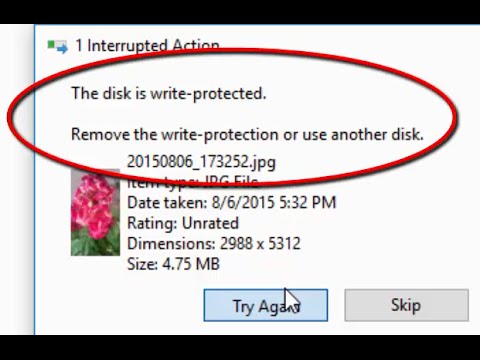
Whenever i am trying to copy files to sd card, Interrupted Action Window is showing with the message 'The disk is write-protected'. Remove the write-protection or use another disk.
Reason: The device is mounted read-only. This usually happens with write-protected devices/media or when BitLocker group policy settings prohibit write access to non-encrypted removable devices.
Solution: Put the sd card in your mobile phone, go to storage settings and Unmount the sd card for safe removal. This will remove the write-protection. So, you can see the files and copy files to sd card without getting the message 'The disk is write-protected'.
Reason: The device is mounted read-only. This usually happens with write-protected devices/media or when BitLocker group policy settings prohibit write access to non-encrypted removable devices.
Solution: Put the sd card in your mobile phone, go to storage settings and Unmount the sd card for safe removal. This will remove the write-protection. So, you can see the files and copy files to sd card without getting the message 'The disk is write-protected'.
About this tutorial
troubleshooterrors published this 2:32 video tutorial on November 2, 2016. It has been watched 228,171 times on YouTube.
- Channel
- troubleshooterrors
- Category
- Science & Technology
- Duration
- 2:32
- Published
- November 2, 2016
- Views
- 228,171
- Likes
- 708
Tags
Share
This tutorial in other languages
- FRComment réparer le disque est protégé en écriture. Retirez la protection en écriture ou utiliser un autre disque de Windows 10
- ESCómo arreglar el disco está protegido contra escritura. Quitar la protección contra escritura o utilice otro disco de Windows 10
- PTComo corrigir o disco está protegido contra gravação. Remova a proteção contra gravação ou usar outro disco Windows 10
- ITCome risolvere il disco è protetto da scrittura. Rimuovere la protezione da scrittura o utilizzare un altro disco di Windows 10
- DEWie man die Festplatte befestigen ist schreibgeschützt. Entfernen Sie den Schreibschutz oder verwenden Sie eine andere Scheibe 10 von Windows
- NLHoe kan ik Fix De schijf is beveiligd tegen schrijven. Verwijder de schrijfbeveiliging of gebruik een andere schijf Windows 10
- RUКак исправить диск защищен от записи. Снимите защиту от записи или используйте другой диск для Windows 10
- PLJak naprawić dysk jest chroniony przed zapisem. Zdejmij ochronę przed zapisem lub użyj innego dysku systemu Windows 10
- JAディスクを修復する方法書き込み保護されています。書き込み禁止を削除するか、別のディスクのWindows 10を使用します
- ARكيفية إصلاح القرص غير محمي ضد الكتابة. إزالة الحماية ضد الكتابة أو استخدام قرص آخر ويندوز 10
- HIकैसे डिस्क को ठीक करने के लिए लिखने-सुरक्षित है। लिखने-सुरक्षा निकालें या किसी अन्य डिस्क Windows 10 का उपयोग
- IDCara Memperbaiki Disk write-dilindungi. Lepaskan write-perlindungan atau menggunakan disk lain Windows 10