Playback starts YouTube’s embedded player (privacy-enhanced mode).
How to Get Netflix on Your Wii
ChannelHowcastDescription from the creator
Full Playlist: youtube.com/playlist?list=PLLALQuK1NDrj4-e0XDKE…
-
-
Watch more Gaming Console Hacks & Tips videos: howcast.com/videos/408608-How-to-Get-Netflix-on…
If you're yearning for more entertainment from your Wii, turn that little white box into an on-demand movie machine with Netflix.
Step 1: Sign up for Netflix
Sign up for a Netflix account and purchase one of the unlimited rental plans to get the streaming feature.
Tip
Make sure your Wii is online. It has a built-in wireless adapter, but a Wii LAN adapter is needed for a wired connection.
Step 2: Load the instant queue
Load the instant queue on your Netflix account with your favorite movies and television shows.
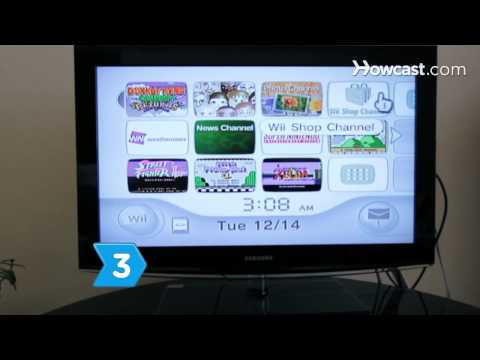
Step 3: Install the Netflix app
On your Wii menu, go to the Wii Shop Channel. Search for and download the Netflix application.
Step 4: Link your Netflix account to your Wii
Follow the instructions that appear on screen to link your Netflix account to your Wii.
Step 5: Select a movie
Select a movie from your instant queue or browse through available movies, pop some popcorn, and enjoy a fun evening using your Wii to instantly watch Netflix.
Did You Know?
Box office sales account for only about 25 percent of a film's profit, while video sales, rentals, and broadcast rights make up the other 75 percent.
-
-
Watch more Gaming Console Hacks & Tips videos: howcast.com/videos/408608-How-to-Get-Netflix-on…
If you're yearning for more entertainment from your Wii, turn that little white box into an on-demand movie machine with Netflix.
Step 1: Sign up for Netflix
Sign up for a Netflix account and purchase one of the unlimited rental plans to get the streaming feature.
Tip
Make sure your Wii is online. It has a built-in wireless adapter, but a Wii LAN adapter is needed for a wired connection.
Step 2: Load the instant queue
Load the instant queue on your Netflix account with your favorite movies and television shows.
Step 3: Install the Netflix app
On your Wii menu, go to the Wii Shop Channel. Search for and download the Netflix application.
Step 4: Link your Netflix account to your Wii
Follow the instructions that appear on screen to link your Netflix account to your Wii.
Step 5: Select a movie
Select a movie from your instant queue or browse through available movies, pop some popcorn, and enjoy a fun evening using your Wii to instantly watch Netflix.
Did You Know?
Box office sales account for only about 25 percent of a film's profit, while video sales, rentals, and broadcast rights make up the other 75 percent.
About this tutorial
Howcast published this 1:23 video tutorial on November 2, 2011. It has been watched 547,112 times on YouTube.
- Channel
- Howcast
- Category
- Science & Technology
- Duration
- 1:23
- Published
- November 2, 2011
- Views
- 547,112
- Likes
- 824
Tags
Share
This tutorial in other languages
- FRComment obtenir Netflix sur votre Wii
- ESCómo obtener Netflix en tu Wii
- PTComo Chegar Netflix em seu Wii
- ITCome ottenere Netflix sul vostro Wii
- DEWie Netflix auf Ihrer Wii holen
- NLHoe u Netflix op je Wii
- RUКак получить Netflix на вашем Wii
- PLJak uzyskać Netflix na Wii
- JAあなたのWiiでネットフリックスを取得する方法
- ARكيفية الحصول على Netflix على وى الخاص بك
- HIकैसे आपका Wii पर Netflix प्राप्त करने
- IDBagaimana Mendapatkan Netflix pada Wii Anda