Playback starts YouTube’s embedded player (privacy-enhanced mode).
How to install windows 8 on a Netbook| Booredatwork
ChannelBooredatwork.comDescription from the creator
booredatwork.com/2011/09/14/how-to-install-wind…
Twitter: twitter.com/booredatwork
Facebook: facebook.com/pages/Booredatwork/211909969459
Empireavenue: empireavenue.com/boored
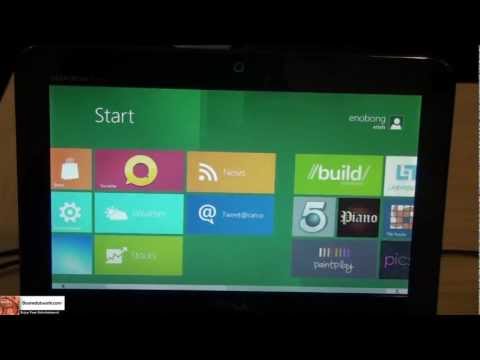
Microsoft just released the first Preview look of Windows 8, with the Windows 8 Developer Preview. This install was done on a Dell Mini 1012 Netbook, to show the versatility of Windows 8 and an installation on the lowest spec base current in the market. The install process for windows 8 developer Preview is fairly simple and straight forward; and similar to Windows 7. Which you will see in the video, the total install time for the Netbook was about 45mins (time will defer with a faster machine)
Base system requirements for Windows 8- (Similar to Windows 7)
Intel Atom CPU
1GB of Ram
Download Links
Windows Developer Preview 32 bit ver. herehttp://wdp.dlws.microsoft.com/WDPDL/9B8DFDFF736C5B1DBF956B89D8A9D4FD925DACD2/WindowsDeveloperPreview-32bit-English.iso
Windows Developer Preview 64 bit ver. herehttp://wdp.dlws.microsoft.com/WDPDL/9B8DFDFF736C5B1DBF956B89D8A9D4FD925DACD2/WindowsDeveloperPreview-64bit-English.iso
Windows Developer Preview 64 bit ver with Developer Tools here wdp.dlws.microsoft.com/WDPDL/9B8DFDFF736C5B1DBF…
Twitter: twitter.com/booredatwork
Facebook: facebook.com/pages/Booredatwork/211909969459
Empireavenue: empireavenue.com/boored
Microsoft just released the first Preview look of Windows 8, with the Windows 8 Developer Preview. This install was done on a Dell Mini 1012 Netbook, to show the versatility of Windows 8 and an installation on the lowest spec base current in the market. The install process for windows 8 developer Preview is fairly simple and straight forward; and similar to Windows 7. Which you will see in the video, the total install time for the Netbook was about 45mins (time will defer with a faster machine)
Base system requirements for Windows 8- (Similar to Windows 7)
Intel Atom CPU
1GB of Ram
Download Links
Windows Developer Preview 32 bit ver. herehttp://wdp.dlws.microsoft.com/WDPDL/9B8DFDFF736C5B1DBF956B89D8A9D4FD925DACD2/WindowsDeveloperPreview-32bit-English.iso
Windows Developer Preview 64 bit ver. herehttp://wdp.dlws.microsoft.com/WDPDL/9B8DFDFF736C5B1DBF956B89D8A9D4FD925DACD2/WindowsDeveloperPreview-64bit-English.iso
Windows Developer Preview 64 bit ver with Developer Tools here wdp.dlws.microsoft.com/WDPDL/9B8DFDFF736C5B1DBF…
About this tutorial
Booredatwork.com published this 18:10 video tutorial on November 13, 2011. It has been watched 91,133 times on YouTube.
- Channel
- Booredatwork.com
- Category
- Science & Technology
- Duration
- 18:10
- Published
- November 13, 2011
- Views
- 91,133
- Likes
- 162
Tags
Share
This tutorial in other languages
- FRComment installer Windows 8 sur un Netbook | Booredatwork
- ESCómo instalar Windows 8 en una Netbook | Booredatwork
- PTComo instalar o Windows 8 em um Netbook | Booredatwork
- ITCome installare Windows 8 su un netbook | Booredatwork
- DEWie Installieren von Windows 8 auf einem Netbook | Booredatwork
- NLHoe kan ik Windows 8 te installeren op een Netbook | Booredatwork
- RUКак установить Windows 8 на нетбуке | Booredatwork
- PLJak zainstalować Windows 8 na netbooku | Booredatwork
- JAネットブックのWindows 8をインストールする方法| Booredatwork
- ARكيفية تثبيت ويندوز 8 على جهاز النت بوك | Booredatwork
- HIएक नेटबुक पर खिड़कियों स्थापित करने के लिए 8 | Booredatwork
- IDCara menginstal windows 8 pada Netbook | Booredatwork