Playback starts YouTube’s embedded player (privacy-enhanced mode).
how to port mobile number | port idea to jio | Whole porting process explained | Step by step
ChannelMake Knowledge FreeDescription from the creator
How to port mobile number from idea to jio
1. First, choose the service provider you wish to port your number to. In this case we want to port idea to Jio
2. Send the following text message - PORT followed by your 10-digit mobile number to TRAI's central number for mobile number portability - 1900. So we went to messages and wrote Port 80968----- and send to 1900 from idea sim
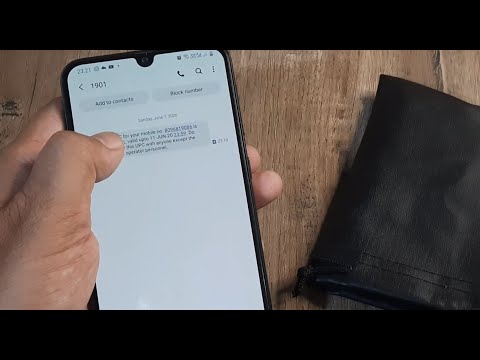
We received an SMS with unique porting code (AL123Q) from 1901 which is valid till 4 days ( earlier it was 15 days )
3. Now, we have to go to the Jio operator store showing them the unique porting code ((AL123Q)) requesting them to port the idea sim to their network .
We carry a photograph and proof of identity( i.e Aadhar /pan /passport etc )
4. The JIO guys will make us fill a consumer acquisition form (CAF) and get our KYC done with aadhar biometric
We do the documentation and submit CAF (consumer acquisition form).
We must ensure that we have cleared all our bills of the number we want to port ( in this case idea ) ...here, i have a idea prepaid number ...
i should ensure that all the bills are paid and if possible attach a copy of the bill receipt along with the Consumer acquisition form and the Unique porting code
6. The operator ( Jio in this case ) will shortly provide us with the new Jio sim having the same idea number ...that's it , porting of idea to jio is complete ..........now we can use the same idea number with jio network
Charges are usually Rs 19 for porting
1. First, choose the service provider you wish to port your number to. In this case we want to port idea to Jio
2. Send the following text message - PORT followed by your 10-digit mobile number to TRAI's central number for mobile number portability - 1900. So we went to messages and wrote Port 80968----- and send to 1900 from idea sim
We received an SMS with unique porting code (AL123Q) from 1901 which is valid till 4 days ( earlier it was 15 days )
3. Now, we have to go to the Jio operator store showing them the unique porting code ((AL123Q)) requesting them to port the idea sim to their network .
We carry a photograph and proof of identity( i.e Aadhar /pan /passport etc )
4. The JIO guys will make us fill a consumer acquisition form (CAF) and get our KYC done with aadhar biometric
We do the documentation and submit CAF (consumer acquisition form).
We must ensure that we have cleared all our bills of the number we want to port ( in this case idea ) ...here, i have a idea prepaid number ...
i should ensure that all the bills are paid and if possible attach a copy of the bill receipt along with the Consumer acquisition form and the Unique porting code
6. The operator ( Jio in this case ) will shortly provide us with the new Jio sim having the same idea number ...that's it , porting of idea to jio is complete ..........now we can use the same idea number with jio network
Charges are usually Rs 19 for porting
About this tutorial
Make Knowledge Free published this 4:03 video tutorial on June 27, 2020. It has been watched 493,905 times on YouTube.
- Channel
- Make Knowledge Free
- Category
- Science & Technology
- Duration
- 4:03
- Published
- June 27, 2020
- Views
- 493,905
- Likes
- 5,423
Tags
Share
This tutorial in other languages
- FRcomment le numéro de port mobile | Port idée de Jio | processus de portage ensemble expliqué | Pas à pas
- EScómo portar número de teléfono móvil | idea puerto a jio | proceso de portabilidad toda explicó | Paso a paso
- PTcomo porta de número de celular | ideia porta para jio | processo de portar todo explicou | Passo a passo
- ITCome port numero di cellulare | idea porta a jio | processo di porting Tutta spiegato | Passo dopo passo
- DEwie in dem Hafen Mobiltelefonnummer | Port Idee jio | Whole Portierungsprozess erklärt | Schritt für Schritt
- NLhoe poort mobiel nummer | port idee om jio | Hele portering proces uitgelegd | Stap voor stap
- RUкак порт номер мобильного | порт идея Jio | Весь процесс портирования объяснил | Шаг за шагом
- PLJak portu numer telefonu komórkowego | Port pomysłem Jio | Cały proces Porting wyjaśnione | Krok po kroku
- JAどのポートに携帯電話番号| JIOへのポートのアイデア| |全体の移植プロセスを説明しましたステップバイステップ
- ARكيفية رقم المنفذ المحمول | فكرة الميناء لجنينيو | وأوضحت عملية ترقية كاملة | خطوة بخطوة
- HIकैसे बंदरगाह के लिए मोबाइल नंबर | जियो को बंदरगाह विचार | पूरे पोर्टिंग प्रक्रिया के बारे में बताया | क्रमशः
- IDbagaimana ke port nomor ponsel | pelabuhan ide untuk jio | Proses porting seluruh menjelaskan | Selangkah demi selangkah