Playback starts YouTube’s embedded player (privacy-enhanced mode).
How to quickly test your SD card or USB Flash drive using FakeFlashtest (v2)
Channelsteve6375Description from the creator
FakeFlashTest and Tutorial 7 can be found at:
rmprepusb.com/tutorials/007-all-about-fake-sd-c…
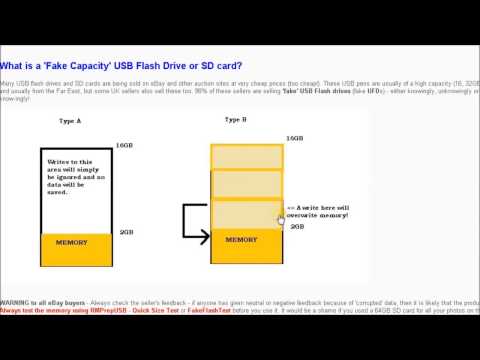
It you have bought a 2TB Flash USB Drive it is probably a FAKE!
Cheap SD cards and USB Flash drives may be fake. When you get a new one, the first thing you should do is test it with FakeFlashTest.exe. This video explains why and how to do it.
Please note: FFT is a quick test designed to find fake drives, it does not test every byte of memory to check for faulty memory.
For more details about FakeFlashTest see my blog at rmprepusb.blogspot.co.uk/2013/10/a-faster-test-… - see the end of the blog to see how many fake flash drives have been reported by users!
If FakeFlashTest seems to be failing all devices, your Windows system may be blocking it. Try rebooting in Safe Mode and running FakeFlashTest in Safe Mode.
If you want to use your USB drive after testing, use RMPrepUSB to re-format it as FAT32. If it is fake\faulty, you may not be able to re-format it as NTFS.
rmprepusb.com/tutorials/007-all-about-fake-sd-c…
It you have bought a 2TB Flash USB Drive it is probably a FAKE!
Cheap SD cards and USB Flash drives may be fake. When you get a new one, the first thing you should do is test it with FakeFlashTest.exe. This video explains why and how to do it.
Please note: FFT is a quick test designed to find fake drives, it does not test every byte of memory to check for faulty memory.
For more details about FakeFlashTest see my blog at rmprepusb.blogspot.co.uk/2013/10/a-faster-test-… - see the end of the blog to see how many fake flash drives have been reported by users!
If FakeFlashTest seems to be failing all devices, your Windows system may be blocking it. Try rebooting in Safe Mode and running FakeFlashTest in Safe Mode.
If you want to use your USB drive after testing, use RMPrepUSB to re-format it as FAT32. If it is fake\faulty, you may not be able to re-format it as NTFS.
About this tutorial
steve6375 published this 14:24 video tutorial on November 10, 2015. It has been watched 160,156 times on YouTube.
- Channel
- steve6375
- Category
- Science & Technology
- Duration
- 14:24
- Published
- November 10, 2015
- Views
- 160,156
- Likes
- 627
Tags
Share
This tutorial in other languages
- FRComment tester rapidement votre carte SD ou une clé USB Flash à l'aide FakeFlashtest (v2)
- ESCómo probar rápidamente su tarjeta SD o una unidad flash USB mediante FakeFlashtest (v2)
- PTComo testar rapidamente o seu cartão SD ou flash drive USB usando FakeFlashtest (v2)
- ITCome testare rapidamente la vostra scheda SD o un'unità flash USB utilizzando FakeFlashtest (v2)
- DEWie schnell testen Sie Ihre SD-Karte oder USB-Flash-Laufwerk mit FakeFlashtest (v2)
- NLHoe kunt u uw SD-kaart of USB Flash drive snel te testen met behulp van FakeFlashtest (v2)
- RUКак быстро проверить вашу SD-карту или USB флэш-накопитель с помощью FakeFlashtest (v2)
- PLJak szybko sprawdzić swoją kartę SD lub dysk USB Flash używając FakeFlashtest (v2)
- JA迅速FakeFlashtest(V2)を使用して、SDカードやUSBフラッシュドライブをテストする方法
- ARكيفية اختبار بسرعة بطاقة SD أو USB فلاش محرك الأقراص باستخدام FakeFlashtest (V2)
- HIकैसे जल्दी से उपयोग कर अपने SD कार्ड या USB फ्लैश ड्राइव का परीक्षण करने के FakeFlashtest (v2)
- IDCara cepat menguji kartu SD atau USB Flash drive menggunakan FakeFlashtest (v2)