Playback starts YouTube’s embedded player (privacy-enhanced mode).
How to Remove Friends From Facebook
ChannelHowcastDescription from the creator
Full Playlist: youtube.com/playlist?list=PLLALQuK1NDrgfCChmo4u…
-
-
Watch more Client Videos videos: howcast.com/videos/291489-How-to-Remove-Friends…
Step 1: Log in
Log in to your Facebook account.
Step 2: Go to the friends' profile
Start typing the name of the friend you want to remove in the search box in the upper right corner of your screen, and click on their name to go to their profile.
Tip
Facebook does not notify the person whose profile you remove, so you can remove friends with impunity.
Step 3: Click "Remove from Friends"
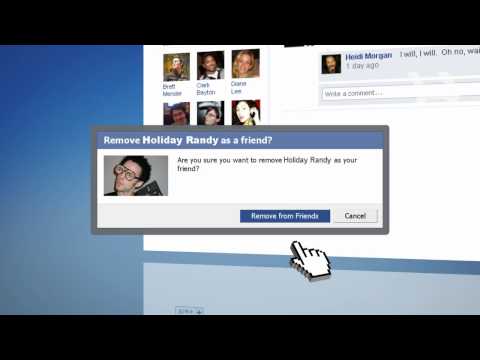
Click "Remove from Friends" at the bottom of the column on the left side of the page. In the pop-up window that appears, click "Remove from Friends" to confirm.
Tip
Removing a friend can't be undone.
Step 4: Remove from your "All Friends" page
You can also remove a friend by going to the "Friends" tab at the top left and clicking "All Friends." Click the "X" to the right of the friend you want to get rid of. Confirm your choice by clicking "Remove."
Did You Know?
The average Facebook user has 120 friends on the site.
-
-
Watch more Client Videos videos: howcast.com/videos/291489-How-to-Remove-Friends…
Step 1: Log in
Log in to your Facebook account.
Step 2: Go to the friends' profile
Start typing the name of the friend you want to remove in the search box in the upper right corner of your screen, and click on their name to go to their profile.
Tip
Facebook does not notify the person whose profile you remove, so you can remove friends with impunity.
Step 3: Click "Remove from Friends"
Click "Remove from Friends" at the bottom of the column on the left side of the page. In the pop-up window that appears, click "Remove from Friends" to confirm.
Tip
Removing a friend can't be undone.
Step 4: Remove from your "All Friends" page
You can also remove a friend by going to the "Friends" tab at the top left and clicking "All Friends." Click the "X" to the right of the friend you want to get rid of. Confirm your choice by clicking "Remove."
Did You Know?
The average Facebook user has 120 friends on the site.
About this tutorial
Howcast published this 1:08 video tutorial on October 31, 2010. It has been watched 837,997 times on YouTube.
- Channel
- Howcast
- Category
- Science & Technology
- Duration
- 1:08
- Published
- October 31, 2010
- Views
- 837,997
- Likes
- 1,449
Tags
Share
This tutorial in other languages
- FRComment faire pour supprimer des amis de Facebook
- ESCómo eliminar amigos de Facebook
- PTComo remover os amigos do Facebook
- ITCome rimuovere i tuoi amici di Facebook
- DESo entfernen Sie Freunde von Facebook
- NLHoe kan ik vrienden verwijderen van Facebook
- RUКак удалить друзей из Facebook
- PLJak usunąć znajomych z Facebook
- JAFacebookの友達からを削除する方法
- ARكيفية إزالة الأصدقاء من الفيسبوك
- HIकैसे फेसबुक से मित्रों को हटाना
- IDCara Hapus Teman Dari Facebook