Playback starts YouTube’s embedded player (privacy-enhanced mode).
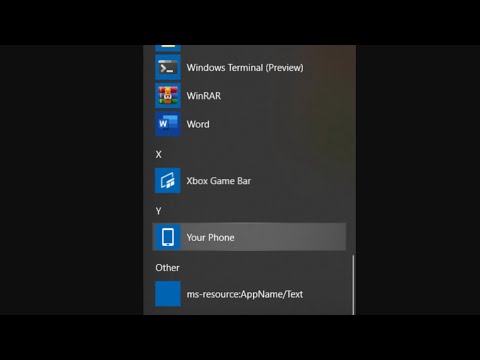
How to Remove ms-resource:AppName/Text from Start menu
ChannelThe Geek PageDescription from the creator
How to Remove ms-resource:AppName/Text from Start menu.
Get-AppxPackage -all *HolographicFirstRun* | Remove-AppPackage -AllUsers
%localappdata%\Packages\Microsoft.Windows.StartMenuExperienceHost_cw5n1h2txyewy
Note: Please do not forget to restart your PC after this
Get-AppxPackage -all *HolographicFirstRun* | Remove-AppPackage -AllUsers
%localappdata%\Packages\Microsoft.Windows.StartMenuExperienceHost_cw5n1h2txyewy
Note: Please do not forget to restart your PC after this
About this tutorial
The Geek Page published this 2:04 video tutorial on May 29, 2020. It has been watched 30,630 times on YouTube.
- Channel
- The Geek Page
- Category
- Science & Technology
- Duration
- 2:04
- Published
- May 29, 2020
- Views
- 30,630
- Likes
- 322
Share
This tutorial in other languages
- FRComment supprimer ms-ressource: AppName / texte à partir du menu Démarrer
- ESCómo quitar MS-recursos: AppName / texto desde el menú Inicio
- PTComo remover ms-resource: AppName / Texto do menu Iniciar
- ITCome rimuovere MS-risorsa: NomeApp / Testo dal menu Start
- DEWie Entfernen von ms-Ressource: AppName / Text aus dem Startmenü
- NLHoe te verwijderen ms-resource: AppName / Tekst uit het menu Start
- RUКак удалить MS-ресурс: APPNAME / Text из меню Пуск
- PLJak usunąć ms-zasobu: AppName / tekst z menu Start
- JAMS-リソースを削除する方法:[スタート]メニューからのAppName /テキスト
- ARكيفية إزالة مللي الموارد: APPNAME / النص من قائمة ابدأ
- HIकैसे निकालें एमएस-संसाधन: प्रारंभ मेनू से AppName / पाठ
- IDCara Hapus ms-sumber daya: AppName / Text dari menu Start