Playback starts YouTube’s embedded player (privacy-enhanced mode).
How To: Replace or Clean your MacBook, MacBook Pro, or MacBook Air Keyboard Keys
ChannelSnazzy LabsIn brief
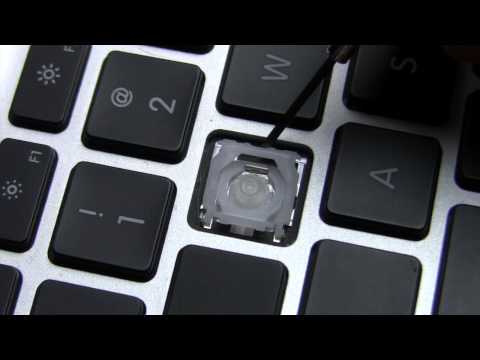
Fix stuck or dirty keys on your MacBook, MacBook Pro, or MacBook Air by accessing the scissor mechanism beneath them. This quick method works for most models and requires minimal tools—just patience and gentle handling.
Description from the creator
Again, all models vary slightly; however by simply poking around gently under that key, you'll be able to identify the scissor mechanism. Email me if you need any more help. [email protected]
Visit our site: snazzylabs.com/
Questions? Gimme a call: +1.801.214.TSIG (8744)
Download TSIG app here - trdd.us/tsigmo
iTunes Podcast - trdd.us/pod
iTunes HD Podcast - trdd.us/podhd
Become a Fan on Facebook - trdd.us/fb
Add me to your Google+ Circles - trdd.us/plus
Follow Snazzy Labs on Twitter - trdd.us/twitter
Follow me on Ping - trdd.us/ping
Follow me on DailyBooth - trdd.us/db
Follow me on Instagram - SnazzyQ
Friend me on Game Center - Snazzy
Friend me on Xbox Live - Quinn One (friends list is full)
Visit our site: snazzylabs.com/
Questions? Gimme a call: +1.801.214.TSIG (8744)
Download TSIG app here - trdd.us/tsigmo
iTunes Podcast - trdd.us/pod
iTunes HD Podcast - trdd.us/podhd
Become a Fan on Facebook - trdd.us/fb
Add me to your Google+ Circles - trdd.us/plus
Follow Snazzy Labs on Twitter - trdd.us/twitter
Follow me on Ping - trdd.us/ping
Follow me on DailyBooth - trdd.us/db
Follow me on Instagram - SnazzyQ
Friend me on Game Center - Snazzy
Friend me on Xbox Live - Quinn One (friends list is full)
About this tutorial
Snazzy Labs published this 3:01 video tutorial on November 1, 2011. It has been watched 3,411,233 times on YouTube.
- Channel
- Snazzy Labs
- Category
- Science & Technology
- Duration
- 3:01
- Published
- November 1, 2011
- Views
- 3,411,233
- Likes
- 12,508
Share
This tutorial in other languages
- FRComment faire pour remplacer ou nettoyer votre MacBook, MacBook Pro ou MacBook Air Touches de clavier
- ESCómo: cambiar o limpiar el MacBook, MacBook Pro o MacBook Air teclas del teclado
- PTComo: substituir ou limpar seu MacBook, MacBook Pro, ou teclas do teclado do MacBook Air
- ITCome: Sostituire o pulire il vostro MacBook, MacBook Pro o MacBook Air tastiera Tasti
- DEHow To: Ersetzen oder Reinigen Sie Ihr MacBook, MacBook Pro oder MacBook Air Keyboard Keys
- NLHow To: Vervang of reinig je MacBook, MacBook Pro of MacBook Air Keyboard Keys
- RUКак: Заменить или мойте MacBook, MacBook Pro, или клавиши клавиатуры MacBook Air
- PLJak Wymienić lub oczyścić komputer MacBook, MacBook Pro lub MacBook Air Keyboard
- JA方法:お使いのMacBookを交換するか、清掃し、MacBook Proの、またはMacBook Airのキーボードのキー
- ARكيفية: استبدال أو تنظيف الخاص بك ماك بوك، ماك بوك برو، أو مفاتيح لوحة المفاتيح ماك بوك اير
- HIकैसे: बदलें या अपने मैकबुक, मैकबुक प्रो, या मैकबुक एयर कीबोर्ड कुंजी साफ
- IDCara: Ganti atau Bersihkan MacBook, MacBook Pro, atau Keyboard Keys MacBook Air