Playback starts YouTube’s embedded player (privacy-enhanced mode).
How to Reset a Router | Internet Setup
ChannelHowcastIn brief
You’ll quickly restore your router to working order by unplugging it, flipping a switch, or using a paper clip to reset—including a hard reset to wipe settings. This works for anyone dealing with slow speeds, forgotten passwords, or unwanted configurations.
Questions & answers
What’s the difference between a reset and a hard reset?
A reset (unplugging/switch) restarts the router; a hard reset (paper clip for 10 sec) wipes all settings.
How do I find the default login details after a hard reset?
Check the router’s manual or manufacturer’s website for default username/password and IP address.
Description from the creator
-
-
Watch more How to Set Up Internet videos: howcast.com/videos/499697-How-to-Reset-a-Router…
Today I want to talk to you about resetting your routers. Routers are wonderful things, and they give all our computers access to the Internet, but sometimes they get slow or they just stop working altogether and in most cases the solution is resetting them. So there are a few ways to reset your routers. The first one is to simply unplug it. So every router is connected to the power so you can just take out the plug and wait a second and then put the plug in and that will reset it pretty effectively. Some routers have a switch on them, like this one, so I can actually just flip the switch to off and on and the router will reset itself.
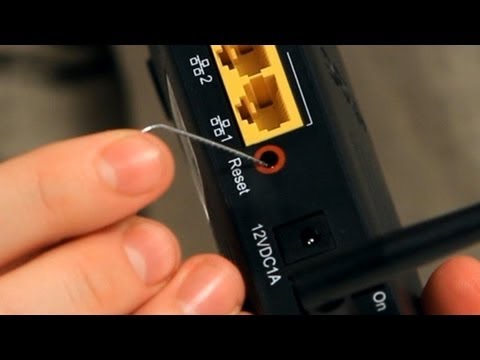
Another way is by using this rare and handy tool called a paper clip. You can just unfold it a little bit to get the sharp point out and sometimes there will be a little reset switch right here that I can just click and that will reset the router. Now the reason we have this reset switch, even though we can reset the router in other ways, is because sometimes we have to do something called a hard reset. The hard reset, what it will do is it will wipe out the memory of the router. It will clean up so it will go back to being the way it was when we first bought it from the store.
The way we do a hard reset is by leaving the router connected and turned on, and then taking the clip, and putting it in there. Pushing the button down for ten seconds and that's it! Once we're done the router will reset itself and completely forget all of the settings you put into it. This is a really good trick in case you lose the password, or forget the settings, or don't know how to access your wireless network anymore or maybe a friend just gave you an old router and you don't want to have his settings on it, so you want to wipe it clean and kind of have a fresh start.
Once you reset the router, because all the settings go back to the default state, it would be wise to first go to the manufacturer's website and download the manual so you can know the default username and password and IP address of the router so that after you reset it you will have access to it.
So that's a little about how to reset your router.
About this tutorial
Howcast published this 2:06 video tutorial on October 26, 2012. It has been watched 3,613,817 times on YouTube.
- Channel
- Howcast
- Category
- Science & Technology
- Duration
- 2:06
- Published
- October 26, 2012
- Views
- 3,613,817
- Likes
- 15,469
Tags
Share
Further reading
-
How to Factory Reset a Router
howtogeek.com
A factory reset wipes your router’s custom settings and returns it to a like-new state. This is an important step when troubleshooting some network problems. Factory-resetting is relatively easy, but every router is a b…
-
How to Properly Restart a Router & Modem - Lifewire
lifewire.com
Reset a modem or router by using the Reset button that's usually located on the back or side of the device. Find out how to reset a router if you can't log in with the default password or if there's a bigger problem wit…
-
How to Reset a Home Network Router - lifewire.com
lifewire.com
Most people who own a network router have had to reset it at least once. Try these methods for resetting routers recommended for various situations.
This tutorial in other languages
- FRComment réinitialiser un routeur | Configuration Internet
- ESCómo restablecer un router | Configuración de Internet
- PTComo Recuperar uma Router | Configuração Internet
- ITCome reimpostare un router | Configurazione Internet
- DEWie man einen Router Zurücksetzen | Internet-Setup
- NLHoe maak je een router resetten | internet instellingen
- RUКак сбросить маршрутизатор | Настройка Интернета
- PLJak zresetować router | Ustawienia internetowe
- JAルータをリセットする方法|インターネット設定
- ARكيفية إعادة تعيين جهاز التوجيه | إعداد Internet
- HIएक रूटर रीसेट कैसे | इंटरनेट सेटअप
- IDCara Reset Router | Pengaturan Internet