Playback starts YouTube’s embedded player (privacy-enhanced mode).
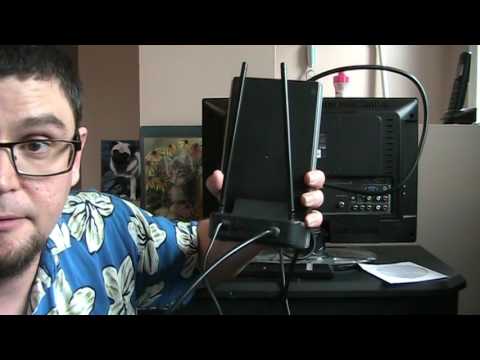
How to Set Up a Rabbit Ears Indoor HDTV Antenna
ChannelRobbie StrikeDescription from the creator
THE HAPPY SATELLITE NERD EPISODE 8.1
PRODUCT OVERVIEW RCA Amplified Indoor HDTV Antenna
The RCA ANT1251Z is a high performance indoor amplified TV antenna featuring our exclusive Smart Boost amplifier circuitry which outperforms all competitive amplifiers against the established standards of the Consumer Technology Association. The ANT1251Z is designed to pick up all broadcast TV channels in UHF and VHF which means you will be able to receive all channels that have sufficient signal strength in your home. Since some channels are stronger than others, the ANT1251Z has an amplifier bypass switch which allows you to use the antenna without amplification for those situations that need this functionality.
Features
UHF and VHF amplification boosts the signal enough for great picture without over modulating
Dipoles extend to 39 inches to improve reception of channels 2 thru 13
Great complement to streaming players
Specifications
Range (Distance) 40 miles
Cable Type 6 ft Coax Cable F Connector
Color Black / Silver
Included Antenna, Amplifier, Power and Coax Cable
Dimensions 10.6H x 6.6W x 5.9D
Weight (Kg/lb) 2.18 lbs
Song: Stay with You
The UHF loop antenna
The loop antenna is a proven design for UHF reception. It has the advantage of being compact in size and easy to construct and is a tool you can easily aim to improve reception. You can build and install a UHF loop antenna with only simple materials and tools, and with a minimal investment in time.
Carefully bend your copper wire into a loop, with the ends of the wire free.
Make a small loop at each end of the wire using your needle-nosed pliers. Size the loops so the bolts slide through with a minimum of clearance.
Place a washer onto a bolt, then slide the bolt through one of the small loops at the end of the wire. Slide another washer onto the bolt and then tighten the nut onto the bolt with your fingers. Repeat the process with the remaining bolt and the other loop of wire.
Slide the connectors of your transformer underneath the nuts---one tab per nut, and then tighten the nuts to hold the transformer in place.
Connect your RG-6 cable between the antenna's transformer and the television's antenna input.
The latest updates on video's of this kind!
facebook.com/RobbieStrikeVideos/
Check out my other video's on what free satellite channels are out there!
Cband Channels youtube.com/watch?v=5twQ3sAHDAo
Ku Band Channels youtube.com/watch?v=F72Egpkq1XA
How to set up a free satellite set-up and what you will need youtube.com/watch?v=SNdmPUcPKL4
For a Big Cband dish youtube.com/watch?v=dD4W2f-Geyg
Check out more videos at
youtube.com/user/ottawaoctane/videos
dailymotion.com/robbiestrike
facebook.com/East-Kentucky-Free-to-Air-Satellit…
(c) Robbie Strike 2017
PRODUCT OVERVIEW RCA Amplified Indoor HDTV Antenna
The RCA ANT1251Z is a high performance indoor amplified TV antenna featuring our exclusive Smart Boost amplifier circuitry which outperforms all competitive amplifiers against the established standards of the Consumer Technology Association. The ANT1251Z is designed to pick up all broadcast TV channels in UHF and VHF which means you will be able to receive all channels that have sufficient signal strength in your home. Since some channels are stronger than others, the ANT1251Z has an amplifier bypass switch which allows you to use the antenna without amplification for those situations that need this functionality.
Features
UHF and VHF amplification boosts the signal enough for great picture without over modulating
Dipoles extend to 39 inches to improve reception of channels 2 thru 13
Great complement to streaming players
Specifications
Range (Distance) 40 miles
Cable Type 6 ft Coax Cable F Connector
Color Black / Silver
Included Antenna, Amplifier, Power and Coax Cable
Dimensions 10.6H x 6.6W x 5.9D
Weight (Kg/lb) 2.18 lbs
Song: Stay with You
The UHF loop antenna
The loop antenna is a proven design for UHF reception. It has the advantage of being compact in size and easy to construct and is a tool you can easily aim to improve reception. You can build and install a UHF loop antenna with only simple materials and tools, and with a minimal investment in time.
Carefully bend your copper wire into a loop, with the ends of the wire free.
Make a small loop at each end of the wire using your needle-nosed pliers. Size the loops so the bolts slide through with a minimum of clearance.
Place a washer onto a bolt, then slide the bolt through one of the small loops at the end of the wire. Slide another washer onto the bolt and then tighten the nut onto the bolt with your fingers. Repeat the process with the remaining bolt and the other loop of wire.
Slide the connectors of your transformer underneath the nuts---one tab per nut, and then tighten the nuts to hold the transformer in place.
Connect your RG-6 cable between the antenna's transformer and the television's antenna input.
The latest updates on video's of this kind!
facebook.com/RobbieStrikeVideos/
Check out my other video's on what free satellite channels are out there!
Cband Channels youtube.com/watch?v=5twQ3sAHDAo
Ku Band Channels youtube.com/watch?v=F72Egpkq1XA
How to set up a free satellite set-up and what you will need youtube.com/watch?v=SNdmPUcPKL4
For a Big Cband dish youtube.com/watch?v=dD4W2f-Geyg
Check out more videos at
youtube.com/user/ottawaoctane/videos
dailymotion.com/robbiestrike
facebook.com/East-Kentucky-Free-to-Air-Satellit…
(c) Robbie Strike 2017
About this tutorial
Robbie Strike published this 3:50 video tutorial on October 28, 2017. It has been watched 203,570 times on YouTube.
- Channel
- Robbie Strike
- Category
- Science & Technology
- Duration
- 3:50
- Published
- October 28, 2017
- Views
- 203,570
- Likes
- 733
Tags
Share
This tutorial in other languages
- FRComment mettre en place un Rabbit Ears HDTV Antenne intérieure
- ESCómo configurar un conejo orejas HDTV Antena Interior
- PTComo configurar um coelho Orelhas HDTV Indoor Antenna
- ITCome impostare un coniglio orecchie HDTV Antenna interna
- DEWie man ein Kaninchen-Ohr-Indoor HDTV-Antenne nach oben
- NLHet instellen van een Oren van het konijn Indoor HDTV Antenna
- RUКак настроить уши кролика Крытый HDTV антенны
- PLJak założyć uszy królika Indoor HDTV Antena
- JAどのようにセットアップにウサギの耳室内HDTVアンテナ
- ARكيفية إعداد أرنب آذان HDTV داخلي هوائي
- HIकैसे इंडोर HDTV एंटीना एक खरगोश कान सेट करने के लिए
- IDCara Set Up Rabbit Ears Indoor HDTV Antena