Playback starts YouTube’s embedded player (privacy-enhanced mode).
How to Type
ChannelHowcastIn brief
This tutorial shows how to position your hands on a keyboard and type efficiently using the touch method, ideal for anyone who needs to type quickly for work or school.
Key steps
- Place fingers on home row: left pinky on 'A', right pinky on ';', thumbs on spacebar
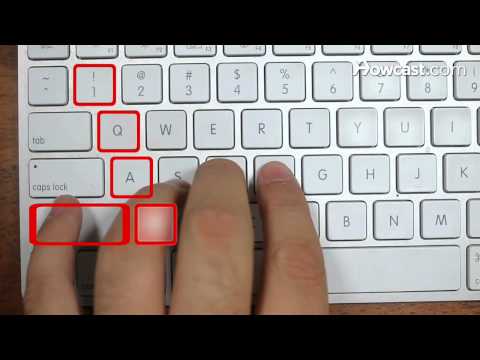
- Assign left-hand keys to fingers: index (F,G,R,T,4,5,V,B), middle (D,E,3,C), ring (S,W,2,X)
- Assign right-hand keys symmetrically to fingers like the left side
- Use right thumb for spacebar and little fingers for shift keys
- Sit upright with arms at 90 degrees, elbows close to body
- Practice with free online touch-typing tutorials
Questions & answers
What keys should my pointer fingers rest on?
The F and J keys, which have small bumps for easy identification.
How do I type capital letters?
Press the shift key with your little finger while typing the letter.
Description from the creator
Gaming Keyboard: Individually Backlit RGB Keys:
🔗amzn.to/3L2F6LM
Ideas Typewriter 21327 Building Kit:
🔗amzn.to/3KYOPT3
Keyboard Wrist Rest Pad Support with Comfortable Memory Foam Padding:
🔗amzn.to/3qnfIrX
Comfort Seat Cushion Pillow for Office Chair:
🔗amzn.to/3CWh2Hg
Keyboard Tray Under Desk Pull Out with Extra Sturdy C Clamp Mount System:
🔗amzn.to/366SWOo
Watch more Business Skills videos: howcast.com/videos/405652-How-to-Type
Whether you need to type a resume, a letter, or a bibliography, it can get done fast if you learn how to control the keys efficiently.
Step 1: Position your fingers on the keys
Position your fingers on the keyboard. Put your left little finger on the "A" and your right little finger on the semicolon. Lay your fingers one at a time on each consecutive key and place your thumbs on the space bar.
Tip
The F and J keys on most keyboards have small bumps to easily identify where your two pointer fingers should stay without having to look down.
Step 2: Learn the left hand keys
Learn what fingers control which keys. The left index finger controls the F, G, R, T, 4, 5, V, and B. The left middle finger controls the D, E, 3, and C. The left ring finger controls the S, W, 2, and x. The left little finger controls the A, Q, 1, Z, and shift.
Step 3: Learn the right hand keys
Learn what keys the fingers on the right hand type. The fingers on the right hand control the same pattern of keys as you learned on the left side.
Step 4: Use your thumb
Press the space bar with your right thumb.
Step 5: Master the shift keys
Master the shift keys with your little fingers. Press the shift key while simultaneously pressing the letter of choice to type a capital letter. If the letter is pressed by the right hand, use the left shift key, and vice versa.
Step 6: Sit up straight
Sit up straight with both feet on the floor. Position your chair and keyboard so your arms are at a 90 degree angle and are parallel to your legs. Keep your elbows next to your body and your head straight.
Tip
Try not to look down at the keys.
Step 7: Practice
Practice typing. You can learn for free online by visiting websites with touch typing tutorials. Learning the art of typing will save you tons of time over the hunt and peck method.
Did You Know?
The letters on old typewriters used to be listed alphabetically. In the late 1800s, Christopher Latham Sholes rearranged the keys to prevent jamming.
About this tutorial
Howcast published this 2:13 video tutorial on October 25, 2011. It has been watched 10,686,935 times on YouTube.
- Channel
- Howcast
- Category
- Science & Technology
- Duration
- 2:13
- Published
- October 25, 2011
- Views
- 10,686,935
- Likes
- 129,366
Tags
Share
Further reading
-
How To Type - Free typing test, typing lessons and typing ...
how-to-type.com
Having the ability to type without looking at the keyboard is the most important factor in achieving a fast typing speed. Even if you have memorized many of the keys, unfamiliar keys will slow you down just like speed b…
-
Learn Touch Typing Free - TypingClub
typingclub.com
TypingClub is the most effective way to learn how to type. It is web based and highly effective. TypingClub is (and will always be) free for both individuals and schools. There is an optional paid school edition. Get St…
-
How to Type - wikiHow
wikihow.com
Don't rush through -- trying to type faster than you are capable usually results in more mistakes. Only type as fast as you can comfortably type for whatever word you are attempting. For commonly used words like "the",…