Playback starts YouTube’s embedded player (privacy-enhanced mode).
How to Zoom In on a Mac
ChannelHowcastDescription from the creator
Full Playlist: youtube.com/playlist?list=PLLALQuK1NDrheOFip252…
-
-
Watch more How to Understand Computers videos: howcast.com/videos/241333-How-to-Zoom-In-on-a-M…
Learn to zoom in on a Mac by using your mouse and following these steps.
Step 1: Open System Preferences
Go to System Preferences and click the Keyboard and Mouse pane.
Step 2: Select mouse tab]
Select the mouse tab, or trackpad on a laptop.
Step 3: Click zoom
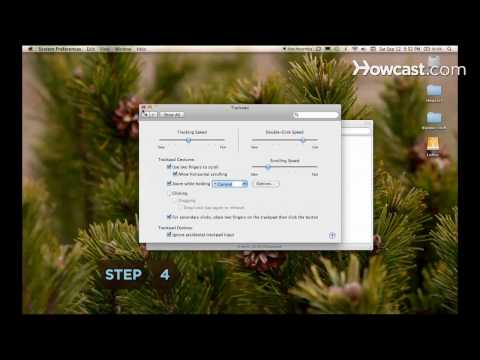
Make sure the box next to "Zoom using scroll ball while holding," or ''Zoom while holding'' is checked, and Control is selected in the drop-down menu.
Step 4: Close preferences
Close System Preferences.
Step 5: Zoom in
Hold down the control key and scroll the mouse wheel up, or drag up on the trackpad with two fingers on a laptop. The screen zooms.
Tip
The Universal Access pane in System Preferences also offers zoom options.
Step 6: Zoom out
Zoom out by holding down the control key and scrolling the mouse wheel down, or dragging down on the trackpad with two fingers.
Did You Know?
Douglas Engelbart invented the mouse and developed the idea of a graphical user interface.
-
-
Watch more How to Understand Computers videos: howcast.com/videos/241333-How-to-Zoom-In-on-a-M…
Learn to zoom in on a Mac by using your mouse and following these steps.
Step 1: Open System Preferences
Go to System Preferences and click the Keyboard and Mouse pane.
Step 2: Select mouse tab]
Select the mouse tab, or trackpad on a laptop.
Step 3: Click zoom
Make sure the box next to "Zoom using scroll ball while holding," or ''Zoom while holding'' is checked, and Control is selected in the drop-down menu.
Step 4: Close preferences
Close System Preferences.
Step 5: Zoom in
Hold down the control key and scroll the mouse wheel up, or drag up on the trackpad with two fingers on a laptop. The screen zooms.
Tip
The Universal Access pane in System Preferences also offers zoom options.
Step 6: Zoom out
Zoom out by holding down the control key and scrolling the mouse wheel down, or dragging down on the trackpad with two fingers.
Did You Know?
Douglas Engelbart invented the mouse and developed the idea of a graphical user interface.
About this tutorial
Howcast published this 1:08 video tutorial on October 29, 2010. It has been watched 46,609 times on YouTube.
- Channel
- Howcast
- Category
- Science & Technology
- Duration
- 1:08
- Published
- October 29, 2010
- Views
- 46,609
- Likes
- 68
Tags
Share
This tutorial in other languages
- FRComment effectuer un zoom avant sur un Mac
- ESCómo hacer un zoom en un Mac
- PTComo aumentar o zoom em um Mac
- ITCome zoomare su un Mac
- DEWie man Zoom auf einem Mac
- NLHoe om in te zoomen op een Mac
- RUКак увеличить на Mac
- PLJak powiększyć Mac
- JAどのようにMac上でズームインへ
- ARكيفية تكبير على ماك
- HIMac पर ज़ूम करने के लिए कैसे
- IDCara Zoom In pada Mac