Playback starts YouTube’s embedded player (privacy-enhanced mode).
GIMP Tutorial: Photo Pop Out Effect
ChannelLogos By NickDescription from the creator
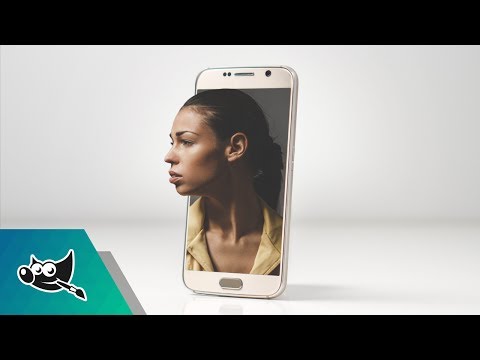
Create a photo pop out effect where part of the subject pops out of a segment of a mobile device.
Phone image: pixabay.com/en/mobile-phone-smartphone-phone-20…
Model image: pixabay.com/en/adult-attractive-elegant-fashion…
This tutorial is for GIMP version 2.8 and is intended to teach beginners how to use the software. GIMP is a great free alternative to Photoshop.
Need a logo made? Request a design at: logosbynick.com
Ready to monetize your design skills? Check out my free guide on landing freelancing gigs: logosbynick.com/freelance/
If you feel compelled to support my work here on Youtube in any way, a one-time purchase of my $17 online course outlining how to design a logo from start to finish would be greatly appreciated, and you may learn a thing or two about logo design as well. You can check it out here: logosbynick.com/designcourse/
Dark theme & updated icon for GIMP: youtu.be/uMojKEHLP0A
Facebook: facebook.com/logosbynick
Twitter: @logosbynick
Instagram: @itslogosbynick
My design setup: logosbynick.com/look-new-design-setup/
Intro song: "In Da Mood" by Combustibles, used with written permission
Phone image: pixabay.com/en/mobile-phone-smartphone-phone-20…
Model image: pixabay.com/en/adult-attractive-elegant-fashion…
This tutorial is for GIMP version 2.8 and is intended to teach beginners how to use the software. GIMP is a great free alternative to Photoshop.
Need a logo made? Request a design at: logosbynick.com
Ready to monetize your design skills? Check out my free guide on landing freelancing gigs: logosbynick.com/freelance/
If you feel compelled to support my work here on Youtube in any way, a one-time purchase of my $17 online course outlining how to design a logo from start to finish would be greatly appreciated, and you may learn a thing or two about logo design as well. You can check it out here: logosbynick.com/designcourse/
Dark theme & updated icon for GIMP: youtu.be/uMojKEHLP0A
Facebook: facebook.com/logosbynick
Twitter: @logosbynick
Instagram: @itslogosbynick
My design setup: logosbynick.com/look-new-design-setup/
Intro song: "In Da Mood" by Combustibles, used with written permission
About this tutorial
Logos By Nick published this 8:39 video tutorial on November 5, 2017. It has been watched 97,352 times on YouTube.
- Channel
- Logos By Nick
- Category
- Education
- Duration
- 8:39
- Published
- November 5, 2017
- Views
- 97,352
- Likes
- 1,856
Tags
Share
This tutorial in other languages
- FRGIMP Tutoriel: Photo Pop Out Effect
- ESGIMP Tutorial: Foto del estallido de Efecto
- PTGIMP Tutorial: Foto Pop Out Effect
- ITGIMP Tutorial: Photo Pop Out Effect
- DEGIMP Tutorial: Photo Pop Out-Effekt
- NLGIMP Tutorial: Foto Pop Out Effect
- RUGIMP Учебное пособие: Photo Pop Out Effect
- PLGIMP Tutorial: Zdjęcie wyskoczyć Effect
- JAGIMPチュートリアル:写真のポップアウト効果
- ARالأعرج دروس: صورة تخرج تأثير
- HIGIMP ट्यूटोरियल: फोटो पॉप बाहर प्रभाव
- IDGIMP Tutorial: Photo Pop Out Effect