Playback starts YouTube’s embedded player (privacy-enhanced mode).
How to add or remove language keyboards on windows 10 computers
ChannelquicktipstoDescription from the creator
How to remove language keyboards on windows 10 laptop or computers
Steps:
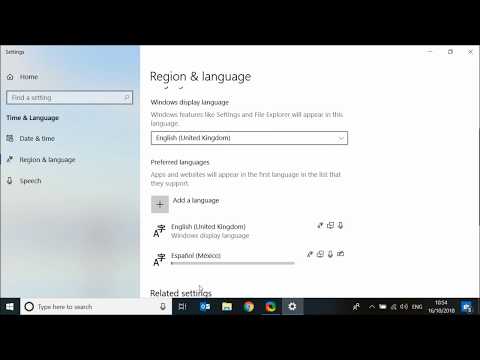
from the home page click on the start icon then type "Region"
Now click on "Region & Language settings"
To add a language, click on the plus button and choose the language you want to add let's say "Spanish".
Now click next
If you don't want this language to be your windows display language then unselect the box next to
"set as my windows display language"
Now click on Install.
It will take few seconds for a new language to be added.
Once completed you will be able to switch between language keyboards from the task-bar.
You can only remove a language if it's not the first in the list.
In my case English is the first in the list and the remove option is grayed out.
Spanish is the 2nd in the list so it can be removed.
You can move languages up or down the list using the arrow and then choose the language to be removed.
About this tutorial
quicktipsto published this 2:22 video tutorial on October 26, 2018. It has been watched 58,235 times on YouTube.
- Channel
- quicktipsto
- Category
- Education
- Duration
- 2:22
- Published
- October 26, 2018
- Views
- 58,235
- Likes
- 327
Tags
Share
Further reading
-
How to Add Languages to Your Windows 10 Keyboard
blogs.umass.edu
The following instructions will help you add new languages to Windows 10. Navigate to Windows Settings by clicking on the gear on the left side of the Start Menu. Click on “Time & Language”, then click on “Region & lang…
-
How to add, change and remove keyboard input languages in ...
digitalcitizen.life
Many people type in more than one language on their computers and devices with Windows 10. If you are one of them, you may need to install a new keyboard input language, add a specific variant of a keyboard input langua…
-
How to change your keyboard language on a Windows 10 computer ...
msn.com
How to change the keyboard language on Windows 10. ... Once you add a second keyboard language to Windows, a language control button will appear in the taskbar, in the lower-right corner of the ...
This tutorial in other languages
- FRComment ajouter ou supprimer des claviers linguistiques sur Windows 10 ordinateurs
- ESCómo añadir o eliminar los teclados de idioma en Windows 10 computadoras
- PTComo adicionar ou remover teclados de idiomas no Windows 10 computadores
- ITCome aggiungere o rimuovere le tastiere lingua sulle finestre 10 Computer
- DEWie hinzuzufügen oder Sprache Tastaturen auf Windows 10 Computer zu entfernen
- NLHoe toe te voegen of te verwijderen taal toetsenborden op Windows 10 computers
- RUКак добавить или удалить языковые клавиатуры на окнах 10 компьютеров
- PLJak dodać lub usunąć język klawiatury na Windows 10 komputerów
- JA追加またはWindows 10コンピューター上の言語のキーボードを削除する方法
- ARكيفية إضافة أو إزالة لوحات المفاتيح لغة على ويندوز 10 أجهزة كمبيوتر
- HIजोड़ सकते हैं या विंडोज़ 10 कंप्यूटरों पर भाषा कीबोर्ड दूर करने के लिए कैसे
- IDCara menambah atau menghapus keyboard bahasa pada windows 10 komputer