Playback starts YouTube’s embedded player (privacy-enhanced mode).
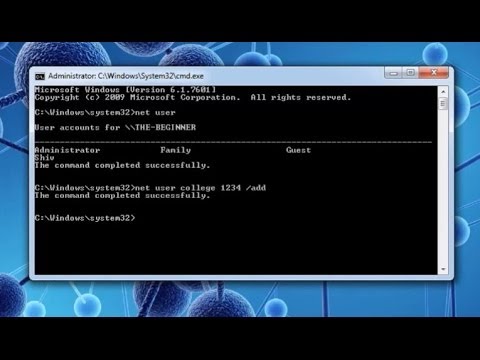
How to create or delete admin and standard user account via cmd: Cool CMD Tricks
ChannelTheBeginnerGuyDescription from the creator
To watch detailed dedicated tutorial of Command Prompt including advance tricks
watch all video of following playlist
youtube.com/playlist?list=PLh9N3oOhtnPPlqjMvQvU…
This video shows how to create or delete a administrative account and also how to turn a guest account into administrator!
source:
note: College is the name of account that i wants to create. you can user any name to create your account.
to create a user account:
net user College /add
to turn a standard user into administrator:
net localgroup administrators College /add
to delete a user account:
net user College /del
I am showing "How to make standard and administrator user account using command prompt". Ya it is true that You can make standard user account and administrator account using command prompt. Actually it is not a common practice in every user that they make user many accounts. But I wanna make you clear that in a family computer not in a personal computer, the admin of the computer makes several accounts one for each persons. That account is standard account. Only admin can make it and delete any account.
Making accounts is done through control panel,but you can actually make it through cmd. Watch this video that will sure clear your doubts. This is cool command prompt trick.
Making standard account is very basic step in command prompt but to make administrator account you have to make it standard first.
This is a kind of basic cmd tricks for beginners. I am presenting beginner's guide to learn command prompt. This is a first step for the cmd world tricks for dummy. These tutorial series or tricks helps you to efficiently learn command prompt.
Please Support my work here
buymeacoffee.com/shivesh
Gears I used
Laptop :- amzn.to/3hzSn27
Mobile :- amzn.to/3loMKF5
keyboard and mouse :- amzn.to/38Pe6yd
Please subscribe for more tricks and tutorials:
watch all video of following playlist
youtube.com/playlist?list=PLh9N3oOhtnPPlqjMvQvU…
This video shows how to create or delete a administrative account and also how to turn a guest account into administrator!
source:
note: College is the name of account that i wants to create. you can user any name to create your account.
to create a user account:
net user College /add
to turn a standard user into administrator:
net localgroup administrators College /add
to delete a user account:
net user College /del
I am showing "How to make standard and administrator user account using command prompt". Ya it is true that You can make standard user account and administrator account using command prompt. Actually it is not a common practice in every user that they make user many accounts. But I wanna make you clear that in a family computer not in a personal computer, the admin of the computer makes several accounts one for each persons. That account is standard account. Only admin can make it and delete any account.
Making accounts is done through control panel,but you can actually make it through cmd. Watch this video that will sure clear your doubts. This is cool command prompt trick.
Making standard account is very basic step in command prompt but to make administrator account you have to make it standard first.
This is a kind of basic cmd tricks for beginners. I am presenting beginner's guide to learn command prompt. This is a first step for the cmd world tricks for dummy. These tutorial series or tricks helps you to efficiently learn command prompt.
Please Support my work here
buymeacoffee.com/shivesh
Gears I used
Laptop :- amzn.to/3hzSn27
Mobile :- amzn.to/3loMKF5
keyboard and mouse :- amzn.to/38Pe6yd
Please subscribe for more tricks and tutorials:
About this tutorial
TheBeginnerGuy published this 0:54 video tutorial on October 31, 2014. It has been watched 43,700 times on YouTube.
- Channel
- TheBeginnerGuy
- Category
- Education
- Duration
- 0:54
- Published
- October 31, 2014
- Views
- 43,700
- Likes
- 146
Tags
Share
This tutorial in other languages
- FRComment créer ou supprimer admin et compte utilisateur standard via cmd: Cool CMD Tricks
- ESCómo crear o administrador de borrado y cuenta de usuario estándar a través de cmd: Enfriar trucos CMD
- PTComo criar ou administrador de exclusão e conta de usuário padrão via cmd: Cool Tricks CMD
- ITCome creare o amministratore di eliminazione e account utente standard via cmd: Cool Tricks CMD
- DESo erstellen oder löschen admin und Standardbenutzerkonto über cmd: Cool CMD Tricks
- NLHoe te maken of te verwijderen admin en standaard user account via cmd: Cool CMD Tricks
- RUКак создать или удалить администратора и стандартная учетная запись пользователя с помощью ЦМД: Cool CMD хитрости
- PLJak utworzyć lub usunąć administrator i standardowe konto użytkownika poprzez cmd: fajne triki CMD
- JAcmdを経て作成または削除管理者と標準ユーザーアカウントにする方法:CMDトリッククール
- ARكيفية إنشاء أو حذف المشرف وحساب مستخدم قياسي عبر كمد: كول CMD الخدع
- HIकैसे बनाने के लिए या हटाने के लिए Admin और मानक उपयोगकर्ता खाते cmd के माध्यम से: सीएमडी ट्रिक्स कूल
- IDCara membuat atau admin delete dan user account standar melalui cmd: keren CMD Trik