Playback starts YouTube’s embedded player (privacy-enhanced mode).
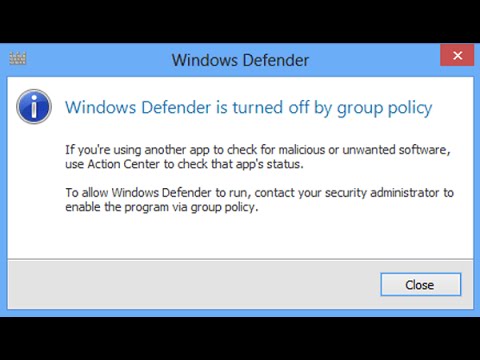
How to enable Windows Defender by Group Policy in Windows 10 || Windows 8 1 || Windows 8
ChannelDhruvil PatelDescription from the creator
This video will show you How to enable windows defender by group policy settings.
Follow this simple and guaranteed steps for the solution:
1. Go to run.
2. Type regedit and press OK.
3. Go to this path
HKEY_LOCAL_MACHINE\ SOFTWARE \ Policies\ Microsoft\ Windows Defender
4. Double click on DisableAntiSpyware.
5. A box will open. Just erase the value and give OK.
Thanks guyz for watching my video.
If you liked my video and if it worked for you, then please like and subscribe.
For any problems and queries, I would be glad to know. Please, comment below.
-~-~~-~~~-~~-~-
Please watch: "How to make your pc/laptop RUN FASTER on Windows 7 | 8 | 8.1 | 10 - PROBLEM FIXED!!!"
→ youtube.com/watch?v=87DYEdNBX9g
-~-~~-~~~-~~-~-
Follow this simple and guaranteed steps for the solution:
1. Go to run.
2. Type regedit and press OK.
3. Go to this path
HKEY_LOCAL_MACHINE\ SOFTWARE \ Policies\ Microsoft\ Windows Defender
4. Double click on DisableAntiSpyware.
5. A box will open. Just erase the value and give OK.
Thanks guyz for watching my video.
If you liked my video and if it worked for you, then please like and subscribe.
For any problems and queries, I would be glad to know. Please, comment below.
-~-~~-~~~-~~-~-
Please watch: "How to make your pc/laptop RUN FASTER on Windows 7 | 8 | 8.1 | 10 - PROBLEM FIXED!!!"
→ youtube.com/watch?v=87DYEdNBX9g
-~-~~-~~~-~~-~-
About this tutorial
Dhruvil Patel published this 4:15 video tutorial on October 26, 2016. It has been watched 295,034 times on YouTube.
- Channel
- Dhruvil Patel
- Category
- Education
- Duration
- 4:15
- Published
- October 26, 2016
- Views
- 295,034
- Likes
- 2,556
Tags
Share
Further reading
-
October 13, 2020—KB4580347 (Monthly Rollup)
support.microsoft.com
IMPORTANT Windows 8.1 and Windows Server 2012 R2 have reached the end of mainstream support and are now in extended support. Starting in July 2020, there will no longer be optional, non-security releases (known as " C"…
-
Create installation media for Windows
support.microsoft.com
Learn how for Windows 10 or for Windows 7 and Windows 8.1. To create the installation media, here's what you'll need: A PC with a reliable internet connection.
-
Microsoft - Official Home Page
microsoft.com
At Microsoft our mission and values are to help people and businesses throughout the world realize their full potential.
This tutorial in other languages
- FRComment activer Windows Defender par une stratégie de groupe dans Windows 10 || Windows 8 1 || Windows 8
- ESCómo activar Windows Defender, la directiva de grupo en Windows 10 || Windows 8 1 || windows 8
- PTComo ativar o Windows Defender pela Diretiva de Grupo no Windows 10 || Windows 8 1 || Windows 8
- ITCome attivare Windows Defender da Criteri di gruppo in Windows 10 || Windows 8 1 || Windows 8
- DEWie Windows Defender von Gruppenrichtlinien in Windows 10 ermöglichen || Windows 8 1 || Windows 8
- NLHoe kan ik Windows Defender inschakelen door Groepsbeleid in Windows 10 || Windows 8 1 || Windows 8
- RUКак включить Защитник Windows с помощью групповой политики в Windows 10 || Windows 8 1 || Windows 8
- PLJak włączyć Windows Defender przez Zasady grupy w systemie Windows 10 || Windows 8 1 || Windows 8
- JAWindowsの10のグループポリシーでWindows Defenderのを有効にする方法|| Windows 8の1 ||ウィンドウズ8
- ARكيفية تمكين ويندوز المدافع من قبل نهج المجموعة في نظام التشغيل Windows 10 || ويندوز 8 1 || ويندوز 8
- HIWindows 10 में समूह नीति द्वारा विंडोज डिफेंडर को सक्षम कैसे करें || Windows 8 1 || विंडोज 8
- IDCara mengaktifkan Windows Defender oleh Group Policy di Windows 10 || Windows 8 1 || Windows 8