Playback starts YouTube’s embedded player (privacy-enhanced mode).
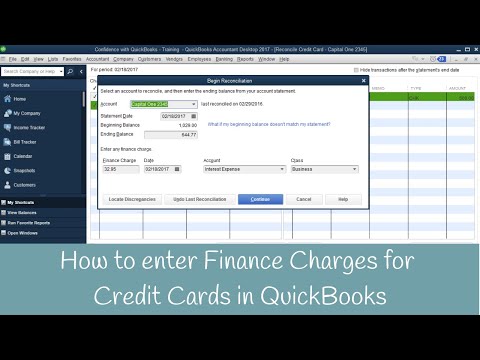
How to enter finance charges for Credit Cards Inside QuickBooks
ChannelCandus KampferChapters
Description from the creator
Have you been struggling with entering your finance charges for credit cards into QuickBooks?
Let me walk you through it step by step. 😊
In this video, you will learn how to enter finance charges for Credit Cards Inside QuickBooks.
➡️ Entering Credit Card Charge
Go up to “Banking”
“Enter Credit Card Charges”
➡️ Reconciling Credit Card
In the Homescreen, Click “Reconcile”
“Begin Reconciliation” pop up screen will show
“Account”
“Statement Date”
“Beginning” / “Ending Balance”
“Finance Charge”
**You can also enter Finance Charge inside Credit Charge
“Date”
“Account”
“Class”
Click “Continue”
Click “Modify if you want to change what you entered previously”
“Hide transactions after the statements end date” Check if you haven’t reconciled in a long time. It will only show all the transactions after the “For period date”
Checkmark your “charges”
**Numbers should match your statement.
➡️ Remember: Difference should always be zero
Click “Reconcile Now”
Need to learn more areas of QuickBooks? Join us on our next workshop to learn how to design QuickBooks for your specific business...
➡️ CandusKampfer.com/workshop
Receive our QB tips straight to your inbox each week visit:
➡️ CandusKampfer.com/tips
Subscribe here for more QuickBooks tips
➡️ youtube.com/c/CandusKampfer?sub_confirmation=1
Timestamps:
0:00 - Intro
0:19 - Finance charges for Credit Cards in QuickBooks
4:45 - Final Thoughts
I’d love to connect with you 👇
Instagram: instagram.com/candus.kampfer
Facebook: facebook.com/CandusKampfer
CandusKampfer.com: canduskampfer.com/
TikTok: tiktok.com/@canduskampfer
Pinterest: pinterest.com/canduskampfer/
#CandusKampfer #QuickBooks
Let me walk you through it step by step. 😊
In this video, you will learn how to enter finance charges for Credit Cards Inside QuickBooks.
➡️ Entering Credit Card Charge
Go up to “Banking”
“Enter Credit Card Charges”
➡️ Reconciling Credit Card
In the Homescreen, Click “Reconcile”
“Begin Reconciliation” pop up screen will show
“Account”
“Statement Date”
“Beginning” / “Ending Balance”
“Finance Charge”
**You can also enter Finance Charge inside Credit Charge
“Date”
“Account”
“Class”
Click “Continue”
Click “Modify if you want to change what you entered previously”
“Hide transactions after the statements end date” Check if you haven’t reconciled in a long time. It will only show all the transactions after the “For period date”
Checkmark your “charges”
**Numbers should match your statement.
➡️ Remember: Difference should always be zero
Click “Reconcile Now”
Need to learn more areas of QuickBooks? Join us on our next workshop to learn how to design QuickBooks for your specific business...
➡️ CandusKampfer.com/workshop
Receive our QB tips straight to your inbox each week visit:
➡️ CandusKampfer.com/tips
Subscribe here for more QuickBooks tips
➡️ youtube.com/c/CandusKampfer?sub_confirmation=1
Timestamps:
0:00 - Intro
0:19 - Finance charges for Credit Cards in QuickBooks
4:45 - Final Thoughts
I’d love to connect with you 👇
Instagram: instagram.com/candus.kampfer
Facebook: facebook.com/CandusKampfer
CandusKampfer.com: canduskampfer.com/
TikTok: tiktok.com/@canduskampfer
Pinterest: pinterest.com/canduskampfer/
#CandusKampfer #QuickBooks
About this tutorial
Candus Kampfer published this 5:20 video tutorial on November 9, 2017. It has been watched 12,074 times on YouTube.
- Channel
- Candus Kampfer
- Category
- Education
- Duration
- 5:20
- Published
- November 9, 2017
- Views
- 12,074
- Likes
- 60
Tags
Share
This tutorial in other languages
- FRComment entrer dans les frais de financement pour les cartes de crédit QuickBooks intérieur
- ESCómo entrar en los cargos financieros para tarjetas de crédito Dentro de QuickBooks
- PTComo entrar encargos financeiros para Cartões de crédito dentro QuickBooks
- ITCome entrare oneri finanziari per Carte di Credito All'interno QuickBooks
- DEWie Finanzierungskosten für Kreditkarten Innenquickbooks eingeben
- NLHoe te financieringskosten voor creditcards Inside QuickBooks invoeren
- RUКак ввести финансовые сборы для кредитных карт Внутри QuickBooks
- PLJak wpisać koszty finansowe dla kart kredytowych Wewnątrz QuickBooks
- JAクレジットカードインサイドQuickBooksのための金融費用を入力する方法
- ARكيفية إدخال الرسوم المالية لبطاقات الائتمان داخل قراء
- HIकैसे क्रेडिट कार्ड के अंदर QuickBooks के लिए वित्त प्रभार दर्ज करने के लिए
- IDCara memasukkan biaya keuangan untuk Kartu Kredit dalam QuickBooks