Playback starts YouTube’s embedded player (privacy-enhanced mode).
How To Mount Windows Drive In Ubuntu Linux
ChannelDevTech SolutionsDescription from the creator
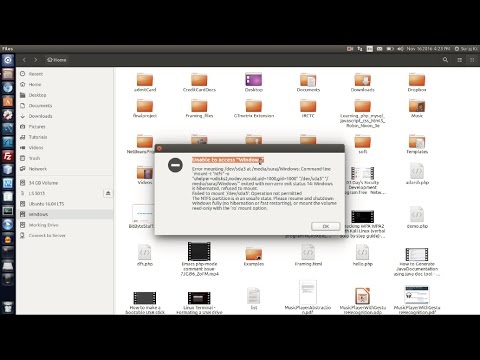
In this video, I have shown the solution to unable to access windows.
Error Status 14 : Hiberation problem of windows drive.
Solution: using command in terminal to access windows without restarting the Windows and properly shuting it down.
Alternate Solution to open in Write-mode : visit youtube.com/watch?v=vDF6EZdeAQ4
To Fix this permanently in future : check out this video youtube.com/watch?v=vDF6EZdeAQ4
Blog : devtechsolutions.in/2019/08/how-to-mount-window…
You are seeing this error because you hibernated Windows instead of turning it off the normal way (in newer versions of Windows, hibernate might be the default option).
Hibernating saves the current state information to the hard disk and then powers down the computer.
Shutting down the computer closes all programs and ends all running processes before powering down the computer.
When you turn off Windows by hibernating it, you are essentially pausing the system and saving all of that information (into a big file called hiberfil.sys) This way when you resume from hibernation all of your applications and files will be exactly how you left them. It also sets a flag in hiberfil.sys to let other Operating Systems know that Windows is hibernated.
Making changes to your Windows (ntfs) partition while it is hibernated could be dangerous--it could cause Windows to not resume from hibernation or to crash after resuming. Because of this, the tool (ntfs-3g) that mounts (opens) the partition will not mount it in read-write mode if it sees a hibernation flag. As such, Nautilus, the default file browser, will not be able to automatically open this partition--hence the error message that you see--because it is trying to open it in read-write mode.
Error Status 14 : Hiberation problem of windows drive.
Solution: using command in terminal to access windows without restarting the Windows and properly shuting it down.
Alternate Solution to open in Write-mode : visit youtube.com/watch?v=vDF6EZdeAQ4
To Fix this permanently in future : check out this video youtube.com/watch?v=vDF6EZdeAQ4
Blog : devtechsolutions.in/2019/08/how-to-mount-window…
You are seeing this error because you hibernated Windows instead of turning it off the normal way (in newer versions of Windows, hibernate might be the default option).
Hibernating saves the current state information to the hard disk and then powers down the computer.
Shutting down the computer closes all programs and ends all running processes before powering down the computer.
When you turn off Windows by hibernating it, you are essentially pausing the system and saving all of that information (into a big file called hiberfil.sys) This way when you resume from hibernation all of your applications and files will be exactly how you left them. It also sets a flag in hiberfil.sys to let other Operating Systems know that Windows is hibernated.
Making changes to your Windows (ntfs) partition while it is hibernated could be dangerous--it could cause Windows to not resume from hibernation or to crash after resuming. Because of this, the tool (ntfs-3g) that mounts (opens) the partition will not mount it in read-write mode if it sees a hibernation flag. As such, Nautilus, the default file browser, will not be able to automatically open this partition--hence the error message that you see--because it is trying to open it in read-write mode.
About this tutorial
DevTech Solutions published this 2:26 video tutorial on November 9, 2017. It has been watched 87,630 times on YouTube.
- Channel
- DevTech Solutions
- Category
- Education
- Duration
- 2:26
- Published
- November 9, 2017
- Views
- 87,630
- Likes
- 476
Tags
Share
This tutorial in other languages
- FRComment monter lecteur Windows Dans Ubuntu Linux
- ESCómo montar unidad de Windows en Ubuntu Linux
- PTComo montar o Windows Drive In Ubuntu Linux
- ITCome montare di Windows Drive In Ubuntu Linux
- DEWie zu montieren Windows-Drive In Ubuntu Linux
- NLHow To Mount Windows Drive In Ubuntu Linux
- RUКак смонтировать Windows, привод в Ubuntu Linux
- PLJak zamontować system Windows Drive In Ubuntu Linux
- JAどのようにマウントWindowsのドライブにUbuntu Linuxの
- ARكيفية جبل يندوز محرك في أوبونتو لينكس
- HIकैसे करने के लिए माउंट विंडोज डिस्क में उबंटू लिनक्स
- IDCara Gunung Windows Drive In Ubuntu Linux