Playback starts YouTube’s embedded player (privacy-enhanced mode).
How To Remove Write Protection From USB Flash Drive In Ubuntu Linux
ChannelDevTech SolutionsDescription from the creator
Trying serveral different methods to Format it like:
1. Regedit --- HKEY_LOCAL_MACHINE\SYSTEM\CurrentControlSet\Control\StorageDevicePolicies. Change the value for the key "WriteProtect" to 0 in Windows.
2. Through MS DOS in the Computer Startup in Microsoft Windows.
3. Through Disk Management.
4. HP USB Drive Format Tool.
every time it gives the same error "The Disk is Write Protected"
What u need is GNU\Linux.
It solved my problem very easily.
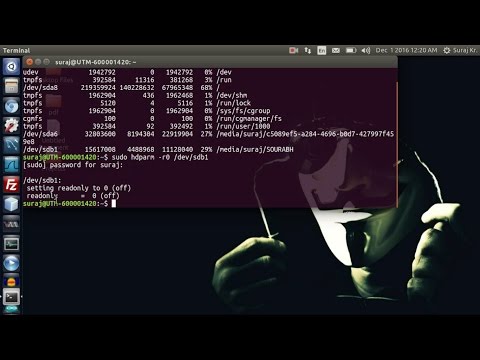
In this video i have set the read-only service to 0 i.e. making it off. and enabling the default r/w i.e. read-write permission for files.
To turn off disk device`s write protect, we use the low level system utility hdparm like this:
sudo hdparm -r0 /dev/sdb
where we asume that /dev/sdb is the Physical disk device we're working on. If the device has partitions that are mounted as read-only, you should re-mount 'em as read-write in order to write data to them.
1. Regedit --- HKEY_LOCAL_MACHINE\SYSTEM\CurrentControlSet\Control\StorageDevicePolicies. Change the value for the key "WriteProtect" to 0 in Windows.
2. Through MS DOS in the Computer Startup in Microsoft Windows.
3. Through Disk Management.
4. HP USB Drive Format Tool.
every time it gives the same error "The Disk is Write Protected"
What u need is GNU\Linux.
It solved my problem very easily.
In this video i have set the read-only service to 0 i.e. making it off. and enabling the default r/w i.e. read-write permission for files.
To turn off disk device`s write protect, we use the low level system utility hdparm like this:
sudo hdparm -r0 /dev/sdb
where we asume that /dev/sdb is the Physical disk device we're working on. If the device has partitions that are mounted as read-only, you should re-mount 'em as read-write in order to write data to them.
About this tutorial
DevTech Solutions published this 2:35 video tutorial on November 3, 2017. It has been watched 189,959 times on YouTube.
- Channel
- DevTech Solutions
- Category
- Education
- Duration
- 2:35
- Published
- November 3, 2017
- Views
- 189,959
- Likes
- 996
Tags
Share
This tutorial in other languages
- FRComment faire pour supprimer Protection en écriture De Clé USB Dans Ubuntu Linux
- ESCómo quitar la protección de escritura desde USB Flash Drive En Ubuntu Linux
- PTComo remover Escreva Proteção Do USB Flash Drive In Ubuntu Linux
- ITCome rimuovere protezione da scrittura da USB Flash Drive In Ubuntu Linux
- DEWie schreibt man Schutz vor USB-Flash-Laufwerk in Ubuntu Linux entfernen
- NLHow To Write Bescherming tegen USB Flash Drive In Ubuntu Linux
- RUКак удалить запись защиты от USB Flash Drive В Ubuntu Linux
- PLJak usunąć zabezpieczenie przed zapisem Od Flash Drive USB w Ubuntu
- JAUSBフラッシュドライブにUbuntu Linuxのからの書き込み保護を削除する方法
- ARكيفية إزالة الكتابة حماية من USB فلاش حملة في أوبونتو لينكس
- HIUSB फ्लैश ड्राइव में उबंटू लिनक्स से संरक्षण लिखें निकालने के लिए कैसे
- IDCara Hapus Write Perlindungan Dari USB Flash Drive In Ubuntu Linux