Playback starts YouTube’s embedded player (privacy-enhanced mode).
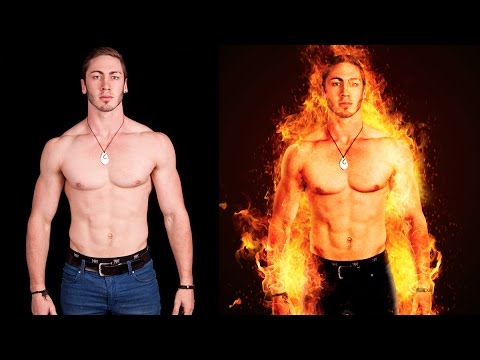
Photoshop Tutorial | Fire Portrait Manipulation | Photo Effects
ChannelPhotoshop Tutorials | Photo effectsDescription from the creator
For more free photoshop tutorials visit: bit.ly/1Q8u7Op
in this video i will show you how to create fire portrait effect using photoshop.
Main effect is based on blending option but that is just part of it. Actually most of work is using one single fire image and using is multiple times to create spectacular effect.
i will show you how you can create rim light in photoshop using hue-saturation and then adjustment layers to match color of portrait with fire.
and like every time i have shown the cut out process but if you already know how to do it then you skip it, its pretty boring. and i have also shown use of sparkles in photoshop to make fire little more realistic.
plus some grouping tricks to manage your layers and save some time, and its pretty useful effect, specially for posters and portrait editing.
Also i feel like no one actually reads my description so it kind of sucks but in case if you read this type "watermelon is best fruit in the world"
===================================
Background music by : youtube.com/user/EMHmusicPromo
===================================
subscribe at ► bit.ly/1Q8u7Op
Facebook: facebook.com/tutorialsjunction
===================================
download images ► bit.ly/29Y7DDz
in this video i will show you how to create fire portrait effect using photoshop.
Main effect is based on blending option but that is just part of it. Actually most of work is using one single fire image and using is multiple times to create spectacular effect.
i will show you how you can create rim light in photoshop using hue-saturation and then adjustment layers to match color of portrait with fire.
and like every time i have shown the cut out process but if you already know how to do it then you skip it, its pretty boring. and i have also shown use of sparkles in photoshop to make fire little more realistic.
plus some grouping tricks to manage your layers and save some time, and its pretty useful effect, specially for posters and portrait editing.
Also i feel like no one actually reads my description so it kind of sucks but in case if you read this type "watermelon is best fruit in the world"
===================================
Background music by : youtube.com/user/EMHmusicPromo
===================================
subscribe at ► bit.ly/1Q8u7Op
Facebook: facebook.com/tutorialsjunction
===================================
download images ► bit.ly/29Y7DDz
About this tutorial
Photoshop Tutorials | Photo effects published this 14:19 video tutorial on November 5, 2016. It has been watched 200,003 times on YouTube.
- Category
- Education
- Duration
- 14:19
- Published
- November 5, 2016
- Views
- 200,003
- Likes
- 2,170
Tags
Share
This tutorial in other languages
- FRTutoriel Photoshop | Manipulation Portrait d'incendie | Effets photo
- ESTutorial Photoshop | Retrato de incendios Manipulación | Efectos fotográficos
- PTPhotoshop | Manipulação Retrato fogo | Efeitos de fotos
- ITTutorial Photoshop | Fuoco Ritratto Manipolazione | photo Effects
- DEPhotoshop Tutorial | Feuer Portrait Manipulation | Foto Effekte
- NLPhotoshop Tutorial | Fire Portrait Manipulatie | Foto effecten
- RUPhotoshop Учебник | Огонь Портрет Manipulation | Фотоэффекты
- PLPhotoshop Tutorial | Ogień Portret Manipulacja | Efekty fotograficzne
- JAPhotoshopのチュートリアル|火災肖像操作|写真の効果
- ARدروس فوتوشوب | حريق التلاعب صورة | صور آثار
- HIफ़ोटोशॉप ट्यूटोरियल | आग पोर्ट्रेट हेरफेर | फ़ोटो प्रभाव
- IDPhotoshop Tutorial | Api Portrait Manipulasi | Efek foto