Playback starts YouTube’s embedded player (privacy-enhanced mode).
How to Double Your Internet Speed on Windows 8 & 8.1 Using CMD
ChannelSandeep SinghDescription from the creator
Double Your Internet Speed on Windows 8, 8.1
How to double your internet speed on windows 8 and 8.1 computers?
Make your internet faster by using these tips and tricks
Tips to make internet aster on windows 8 & 8.1
1. Enabling advanced TCP parameters
1. Go to Start and search for "cmd", Right click on it and hit on "Run as Administrator"
2. Type "cd/" and hit Enter
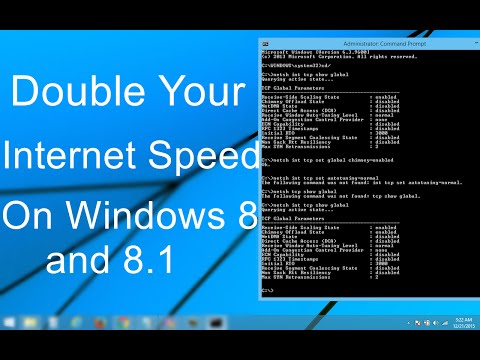
3. Type "netsh int tcp show global" and hit Enter
3. Type "netsh int tcp set global chimney=enabled" hit Enter
4. Type "netsh int tcp set autotuning=normal" Hit Enter
2.Open Command prompt as admin
Type "ipconfig /flushdns" Hit Enter
3.Open Cmd as admin again
Type "netsh int ip reset c:\resetlog.txt" hit Enter
4. Now open Device Manager and under the Network Adapters find your network driver and update it.
5. Disable reservable bandwidth
1. Press "Win+R" key and type "gpedit.msc" hit OK.
2. In Local group policy editor, navigate to -
Local Computer Policy - Administrative Templates - Network - QoS Packet scheduler
3 .Double click on "Limit Reservable bandwidth"
4. Enable it and assign a value "0".
If your Windows version doesn't have the Group Policy Editor feature, you can skip it.
6. Optimize TCP
1. Download TCP optimizer from this link - bit.ly/tcp-optimizer
2. Open the download folder and Run as administrator
3. Select your internet speed
4. Select Optimal and click on Apply Changes
5. Hit OK to confirm
7. Use Public DNS by Google
1. Open the Network and Sharing Center
2. Click on your Network and go to Properties.
3. Double-click on Internet Protocol Version 4.
4. Check "Use following DNS server address"
5. Put 8.8.8.8 and 8.8.4.4
6. Hit OK, OK, and Close on other dialog boxes.
Now Restart Your Windows 8, 8.1 Computer.
Like Us on Facebook - fb.com/itechfever
Visit - itechfever.com
How to double your internet speed on windows 8 and 8.1 computers?
Make your internet faster by using these tips and tricks
Tips to make internet aster on windows 8 & 8.1
1. Enabling advanced TCP parameters
1. Go to Start and search for "cmd", Right click on it and hit on "Run as Administrator"
2. Type "cd/" and hit Enter
3. Type "netsh int tcp show global" and hit Enter
3. Type "netsh int tcp set global chimney=enabled" hit Enter
4. Type "netsh int tcp set autotuning=normal" Hit Enter
2.Open Command prompt as admin
Type "ipconfig /flushdns" Hit Enter
3.Open Cmd as admin again
Type "netsh int ip reset c:\resetlog.txt" hit Enter
4. Now open Device Manager and under the Network Adapters find your network driver and update it.
5. Disable reservable bandwidth
1. Press "Win+R" key and type "gpedit.msc" hit OK.
2. In Local group policy editor, navigate to -
Local Computer Policy - Administrative Templates - Network - QoS Packet scheduler
3 .Double click on "Limit Reservable bandwidth"
4. Enable it and assign a value "0".
If your Windows version doesn't have the Group Policy Editor feature, you can skip it.
6. Optimize TCP
1. Download TCP optimizer from this link - bit.ly/tcp-optimizer
2. Open the download folder and Run as administrator
3. Select your internet speed
4. Select Optimal and click on Apply Changes
5. Hit OK to confirm
7. Use Public DNS by Google
1. Open the Network and Sharing Center
2. Click on your Network and go to Properties.
3. Double-click on Internet Protocol Version 4.
4. Check "Use following DNS server address"
5. Put 8.8.8.8 and 8.8.4.4
6. Hit OK, OK, and Close on other dialog boxes.
Now Restart Your Windows 8, 8.1 Computer.
Like Us on Facebook - fb.com/itechfever
Visit - itechfever.com
About this tutorial
Sandeep Singh published this 8:18 video tutorial on November 11, 2016. It has been watched 93,560 times on YouTube.
- Channel
- Sandeep Singh
- Category
- Howto & Style
- Duration
- 8:18
- Published
- November 11, 2016
- Views
- 93,560
- Likes
- 1,080
Share
This tutorial in other languages
- FRComment doubler votre vitesse Internet sur Windows 8 et 8.1 Utilisation CMD
- ESCómo duplicar su velocidad de Internet en Windows 8 y 8.1 Uso de CMD
- PTComo dobrar sua velocidade de Internet no Windows 8 e 8.1 Usando CMD
- ITCome raddoppiare la velocità di Internet su Windows 8 e 8.1 Uso CMD
- DEWie Sie Ihre Internet-Geschwindigkeit auf Windows 8 und 8.1 Verwendung CMD Double
- NLHoe tem je een Internet Speed dubbel op Windows 8 en 8.1 met behulp van CMD
- RUКак удвоить свою скорость интернета на Windows 8 и 8.1 Использования CMD
- PLJak Double Your łącze internetowe w Windows 8 i 8.1 Korzystanie CMD
- JACMDを使用したWindows 8&8.1にあなたのインターネットの速度を倍増する方法
- ARكيف لمضاعفة سرعة الانترنت الخاصة بك على ويندوز 8 و 8.1 عن طريق CMD
- HIWindows 8 और 8.1 अध्यक्ष एवं प्रबंध निदेशक का उपयोग पर अपने इंटरनेट की गति को दोगुना करें कैसे
- IDBagaimana untuk Double Anda Kecepatan Internet di Windows 8 & 8.1 Menggunakan CMD