Playback starts YouTube’s embedded player (privacy-enhanced mode).
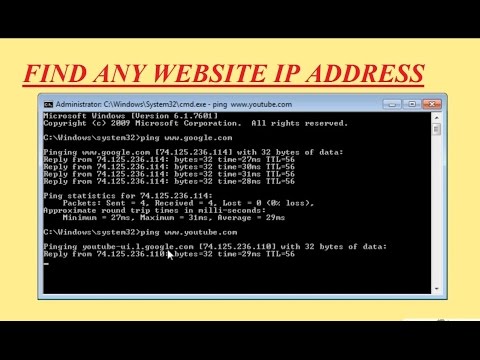
How to find any website server IP address using command prompt
ChannelTheBeginnerGuyDescription from the creator
To watch detailed dedicated tutorial of Command Prompt including advance tricks
watch all video of following playlist
youtube.com/playlist?list=PLh9N3oOhtnPPlqjMvQvU…
You can easily find any website server ip address using command prompt. As you may know that on internet each and every server or system, computer has its own ip address. You can find your own or others.You have to do some little trick in the command prompt to find website ip address.
"WRITTEN TUTORIAL"
1- Open command prompt.
2- In command prompt type-
ping website name
eg:- ping www.youtube.com
3- This will show youtube ip address like 173.194.36.104
""BONUS TRICK""- type this ip address in your url bar in your browser (where website name you type) and press enter, the site will be open.
You may also like this video
"How to find my system IP Address using command prompt"
youtube.com/watch?v=BjpWW6owgrQ
Videos Recommended
youtube.com/playlist?list=PLh9N3oOhtnPPusbr8B_L…
PING- this command is not for the purpose of finding website ip address. It actually checks the connection between your system with the other system or server. It sends test data to that server/system and receive data packets. as you can see this after typing the command.
Here TTL means Time To Live.
Please Support my work here
buymeacoffee.com/shivesh
Gears I used
Laptop :- amzn.to/3hzSn27
Mobile :- amzn.to/3loMKF5
keyboard and mouse :- amzn.to/38Pe6yd
For more trick and Tutorials please "SUBSCRIBE"
watch all video of following playlist
youtube.com/playlist?list=PLh9N3oOhtnPPlqjMvQvU…
You can easily find any website server ip address using command prompt. As you may know that on internet each and every server or system, computer has its own ip address. You can find your own or others.You have to do some little trick in the command prompt to find website ip address.
"WRITTEN TUTORIAL"
1- Open command prompt.
2- In command prompt type-
ping website name
eg:- ping www.youtube.com
3- This will show youtube ip address like 173.194.36.104
""BONUS TRICK""- type this ip address in your url bar in your browser (where website name you type) and press enter, the site will be open.
You may also like this video
"How to find my system IP Address using command prompt"
youtube.com/watch?v=BjpWW6owgrQ
Videos Recommended
youtube.com/playlist?list=PLh9N3oOhtnPPusbr8B_L…
PING- this command is not for the purpose of finding website ip address. It actually checks the connection between your system with the other system or server. It sends test data to that server/system and receive data packets. as you can see this after typing the command.
Here TTL means Time To Live.
Please Support my work here
buymeacoffee.com/shivesh
Gears I used
Laptop :- amzn.to/3hzSn27
Mobile :- amzn.to/3loMKF5
keyboard and mouse :- amzn.to/38Pe6yd
For more trick and Tutorials please "SUBSCRIBE"
About this tutorial
TheBeginnerGuy published this 0:59 video tutorial on November 12, 2015. It has been watched 32,031 times on YouTube.
- Channel
- TheBeginnerGuy
- Category
- Howto & Style
- Duration
- 0:59
- Published
- November 12, 2015
- Views
- 32,031
- Likes
- 68
Tags
Share
This tutorial in other languages
- FRComment trouver une adresse IP du serveur de site en utilisant la commande rapide
- ES¿Cómo encontrar ninguna dirección IP del servidor web utilizando símbolo del sistema
- PTComo encontrar a qualquer endereço IP do servidor site usando prompt de comando
- ITCome trovare qualsiasi indirizzo IP del server web tramite prompt dei comandi
- DEWie jede Website-Server-IP-Adresse zu finden, mit Eingabeaufforderung
- NLHoe maak je een website server IP-adres te vinden met behulp van de opdrachtprompt
- RUКак найти IP-адрес веб-сервера с помощью команды быстрое
- PLJak znaleźć dowolny adres IP serwera www za pomocą wiersza polecenia
- JAコマンドプロンプトを使用して、任意のWebサイトのサーバーのIPアドレスを見つける方法
- ARكيفية العثور على أي عنوان IP خادم الموقع الالكتروني باستخدام موجه الأوامر
- HIकैसे कमांड प्रॉम्प्ट का उपयोग कर किसी भी वेबसाइट सर्वर आईपी पते को खोजने के लिए
- IDBagaimana menemukan alamat situs IP server menggunakan command prompt