Playback starts YouTube’s embedded player (privacy-enhanced mode).
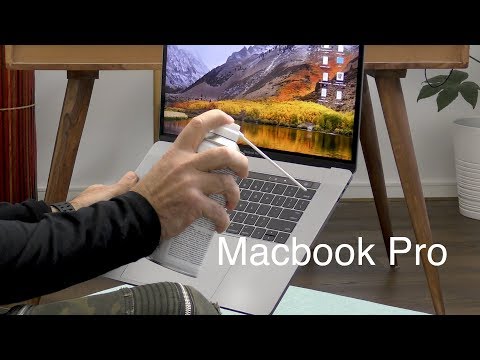
How to fix a stuck key on the New Macbook Pro - Butterfly Keyboard
ChannelTouch Technology ReviewDescription from the creator
If you have been experiencing stuck keys on the new Macbook Pro, this tutorial will show you how to fix the problem.
Apple have Provided some support notes on how to do it so I have provided you with a link below:
support.apple.com/en-au/HT205662
Sticky keys are not uncommon, and usually occur if dust or food particles become lodged in the spaces between the keys. In the past you could dislodge the keys and clean them, however with the new Macbook Pro since the late model released in 2016 it is no longer possible to remove the keys without damaging them, so in this tutorial I will show you how to safely remove the dust from your keyboard.
I have heard reports that this issue has affected all Macbook Pros with the new butterfly keyboard mechanism which ranges from 2016, 2017 and 2018 models.
Where to Buy - US:
touchtechnologyreview.com/2018/05/18/how-to-fix…
If you are currently debating whether to purchase this computer you may be interested in my honest conversation about the MacBook Pro - 1 Year after review which you can view here: youtube.com/watch?v=TsbxS9FtqDE
Apple have Provided some support notes on how to do it so I have provided you with a link below:
support.apple.com/en-au/HT205662
Sticky keys are not uncommon, and usually occur if dust or food particles become lodged in the spaces between the keys. In the past you could dislodge the keys and clean them, however with the new Macbook Pro since the late model released in 2016 it is no longer possible to remove the keys without damaging them, so in this tutorial I will show you how to safely remove the dust from your keyboard.
I have heard reports that this issue has affected all Macbook Pros with the new butterfly keyboard mechanism which ranges from 2016, 2017 and 2018 models.
Where to Buy - US:
touchtechnologyreview.com/2018/05/18/how-to-fix…
If you are currently debating whether to purchase this computer you may be interested in my honest conversation about the MacBook Pro - 1 Year after review which you can view here: youtube.com/watch?v=TsbxS9FtqDE
About this tutorial
Touch Technology Review published this 4:30 video tutorial on November 10, 2018. It has been watched 718,391 times on YouTube.
- Channel
- Touch Technology Review
- Category
- Howto & Style
- Duration
- 4:30
- Published
- November 10, 2018
- Views
- 718,391
- Likes
- 4,754
Tags
Share
This tutorial in other languages
- FRComment fixer une clé coincé sur le nouveau MacBook Pro - Clavier papillon
- ESCómo fijar una tecla atascada en la nueva Macbook Pro - la mariposa del teclado
- PTComo corrigir uma chave presa na Pro New Macbook - Teclado da borboleta
- ITCome riparare un tasto bloccato sul nuovo MacBook Pro - Butterfly tastiera
- DESchmetterlings-Tastatur - Wie eine stuck-Taste auf der neuen MacBook Pro beheben
- NLButterfly Keyboard - Hoe maak je een vastzittende toets op de nieuwe MacBook Pro op te lossen
- RUКак исправить застрял ключ на Новый Macbook Pro - Бабочка Клавиатура
- PLJak naprawić zablokowanego klawisza na nowym MacBooku Pro - Butterfly Keyboard
- JAバタフライキーボード - 新しいMacBook Proの上で立ち往生キーを修正する方法
- ARكيفية إصلاح مفتاح عالقة على نيو ماك بوك برو - لوحة المفاتيح الفراشة
- HIतितली कीबोर्ड - कैसे नई मैकबुक प्रो पर एक अटक कुंजी ठीक करने के लिए
- IDCara untuk memperbaiki kunci terjebak di New Macbook Pro - Kupu-kupu Keyboard