Playback starts YouTube’s embedded player (privacy-enhanced mode).
How to identify your Apple iPod Touch model
ChannelMy Mate VINCEDescription from the creator
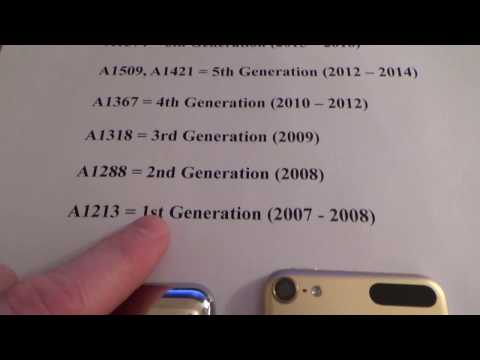
Hi, this video shows you how to determine which generation of Apple iPod touch that you have. The quickest way is to look at the model numbers on the back. A1213 is the 1st generation, A1288 is the 2nd generation, A1318 is the 3rd generation, A1367 is the 4th generation, A1509,A1421 are the 5th generation and A1574 is the 6th Generation.
Many thanks Vince
Many thanks Vince
About this tutorial
My Mate VINCE published this 1:23 video tutorial on November 1, 2016. It has been watched 65,454 times on YouTube.
- Channel
- My Mate VINCE
- Category
- Howto & Style
- Duration
- 1:23
- Published
- November 1, 2016
- Views
- 65,454
- Likes
- 404
Tags
Share
This tutorial in other languages
- FRComment identifier votre modèle Apple iPod Touch
- ESCómo identificar el modelo de Apple iPod Touch
- PTComo identificar o seu modelo Apple iPod Touch
- ITCome identificare il modello di Apple iPod Touch
- DEWie Sie Ihr Apple iPod Touch Modell identifizieren
- NLHoe kunt u uw Apple iPod Touch model te identificeren
- RUКак определить модель Apple, IPod Touch
- PLJak zidentyfikować model Apple iPod Touch
- JAお使いのAppleのiPod touchのモデルを特定する方法
- ARكيفية التعرف على نموذج أبل آي بود تاتش الخاص بك
- HIअपने एप्पल आइपॉड टच मॉडल की पहचान कैसे
- IDBagaimana mengidentifikasi Model iPod Touch Apple Anda