Playback starts YouTube’s embedded player (privacy-enhanced mode).
How to Manage My Craigslist Account
ChannelInternet Services and Social Networks Tutorials from HowTechDescription from the creator
This tutorial is going to show you how to create and manage a Craigslist account.
Don't forget to check out our site howtech.tv/ for more free how-to videos!
youtube.com/ithowtovids - our feed
facebook.com/howtechtv - join us on facebook
plus.google.com/103440382717658277879 - our group in Google+
It is not required to have a Craigslist account if you want to post on the service but if you want to easily keep track of what you are posting it can be a good idea to have one.
Step # 1 -- Creating Your Account
In order to manage your account you are first going to need to create one. Visit the website "accounts.craigslist.org/login/signup", enter you email address, complete the CAPTCHA code, and click the "create account" button. You will be informed that an email has been sent to your address.
Step # 2 -- Accessing Your Account
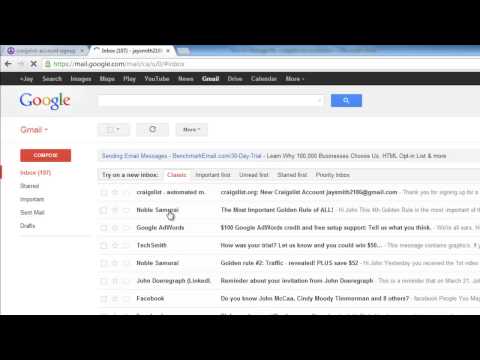
Go to your email and open the message from Craigslist and click the link in the email to go to your account. Enter a new password twice and click the "Submit Password" button. On the next page click the "Return to your account" link and on the page that loads scroll to the bottom and click "I ACCEPT". You will then be taken to the home page of your account and this is where you can manage things.
Step # 3 -- Managing Your Account
By default you will be in the "your postings" area and you can easily manage your postings by clicking on the "edit" or "delete" links. You can view the posting by clicking on its name. The "new posting" tab will allow you to place a new ad on the site. The "account settings" tab lets you change your basic account information. "billing/accounting" lets you handle the financial side of things and "drafts" is where you will see any posts that you have made but haven't decided to list yet. This is basically how to manage your simple craigslist account.
Don't forget to check out our site howtech.tv/ for more free how-to videos!
youtube.com/ithowtovids - our feed
facebook.com/howtechtv - join us on facebook
plus.google.com/103440382717658277879 - our group in Google+
It is not required to have a Craigslist account if you want to post on the service but if you want to easily keep track of what you are posting it can be a good idea to have one.
Step # 1 -- Creating Your Account
In order to manage your account you are first going to need to create one. Visit the website "accounts.craigslist.org/login/signup", enter you email address, complete the CAPTCHA code, and click the "create account" button. You will be informed that an email has been sent to your address.
Step # 2 -- Accessing Your Account
Go to your email and open the message from Craigslist and click the link in the email to go to your account. Enter a new password twice and click the "Submit Password" button. On the next page click the "Return to your account" link and on the page that loads scroll to the bottom and click "I ACCEPT". You will then be taken to the home page of your account and this is where you can manage things.
Step # 3 -- Managing Your Account
By default you will be in the "your postings" area and you can easily manage your postings by clicking on the "edit" or "delete" links. You can view the posting by clicking on its name. The "new posting" tab will allow you to place a new ad on the site. The "account settings" tab lets you change your basic account information. "billing/accounting" lets you handle the financial side of things and "drafts" is where you will see any posts that you have made but haven't decided to list yet. This is basically how to manage your simple craigslist account.
About this tutorial
Internet Services and Social Networks Tutorials from HowTech published this 1:35 video tutorial on November 7, 2013. It has been watched 12,899 times on YouTube.
- Category
- Howto & Style
- Duration
- 1:35
- Published
- November 7, 2013
- Views
- 12,899
- Likes
- 25
Share
This tutorial in other languages
- FRComment gérer mon compte Craigslist
- ESCómo administrar mi cuenta de Craigslist
- PTComo Gerenciar Minha Conta Craigslist
- ITCome gestire il mio account Craigslist
- DEWie Verwalten von My Craigslist Konto
- NLHoe te Manage My Craigslist Account
- RUКак управлять своим Craigslist счета
- PLJak zarządzać Craigslist konto
- JAマイCraigslistのアカウントを管理する方法
- ARكيفية إدارة بلدي كريغزلست حساب
- HIकैसे प्रबंधित करें मेरे Craigslist खाता
- IDCara Mengelola saya Craigslist Akun