Playback starts YouTube’s embedded player (privacy-enhanced mode).
How to Report Craigslist Scam
ChannelInternet Services and Social Networks Tutorials from HowTechDescription from the creator
This tutorial will show you how to report a suspected scam on Craigslist.
Don't forget to check out our site howtech.tv/ for more free how-to videos!
youtube.com/ithowtovids - our feed
facebook.com/howtechtv - join us on facebook
plus.google.com/103440382717658277879 - our group in Google+
Craigslist can be a great way to buy and sell online but as with any marketplace there are occasional scams. You must be very careful to avoid these and if you suspect something of being a scam it is best to report craigslist scam to the support team.
Step # 1 -- Flagging the Posting Itself
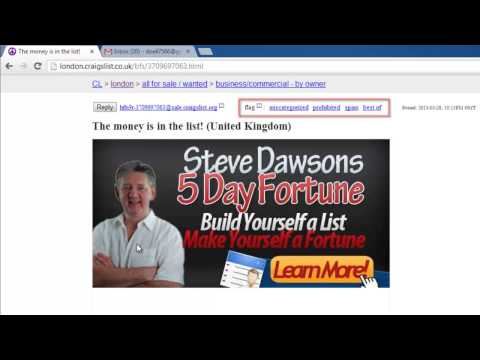
The first method to report a scam is to go to the advert that you believe to be a scam. Visit your local Craigslist, here we are using "london.craigslist.co.uk", navigate to the right section and click on the advert. At the top you will see a section labeled "flag" and to report spam you should click the "prohibited" link. As this is just an example, we won't flag this posting as spam, but that is how to.
Step # 2 -- Reporting Scam Emails
If you have gone further down the line and have now realized that you might be being scammed it can be a good idea to email any correspondence you have received to Craiglist support. Navigate to your email account, load the suspicious email and click the forward option. Write an explanation about the scam and send the email to "[email protected]", again, we won't actually send this mail now, but that is how to report a scam.
Of course, if you have been the victim of a serious illegal scam you may want to report craigslist scam to the police.
Don't forget to check out our site howtech.tv/ for more free how-to videos!
youtube.com/ithowtovids - our feed
facebook.com/howtechtv - join us on facebook
plus.google.com/103440382717658277879 - our group in Google+
Craigslist can be a great way to buy and sell online but as with any marketplace there are occasional scams. You must be very careful to avoid these and if you suspect something of being a scam it is best to report craigslist scam to the support team.
Step # 1 -- Flagging the Posting Itself
The first method to report a scam is to go to the advert that you believe to be a scam. Visit your local Craigslist, here we are using "london.craigslist.co.uk", navigate to the right section and click on the advert. At the top you will see a section labeled "flag" and to report spam you should click the "prohibited" link. As this is just an example, we won't flag this posting as spam, but that is how to.
Step # 2 -- Reporting Scam Emails
If you have gone further down the line and have now realized that you might be being scammed it can be a good idea to email any correspondence you have received to Craiglist support. Navigate to your email account, load the suspicious email and click the forward option. Write an explanation about the scam and send the email to "[email protected]", again, we won't actually send this mail now, but that is how to report a scam.
Of course, if you have been the victim of a serious illegal scam you may want to report craigslist scam to the police.
About this tutorial
Internet Services and Social Networks Tutorials from HowTech published this 1:21 video tutorial on November 15, 2013. It has been watched 24,312 times on YouTube.
- Category
- Howto & Style
- Duration
- 1:21
- Published
- November 15, 2013
- Views
- 24,312
- Likes
- 46
Share
This tutorial in other languages
- FRComment Craigslist Rapport Scam
- ESCómo Informe Craigslist estafa
- PTComo Relatório Craigslist Scam
- ITCome segnalare Craigslist Scam
- DEWie zu melden Craigslist Scam
- NLHoe kan Report Craigslist Scam
- RUКак Сообщить Craigslist Scam
- PLJak zgłosić oszustwo Craigslist
- JAどのようにレポートCraigslistの詐欺へ
- ARكيفية الإبلاغ عن كريغزلست الغش
- HIकैसे करने के लिए रिपोर्ट Craigslist घोटाले
- IDCara Laporan Craigslist Scam