Playback starts YouTube’s embedded player (privacy-enhanced mode).
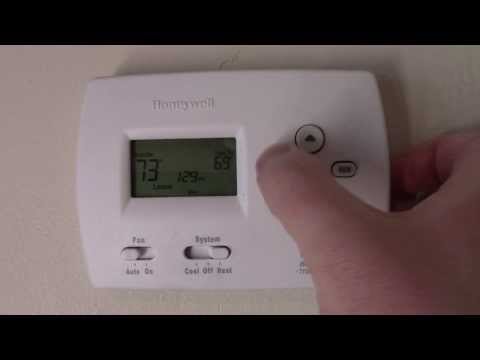
How to program a Honeywell Thermostat
ChannelAndrew DIYDescription from the creator
Venmo Tip Jar @AndrewDIY
This is a pretty standard process for thermostats even if they aren't the Honeywell brand.
But, if you hate it that much try this one: amzn.to/2jzXXme
To set the time and day:
Press "SET"
Press Up/Down arrows to set the time
Press "SET"
Press Up/Down arrows to set the day
Press "RUN" to save
To set a heating/cooling programmed schedule:
Select the SYSTEM switch to "Heat" or "Cool"
Press "SET" until the LCD display reads "Set Schedule"
Press Up/Down arrows to set the Monday - Friday wake time
Press "SET"
Press Up/Down arrows to set the Monday - Friday wake temperature
Press "SET"
Go through the whole process for the other time periods Leave, Return and Sleep and the Weekend settings. Then press "RUN"
To perform a system override:
Press Up/Down arrows to set the temperature
Press "HOLD" if you want the temperature to remain throughout all the time periods of the day or don't push "HOLD" and the temperature will reset at the next time period (leave, arrive, sleep) Push RUN to return to the regularly scheduled program.
Thats it! Good luck!
This is a pretty standard process for thermostats even if they aren't the Honeywell brand.
But, if you hate it that much try this one: amzn.to/2jzXXme
To set the time and day:
Press "SET"
Press Up/Down arrows to set the time
Press "SET"
Press Up/Down arrows to set the day
Press "RUN" to save
To set a heating/cooling programmed schedule:
Select the SYSTEM switch to "Heat" or "Cool"
Press "SET" until the LCD display reads "Set Schedule"
Press Up/Down arrows to set the Monday - Friday wake time
Press "SET"
Press Up/Down arrows to set the Monday - Friday wake temperature
Press "SET"
Go through the whole process for the other time periods Leave, Return and Sleep and the Weekend settings. Then press "RUN"
To perform a system override:
Press Up/Down arrows to set the temperature
Press "HOLD" if you want the temperature to remain throughout all the time periods of the day or don't push "HOLD" and the temperature will reset at the next time period (leave, arrive, sleep) Push RUN to return to the regularly scheduled program.
Thats it! Good luck!
About this tutorial
Andrew DIY published this 5:23 video tutorial on October 29, 2014. It has been watched 1,773,192 times on YouTube.
- Channel
- Andrew DIY
- Category
- Howto & Style
- Duration
- 5:23
- Published
- October 29, 2014
- Views
- 1,773,192
- Likes
- 10,910
Tags
Share
This tutorial in other languages
- FRComment programmer un thermostat Honeywell
- ESCómo programar un termostato Honeywell
- PTComo programar a Honeywell termostato
- ITCome programmare un termostato Honeywell
- DEWie ein Honeywell Thermostat programmieren
- NLHoe maak je een Honeywell Thermostaat programmeren
- RUКак запрограммировать Honeywell термостат
- PLJak zaprogramować Honeywell Termostat
- JAハネウェルサーモスタットをプログラムする方法
- ARكيفية برمجة هانيويل الحرارة
- HIकार्यक्रम कैसे एक हनीवेल थर्मोस्टेट
- IDBagaimana program Honeywell Thermostat