Playback starts YouTube’s embedded player (privacy-enhanced mode).
How to Turn Off All Facebook Third Party Applications
ChannelInternet Services and Social Networks Tutorials from HowTechDescription from the creator
Follow this step by step guide to learn how to turn off platform in facebook in order to disable all the facebook applications.
Don't forget to check out our site howtech.tv/ for more free how-to videos!
youtube.com/ithowtovids - our feed
facebook.com/howtechtv - join us on facebook
plus.google.com/103440382717658277879 - our group in Google+
In this tutorial, we will teach you how to block all Facebook Apps. We will teach you how to access the apps section and over there, disable all the facebook applications.
Step 1 -- Login to facebook
Follow this step by step guide to learn how to block all Facebook Apps.
First of all, open any web browser and go to facebook.com.
Once the web page opens, sign in to your facebook account. Enter the email and password in the top right corner of the page and then click on the log in button.
Step 2 -- Open settings
As a result, you will be taken to the home page of your facebook account. Click on the settings icon at the top right corner of the page and from the drop down menu, select privacy settings.
Step 3 -- Go to apps section
In the privacy settings and tools page, click on the apps section available on the left hand side of the page. Next, go to the "apps you use" section and click on the "edit" button.
Step 4 -- Turn off platform
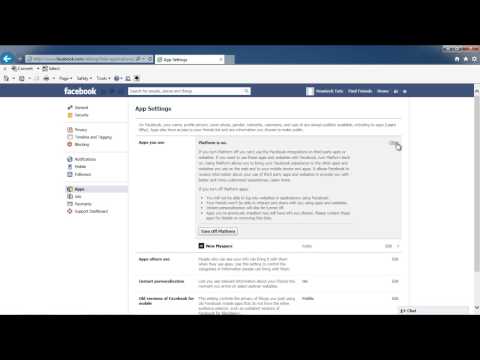
As a result, the section will expand. Over there, click on the turn off platform button. Turning off the platform means that you won't be able to use third party applications, websites or facebook integrations.
Once you are done, the page will refresh and you will notice the app section will become empty. In order to use the apps, games and websites on facebook you need to have platform turned on.
In this manner, you can block all facebook applications.
Don't forget to check out our site howtech.tv/ for more free how-to videos!
youtube.com/ithowtovids - our feed
facebook.com/howtechtv - join us on facebook
plus.google.com/103440382717658277879 - our group in Google+
In this tutorial, we will teach you how to block all Facebook Apps. We will teach you how to access the apps section and over there, disable all the facebook applications.
Step 1 -- Login to facebook
Follow this step by step guide to learn how to block all Facebook Apps.
First of all, open any web browser and go to facebook.com.
Once the web page opens, sign in to your facebook account. Enter the email and password in the top right corner of the page and then click on the log in button.
Step 2 -- Open settings
As a result, you will be taken to the home page of your facebook account. Click on the settings icon at the top right corner of the page and from the drop down menu, select privacy settings.
Step 3 -- Go to apps section
In the privacy settings and tools page, click on the apps section available on the left hand side of the page. Next, go to the "apps you use" section and click on the "edit" button.
Step 4 -- Turn off platform
As a result, the section will expand. Over there, click on the turn off platform button. Turning off the platform means that you won't be able to use third party applications, websites or facebook integrations.
Once you are done, the page will refresh and you will notice the app section will become empty. In order to use the apps, games and websites on facebook you need to have platform turned on.
In this manner, you can block all facebook applications.
About this tutorial
Internet Services and Social Networks Tutorials from HowTech published this 1:03 video tutorial on November 1, 2013. It has been watched 13,735 times on YouTube.
- Category
- Howto & Style
- Duration
- 1:03
- Published
- November 1, 2013
- Views
- 13,735
- Likes
- 21
Tags
Share
This tutorial in other languages
- FRComment désactiver toutes les applications tierces Facebook
- ESCómo activar Aplicaciones De Todas Facebook Terceros
- PTComo transformar Applications Off All Facebook Terceiros
- ITCome trasformare applicazioni off Tutto Facebook di terze parti
- DEWie Rabatt auf Facebook Anwendungen von Drittanbietern drehen
- NLHoe kan ik korting op Facebook Toepassingen van derden Turn
- RUКак отключить все Facebook сторонних приложений
- PLJak wyłączyć wszystkie aplikacje firm trzecich Facebook
- JAすべてのFacebookのサードパーティのアプリケーションを無効にする方法
- ARكيفية تشغيل تطبيقات معطلة جميع الفيسبوك الطرف الثالث
- HIचालू करने के लिए कैसे बंद सभी फेसबुक तृतीय पक्ष एप्लिकेशन
- IDBagaimana Turn Off Aplikasi Semua Facebook Pihak Ketiga