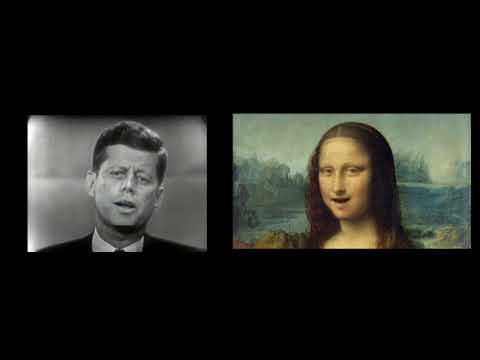
Playback starts YouTube’s embedded player (privacy-enhanced mode).
Make Art Talk - Wav2Lip Lip Sync Deepfake Google Collab Tutorial
ChannelWhat Make ArtChapters
Description from the creator
Art Video Demo using Wav2Lip - youtu.be/ca9rcQYTIS0 Make any painting or other artwork talk. Make videos appear to say other things for fun creative uses. Using Wav2Lip, a pre-trained lip sync model and Google Collab you can be up an running with new lip synced creations in minutes.
The other day I saw an article on the Verge talking about a lip sync deepfake technique that anyone could do using the wave2lip algorithm on GitHub. This technique uses a Google Collab notebook and all of the computing happens in the cloud. Often when I see a tutorial about deep learning or artificial intelligence image manipulation I get excited and want to try it only to be foiled by its complexity. I usually find that I am missing code dependencies and have to install various python libraries. Once I get those libraries installed I then find out that I don't have a powerful enough GPU or other necessary computing hardware. This technique uses the Collab notebook provided by the repository creator and allows anyone to have fun creating lip-synced deepfaked videos.. I think it's important for as many people as possible to understand this technology because it will become more and more prevalent and we need to have media literacy to know what could potentially be real and what is no. We need an informed public that can debate about future legislation or needed regulation about these technologies as they become more powerful. For now I think that deep learning has lots of potential creative uses for animation and other visual communication.
Although there are lots of potentially bad uses for this technology there are just as many creative uses for making animated drawings and other creative visual content. Be good.
Face Swap Demo - youtu.be/laF0X0kNuDE
Link to GitHub Repository:
github.com/Rudrabha/Wav2Lip
Link to Google Collab:
colab.research.google.com/drive/1tZpDWXz49W6wDc…
Link to sample Kennedy and Mona mp4 files for demo use:
drive.google.com/file/d/1H0XmXzfRh2Uh11W15m8VZf…
👍 Support on Patreon
patreon.com/WhatMakeArt
🟥 Subscribe
youtube.com/
Links
🌐 What? Make Art Online
whatmakeart.com/
👕🎽Looking for What? Make Art merch?
teespring.com/stores/what-make-art
📷 What? Make Art on Instagram:
instagram.com/whatmakeart/
🐦 What? Make Art on Twitter:
twitter.com/whatmakeart
My Work:
🌐 jimmykuehnle.com/
▶️Videos:
youtube.com/c/jimmykuehnle
0:00 - Introduction
1:20 - Setup folders in Google Drive
1:40 _ Wav2Lip GitHub Repository
1:59 - Download Pre-trained Model
2:15 - Google Collab Notebook
3:00 - Upload Pre-trained Model to Google Drive
3:18 - Uninstall Tensorflow GPU
3:48 - Upload Video and Audio files
4:07 - Rename files in Collab Notebook
4:30 - Run Wav2Lip on video
4:59 - Download lip synced video
5:12 - Variations to try
6:04 - Lip sync a painting
6:30 - Conclusion
#deepfake #wav2lip #lipsync
The other day I saw an article on the Verge talking about a lip sync deepfake technique that anyone could do using the wave2lip algorithm on GitHub. This technique uses a Google Collab notebook and all of the computing happens in the cloud. Often when I see a tutorial about deep learning or artificial intelligence image manipulation I get excited and want to try it only to be foiled by its complexity. I usually find that I am missing code dependencies and have to install various python libraries. Once I get those libraries installed I then find out that I don't have a powerful enough GPU or other necessary computing hardware. This technique uses the Collab notebook provided by the repository creator and allows anyone to have fun creating lip-synced deepfaked videos.. I think it's important for as many people as possible to understand this technology because it will become more and more prevalent and we need to have media literacy to know what could potentially be real and what is no. We need an informed public that can debate about future legislation or needed regulation about these technologies as they become more powerful. For now I think that deep learning has lots of potential creative uses for animation and other visual communication.
Although there are lots of potentially bad uses for this technology there are just as many creative uses for making animated drawings and other creative visual content. Be good.
Face Swap Demo - youtu.be/laF0X0kNuDE
Link to GitHub Repository:
github.com/Rudrabha/Wav2Lip
Link to Google Collab:
colab.research.google.com/drive/1tZpDWXz49W6wDc…
Link to sample Kennedy and Mona mp4 files for demo use:
drive.google.com/file/d/1H0XmXzfRh2Uh11W15m8VZf…
👍 Support on Patreon
patreon.com/WhatMakeArt
🟥 Subscribe
youtube.com/
Links
🌐 What? Make Art Online
whatmakeart.com/
👕🎽Looking for What? Make Art merch?
teespring.com/stores/what-make-art
📷 What? Make Art on Instagram:
instagram.com/whatmakeart/
🐦 What? Make Art on Twitter:
twitter.com/whatmakeart
My Work:
🌐 jimmykuehnle.com/
▶️Videos:
youtube.com/c/jimmykuehnle
0:00 - Introduction
1:20 - Setup folders in Google Drive
1:40 _ Wav2Lip GitHub Repository
1:59 - Download Pre-trained Model
2:15 - Google Collab Notebook
3:00 - Upload Pre-trained Model to Google Drive
3:18 - Uninstall Tensorflow GPU
3:48 - Upload Video and Audio files
4:07 - Rename files in Collab Notebook
4:30 - Run Wav2Lip on video
4:59 - Download lip synced video
5:12 - Variations to try
6:04 - Lip sync a painting
6:30 - Conclusion
#deepfake #wav2lip #lipsync
About this tutorial
What Make Art published this 6:54 video tutorial on September 13, 2020. It has been watched 162,542 times on YouTube.
- Channel
- What Make Art
- Category
- Howto & Style
- Duration
- 6:54
- Published
- September 13, 2020
- Views
- 162,542
- Likes
- 3,222
Tags
Share
This tutorial in other languages
- FRMake Art Talk - Wav2Lip Lip Sync Deepfake Google Collab Tutoriel
- ESHacer Art Talk - Wav2Lip Sincronización de labios Deepfake Google Collab Tutorial
- PTFaça a arte Talk - Wav2Lip Lip Sync Deepfake Google Collab Tutorial
- ITMake Art Talk - Wav2Lip Lip Sync Deepfake Google Collab Tutorial
- DEMachen Sie Kunst-Talk - Wav2Lip Lip Sync Deepfake Google Collab Tutorial
- NLMake Art Talk - Wav2Lip Lip Sync Deepfake Google Collab Tutorial
- RUСделать Art Talk - Wav2Lip Lip Sync Deepfake Google Collab Учебник
- PLDokonaj Art Talk - Wav2Lip Lip Sync Deepfake Google Collab Tutorial
- JAWav2LipリップシンクDeepfake Googleのコラボチュートリアル - トークを行います
- ARجعل الفن الحديث - Wav2Lip الشفاه مزامنة Deepfake جوجل تعاوني دروس
- HIWav2Lip लिप सिंक Deepfake गूगल सहयोग ट्यूटोरियल - कला टॉक बनाओ
- IDMembuat Seni Bicara - Wav2Lip Lip Sync Deepfake Google Collab Tutorial